
Vandaag of morgen in huis

Kwaliteit gegarandeerd

Welkomstaanbiedingen ontgrendelen: GRATIS bezorging | Tot 80% korting | Gratis 30 dagen JoyPlus-proefperiode
Download de app
A wireless computer mouse gives you a tidier desk and more freedom of movement, but not every model is right for every laptop, PC or workspace. A cheap mouse might seem perfectly suitable until the cursor starts jumping, the battery runs out quickly or the size proves uncomfortable after a long day.
So don’t focus only on DPI, RGB lighting or a low price. The connection type, shape, power supply and number of buttons are what really determine whether a wireless mouse is comfortable to use day to day.
A wireless mouse with a USB receiver usually works over 2.4 GHz. Plug the receiver into a USB port and you can usually get started straight away. That’s convenient with a desktop PC, but less practical with a slim laptop that only has USB-C ports. In that case, you may need an adapter.
A Bluetooth mouse doesn’t use a separate receiver. That frees up a USB port, making it handy for laptops, tablets and devices you connect to several accessories. Just check that your device supports Bluetooth and that the mouse works with your operating system.
DPI determines how far the cursor moves in response to a given hand movement. A higher figure isn’t automatically useful. For office work and studying, around 1,000 to 1,600 DPI is enough for many users. Gamers may prefer a mouse with adjustable DPI, so they can change the sensitivity for each game or task.
Also check that you can actually adjust the DPI. A sensor with a high maximum resolution but no convenient way to switch settings may be less flexible for everyday use.
A compact mouse is easy to carry around, but may be less comfortable for larger hands. A vertical ergonomic mouse also takes some getting used to, as the hand position is quite different from that of a standard model. Check too whether the mouse is designed for right-handed use only or has a symmetrical shape.
A quiet mouse can be a practical choice for shared offices, libraries and home-working spaces. Check the wording in the product information, though. A manufacturer’s claim about noise reduction isn’t a universal measurement for every environment. For example, Logitech says the M330 Silent Plus has click noise that is more than 90% lower than that of traditional mice. This is a claim made by Logitech itself.
Choose 2.4 GHz with a USB receiver if you want a direct connection and low latency for PC use. Choose Bluetooth if you want to keep your USB ports free. A model with both connection types gives you more flexibility, but check whether the receiver you need is included.
Also check the USB connector. Some receivers use USB-A, while many modern laptops mainly have USB-C ports. An adapter isn’t always included.
An optical mouse uses an optical sensor to track movement across a surface. The surface can affect tracking. Glossy or glass desks may cause problems, while a mouse mat often gives you more consistent results.
For standard navigation, 1,000 to 1,600 DPI is common across the range. Gaming models go much higher, but focus on adjustability, polling rate, shape and weight. Extremely high DPI is mainly useful if you can fine-tune it.
A mouse that uses AA or AAA batteries has the advantage that you can pop in a spare straight away. A rechargeable wireless mouse avoids disposable batteries, but you’ll need to charge it in good time. Check the stated battery life and whether you can continue using the mouse while it’s charging.
Store the USB receiver in the mouse if possible. This reduces the chance of losing it while travelling. Keep dust away from the sensor and scroll wheel, and don’t use liquid inside the casing.

Why it suits this type of user: This mouse is designed for everyday use, with a 2.4 GHz connection, USB receiver and 1600 DPI. It’s a good fit for basic use with a laptop or PC.
The product specifications clearly state the connection type and DPI, so you don’t have to rely solely on looks or marketing claims.
2.4 GHz wireless, USB receiver and optical tracking at 1600 DPI.

Why it suits this type of user: Its vertical shape, Bluetooth and USB receiver connections, adjustable 4000 DPI and rechargeable battery make it well suited to long days working in the office or from home.
The shape and connection options are clear from the outset. Check that a vertical mouse suits your hand, though, and be prepared for a short adjustment period.
57-degree design, up to 4000 DPI and a rechargeable battery with fast charging, according to the product specifications.

Why it suits this type of user: This wireless gaming mouse combines a 2.4 GHz USB receiver with an optical sensor offering up to 4800 DPI, six programmable buttons and a rechargeable battery.
Its performance isn’t all about RGB lighting: the DPI range, polling rate, weight, buttons and connection are listed separately.
Lightweight design at around 73–75 grams, six programmable buttons and up to 80 hours of battery life, according to the product information.
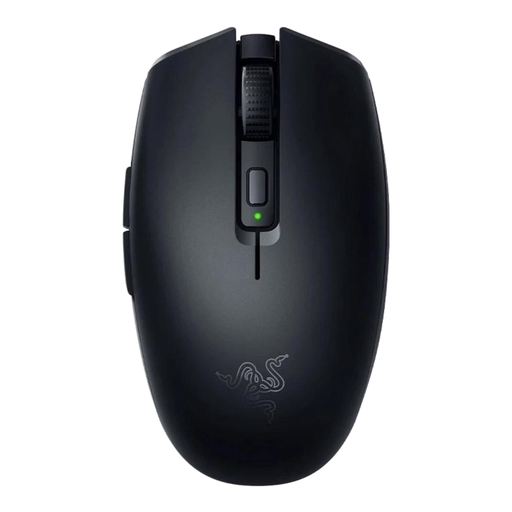
Why it suits this type of user: This compact model supports Bluetooth and Razer HyperSpeed Wireless. That’s handy if you want to use the same mouse with a laptop and a gaming PC.
The dual connection means you don’t need a different type of mouse for each device. This model does use replaceable AA or AAA batteries, though, and isn’t rechargeable.
Symmetrical shape, six programmable buttons and an optical sensor offering up to 18,000 DPI.
We’ve put together a full, up-to-date list of products that meet these strict selection criteria and the applicable European safety regulations.
Not necessarily. Check whether your computer supports Bluetooth or has a suitable USB port. If the receiver uses USB-A, some laptops may need a USB-C adapter. Also check whether Windows, macOS or ChromeOS is listed as supported.
It depends on the model, connection and how you use it. A mouse with AA or AAA batteries may last for months. According to Logitech’s product information, the M330 Silent Plus has a battery life of up to 24 months. For rechargeable models, battery life is usually stated in hours or months per charge. Treat these as figures provided by the manufacturer; actual battery life may vary.
Yes, if you want to make less clicking noise in a shared space. Check that the model is specifically described as quiet or silent, and whether all the buttons are quieter—not just the left and right buttons. For gaming, noise levels are usually less important than latency, sensor performance and button layout.
