
Vandaag of morgen in huis

Kwaliteit gegarandeerd

Welkomstaanbiedingen ontgrendelen: GRATIS bezorging | Tot 80% korting | Gratis 30 dagen JoyPlus-proefperiode
Download de app
A gaming mouse needs more than eye-catching RGB lighting. For PC gamers, the sensor, connection, shape and weight are the main factors determining whether a mouse feels comfortable during a long session. A model that looks impressive on paper may be less suitable for your hand, grip or favourite games in practice.
The most common purchasing mistakes are easy to avoid:
DPI indicates how sensitively the cursor responds to movement. A gaming mouse with a high DPI offers more adjustment options, but maximum DPI is not an end in itself. FPS players often use lower sensitivity for controlled aiming movements. For large screens or general desktop use, a higher setting may be more practical.
An optical sensor is common in gaming mice. As well as the maximum DPI, look at:
The polling rate, expressed in hertz, indicates how often the mouse sends data to the computer. 1,000 Hz is a common figure. According to the product specifications, some wireless gaming mice support 8,000 Hz. However, check whether this requires a suitable receiver, software and system configuration.
A wired gaming mouse works via USB and does not need to be charged. This makes it suitable for a fixed PC setup or for users who do not want to manage a rechargeable battery. Pay attention to the cable length: 1.8 to 2.1 metres generally offers more flexibility than a short cable.
A wireless gaming mouse usually works via a 2.4GHz receiver. Some models also include Bluetooth for laptops or other devices. For a wireless model, check:
Battery claims depend on usage conditions. RGB lighting, a higher polling rate and constant movement can affect the actual battery life.
An ultra-light gaming mouse often weighs less than 70 grams. This can be useful for quick movements in FPS games. A heavier model may instead provide a more solid feel. Also choose based on your hand:
Also check whether the mouse is suitable for right- or left-handed use. An ergonomic gaming mouse is not automatically suitable for every hand. Look at the dimensions, position of the thumb buttons and number of buttons.
Does your game use a lot of functions? Then programmable buttons and macro support may be relevant. For simple shooters, five or six buttons are often enough. RGB lighting is mainly a style choice and has no direct effect on sensor performance.
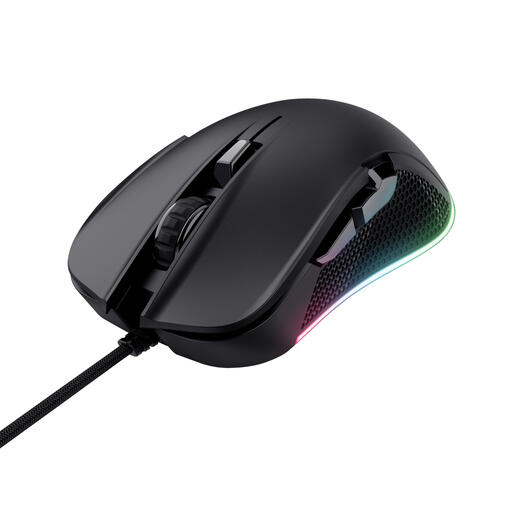
Why it suits this profile: This wired gaming mouse connects easily via USB and offers adjustable DPI of up to 7,200. This makes it suitable as a first gaming mouse for a PC without the need to manage charging.
The USB connection means you do not have to worry about a flat battery while gaming. The specifications also state six buttons and a polling rate of up to 1,000 Hz.
Optical sensor, DPI switch, programmable buttons, RGB lighting and a 2.1-metre cable.
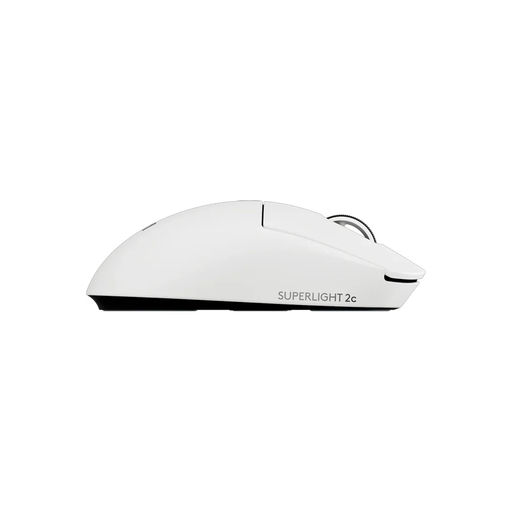
Why it suits this profile: The compact 53-gram design is aimed at players looking for a lightweight wireless gaming mouse for a smaller hand or a customised grip.
The specifications state both adjustable DPI of up to 44,000 and a polling rate of up to 8,000 Hz. The mouse has no RGB lighting, so the focus is more on performance and weight.
53 grams, wireless connection, five programmable buttons, rechargeable battery and USB-C cable.

Why it suits this profile: This wireless gaming mouse is designed for users who want to combine plenty of buttons, low weight and long battery life with software settings.
The choice is not based on DPI alone: the model features ten programmable buttons, an optical switch and support for macros via A HUB.
53 grams, up to 30,000 DPI, polling rate of up to 8,000 Hz and, according to the product specifications, up to 750 hours of battery life at 1,000 Hz.
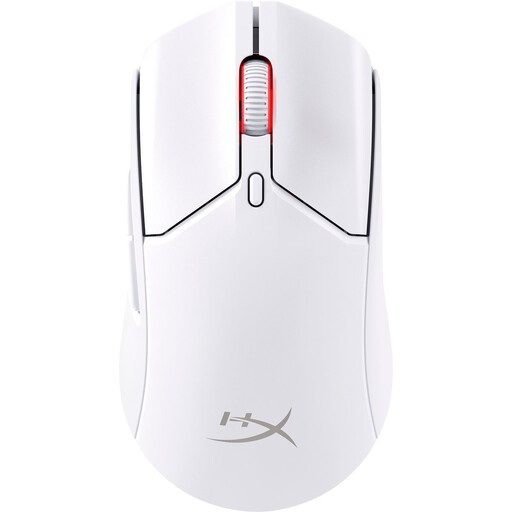
Why it suits this profile: This mouse combines 2.4GHz and Bluetooth with a weight of approximately 60 grams. It is a good fit for FPS players who value freedom of movement and a second connection option.
You are not dependent on a single wireless mode: the mouse can also be used with a USB cable. The software provides settings for DPI, macros and lighting.
HyperX 26K sensor, six buttons, up to 1,000 Hz, two wireless modes and a stated battery life of up to 100 hours.
We have compiled a complete, up-to-date list of products that fully meet these strict selection criteria and the applicable European safety regulations.
It can be, provided the mouse has a reliable 2.4GHz connection, a suitable polling rate and sufficient battery life. Also check whether the receiver can be positioned properly. Bluetooth is useful for compatibility, but not every model uses it as its primary gaming connection.
For most players, an adjustable range is more important than the maximum value. A mouse with 7,200, 12,000 or 30,000 DPI offers different options, but your final in-game setting depends on your screen, mouse mat and playing style. Start with moderate sensitivity and adjust it gradually.
Lifespan depends on the switches, cable or battery, usage and maintenance. Manufacturers may state a click lifespan; according to the product specifications, some models quote, for example, 10 million, 100 million or 120 million clicks. This is a stated product specification, not a guarantee of a particular service life. Use the mouse on a flat surface, keep the sensor and mouse feet clean, and charge a wireless model with a suitable cable and adapter.
