
Vandaag of morgen in huis

Kwaliteit gegarandeerd

Welkomstaanbiedingen ontgrendelen: GRATIS bezorging | Tot 80% korting | Gratis 30 dagen JoyPlus-proefperiode
Download de app
A quiet wireless mouse is useful for working from home, the office, studying and using a laptop. There is no cable cluttering your desk, and you are less likely to disturb colleagues or housemates while clicking. However, a product name such as “silent” does not tell you everything. Noise levels, connectivity, shape and power options can vary considerably between models.
Manufacturers use terms such as silent click, quiet buttons or noise reduction. This may apply only to the left and right mouse buttons, while the scroll wheel or side buttons may still be audible. According to Logitech’s own information, the M330 Silent Plus produces up to 90% less clicking noise than traditional mice. This is a brand claim; the actual noise level also depends on the surface and how you click.
So check which components are described as quieter in the product specifications. For a library or shared workspace, a quiet computer mouse with silent main buttons is often sufficient. However, anyone expecting complete silence may still be disappointed.
A wireless mouse with USB receiver usually uses 2.4GHz and requires a free USB-A port. This works with many PCs and laptops, but modern laptops sometimes have USB-C ports only. In that case, you will need a suitable adapter or a Bluetooth mouse.
Bluetooth saves a USB port, but the device must support the correct Bluetooth version and functionality. For example, the Microsoft Surface Arc Mouse requires Bluetooth 4.0 or higher. Also check the operating system: Windows, macOS, ChromeOS, Android and iPadOS are not supported in the same combinations by every model.
DPI determines how quickly the cursor moves with the same hand movement. Adjustable DPI is useful when you switch between precise work in spreadsheets and moving quickly across a large screen. For office work, a range of around 800 to 1600 DPI is a sensible choice for many users. Higher values are mainly relevant to specific working styles and large screens.
Also consider the shape, weight and the surfaces on which the sensor works. A mouse with 4000 DPI can still be uncomfortable if it is too small, too heavy or unsuitable for the way you hold it.
Choose a mouse for laptop and PC with a USB receiver if plug-and-play functionality and a stable connection are important to you. A receiver that can be stored inside the mouse, as with several Trust models, reduces the chance of losing it while travelling.
A Bluetooth mouse is more convenient for laptops without a free USB port. If you use a desktop PC, laptop and tablet, look for a multi-device mouse. According to the product specifications, the Trust Yvi+ Multi-Device can connect to up to three devices: via 2.4GHz and two Bluetooth channels. Before buying, check that your devices support the stated Bluetooth versions.
A compact mouse is practical for a laptop bag, but may offer less support for larger hands. An ambidextrous mouse works for both left- and right-handed users, while a vertical or ergonomic mouse is often designed specifically for one hand.
With an ergonomic mouse, dimensions, grip and wrist position matter more than simply having the word “ergonomic” in the title. The Trust Bayo II and Logitech MX Vertical, for example, have a vertical shape with an angle of 57 degrees. According to the brands’ own information, this position is intended to make the hand feel more naturally positioned. This is not a medical benefit; personal fit and familiarity determine whether the shape feels comfortable.
A model powered by AA or AAA batteries can be used straight away and is easy to power up with new batteries while you are out and about. A rechargeable mouse eliminates loose batteries, but you will need to charge it regularly and check which type of charging cable is included.
Battery life is generally stated under specific usage conditions. Claims such as “up to 12, 18 or 24 months” are therefore brand estimates, not a fixed guarantee for every user. An on/off switch and automatic sleep mode can help reduce power consumption.
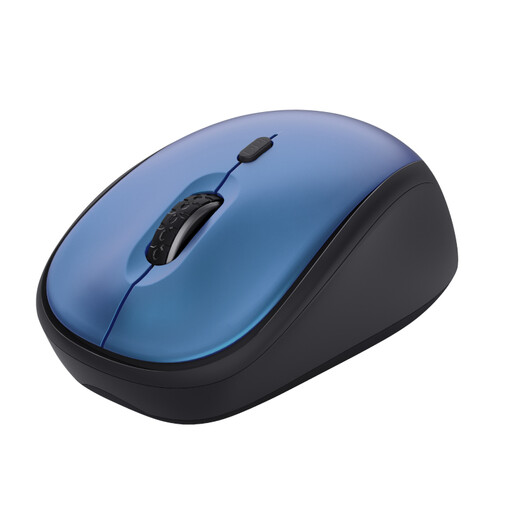
Why it suits this profile: This compact mouse is designed for everyday office and home use and connects via a USB micro receiver.
The specifications mention quiet buttons, storage space for the receiver and DPI settings from 800 to 1600. This makes the key usage details clear.
Compact design, optical sensor, quiet clicking and one AA battery offering up to 12 months of use according to Trust.
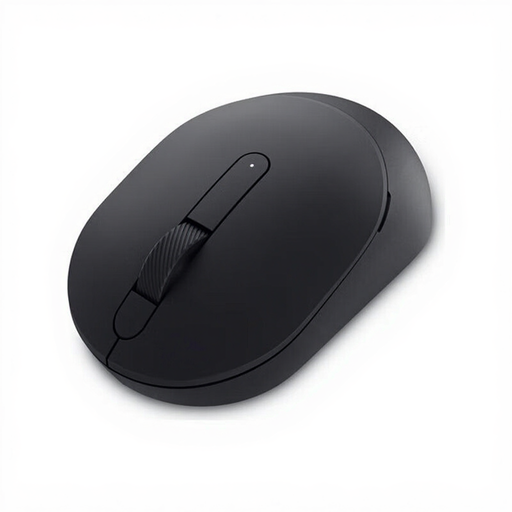
Why it suits this profile: Ideal for users looking for a quiet, compact mouse with two connection methods and a high adjustable resolution.
You are not limited to Bluetooth alone: this model supports both Bluetooth and RF. Its ambidextrous design also means that being left- or right-handed will not become an issue after purchase.
Quiet operation, automatic switching between RF and Bluetooth, ambidextrous design and up to 4020 DPI according to the product specifications.
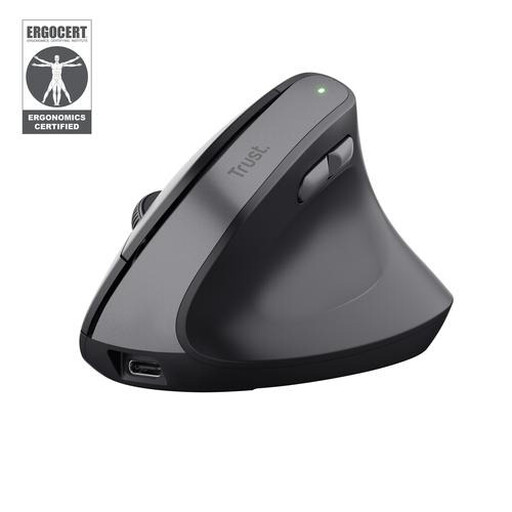
Why it suits this profile: The vertical design and six buttons suit right-handed users who work at a desk for long periods and want additional controls.
The hand orientation and vertical angle are clearly stated. You therefore know in advance that this is not an ambidextrous model and can assess the fit accordingly.
57-degree vertical design, quiet main buttons, rechargeable battery, two thumb buttons and adjustable DPI from 800 to 2400.
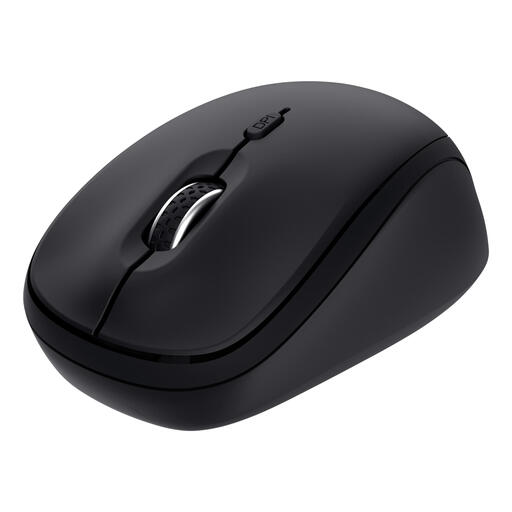
Why it suits this profile: A lightweight, compact choice for anyone switching between a laptop, PC and tablet who does not want a separate mouse for each device.
The connection options, number of devices and DPI settings are clearly stated. This makes it clear what you are getting, rather than relying on a general multi-device claim.
Up to three connected devices, Bluetooth plus 2.4GHz, quiet buttons, ambidextrous design and DPI settings from 800 to 1600.
We have put together a complete, up-to-date list of products that fully meet these strict selection criteria and the applicable European safety regulations.
Yes, especially if you work in a shared space. Check whether “quiet” applies only to the main buttons. A quiet mouse reduces clicking noise, but scrolling and additional buttons may still be audible. Also check that the USB receiver is compatible with the ports available on your computer.
That depends on the model. A USB mouse works with both devices if a suitable USB port is available. A Bluetooth mouse works without a receiver, but the laptop and PC must support Bluetooth. A multi-device mouse is practical if you regularly switch between several devices.
For a model with AA or AAA batteries, ongoing costs depend on battery life and usage. According to information from various brands, a battery can last from several months to several years, but these are estimates. A rechargeable mouse does not require disposable batteries, but it does need to be recharged periodically. So do not compare only the purchase price; also consider the power source, included accessories and warranty terms.
