
Vandaag of morgen in huis

Kwaliteit gegarandeerd

Welkomstaanbiedingen ontgrendelen: GRATIS bezorging | Tot 80% korting | Gratis 30 dagen JoyPlus-proefperiode
Download de app
A wireless mouse keeps your desk tidy and gives you more freedom to move. However, not every model is right for every user. A Bluetooth mouse for travel has different requirements from a wireless gaming mouse for fast-paced FPS games. A mouse for a laptop, Mac or Windows PC also needs to do more than simply connect wirelessly: it should work well with your devices and suit the way you work.
A high DPI rating may sound appealing, but it doesn’t tell you everything about the user experience. DPI determines cursor sensitivity, not necessarily accuracy or comfort. For office work, 1,000 to 4,000 DPI is often enough. Gamers may place more value on an adjustable sensor, a suitable polling rate and a shape that fits their hand.
A Bluetooth mouse connects directly to devices that support Bluetooth. That’s handy for laptops and tablets, as you don’t need a USB receiver. A 2.4GHz mouse usually uses a dongle. This connection can be practical for gaming, but it does take up a USB port.
Before you buy, check:
An ergonomic mouse isn’t automatically right for every hand. Consider its dimensions, weight and whether it’s designed for left- or right-handed use. A vertical mouse may encourage a different wrist position, while a compact, flat mouse is especially handy for travel. For long working days, fit matters more than appearance alone.
A Bluetooth wireless mouse is practical for everyday use. Models with both Bluetooth and 2.4GHz offer more flexibility if you switch between a laptop, desktop and tablet. A tri-mode mouse often adds a USB-C cable connection too.
Check the software as well. Programmable buttons may only work with Windows software or when the mouse is connected by cable. For example, the product information for the ET Wireless Gaming Mouse states that its configuration software is only available on Windows and in wired mode. This matters if you’re looking for a mouse for Mac and Windows.
A rechargeable mouse means you won’t have to replace disposable batteries regularly. Check whether it uses a USB-C cable, how long the stated battery life is and whether you can keep using the mouse while it charges. The stated battery life is generally a maximum based on the brand’s product information; actual battery life depends on the connection, lighting and how you use it.
For models with a built-in lithium-ion battery, take care when charging. Use the supplied or a compatible cable, keep the mouse dry and don’t open the battery yourself. A mouse with AAA batteries can be handy if you want to swap batteries quickly, as with the Microsoft Surface Arc Mouse.
An optical sensor is common in office and gaming mice. A higher polling rate can increase how often the mouse sends position data, but this is mainly relevant for fast-paced games and compatible hardware. For word processing and browsing, the shape, scroll wheel and click noise are usually more important.
An ultralight gaming mouse weighing around 54 to 64 grams may be easier to move. A heavier model with a thumb rest and multiple buttons may offer more control for productivity or MMO games. Choose based on how you’ll use it, not just its weight.
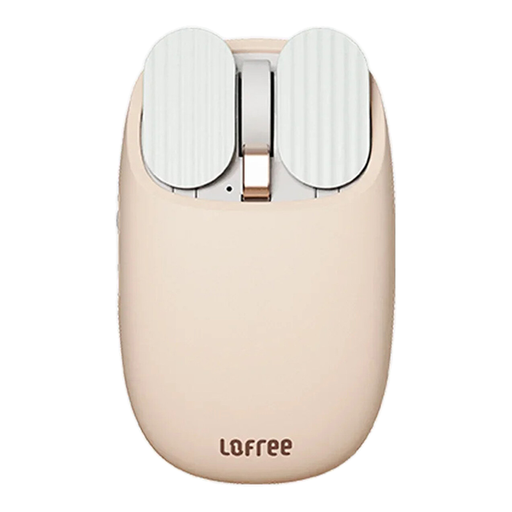
Why it suits this profile: A practical choice for working from home, studying and travelling. It connects via Bluetooth or 2.4GHz and has five DPI settings.
You’re not tied to a single connection. The sensor offers adjustable settings from 800 to 3,600 DPI, without unnecessary gaming features.
Built-in 800mAh battery, Bluetooth 4.0, 2.4GHz connection and support for Windows, macOS, iPadOS, iOS and Android, according to the product information.

Why it suits this profile: Designed for business users who do a lot of scrolling, use multiple devices and appreciate quiet clicks.
It’s about more than DPI. You get features including horizontal scrolling, eight buttons and the ability to connect to up to three devices.
Rechargeable battery, Bluetooth and Logi Bolt, 8,000 DPI and quiet clicks, according to the product specifications.

Why it suits this profile: Designed for users looking for a lightweight mouse and fast settings for competitive gaming.
Its low weight of 54 grams and right-handed shape make it clear that this model is designed for quick movements, not for everyone.
Razer Focus Pro 35K sensor, polling rate of up to 8,000Hz, six buttons and a stated battery life of up to 95 hours, according to Razer.
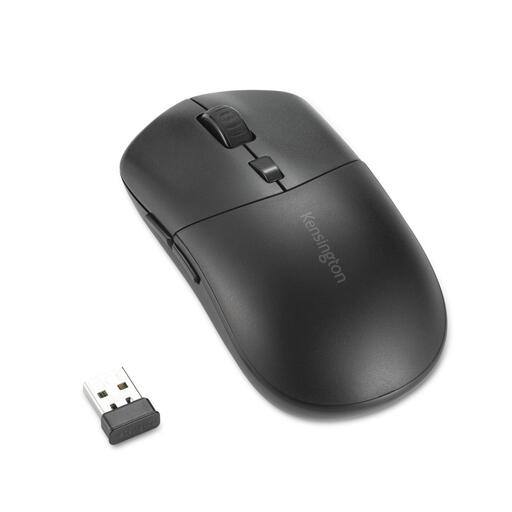
Why it suits this profile: A quiet, rechargeable mouse for office work, video calls and using multiple devices.
It’s designed for everyday use, with quiet buttons, multiple connection options and customisable features instead of gaming lights.
Up to three active devices, USB-C charging, six buttons and a stated battery life of up to four months, according to Kensington.
We’ve put together a complete, up-to-date list of products that meet these strict selection criteria and the current European safety regulations.
Use this quick checklist before ordering a computer mouse:
That depends on the model and its software. Bluetooth mice often work with multiple operating systems, but button configuration software may be limited to Windows or macOS. Always check the manufacturer’s compatibility list.
It varies by model, connection and use. Product information may state up to one month, four months or 70 days, for example. These are stated figures under certain conditions. Lighting, a high polling rate and frequent use can all affect battery life.
Bluetooth may be good enough for casual gaming. For competitive gaming, many users prefer a 2.4GHz connection or a model with a low stated latency. Also consider the sensor, polling rate, weight and whether you can use the mouse with a cable.
