
Vandaag of morgen in huis

Kwaliteit gegarandeerd

Welkomstaanbiedingen ontgrendelen: GRATIS bezorging | Tot 80% korting | Gratis 30 dagen JoyPlus-proefperiode
Download de app
A wireless mouse can help keep your desk tidy, but not every model is right for every computer or hand. A Bluetooth mouse, for example, works without a USB receiver, while a wireless computer mouse with a 2.4GHz receiver can sometimes be a more reliable choice for a desktop. Comfort, battery type and the number of buttons also affect how well your purchase works for you after a few weeks.
As a Joybuy Product Recommendation Officer, I review product specifications with practical considerations in mind. That way, you can quickly find a wireless mouse to suit the way you use it and see which marketing claims are worth checking.
A high DPI figure may sound appealing, but it doesn’t tell you everything about accuracy or ease of use. For word processing, spreadsheets and browsing, a moderate setting is often enough. Adjustable DPI is particularly useful if you regularly switch between general work, image editing and gaming.
Check the sensor type, too. An optical mouse usually works well on a standard matt surface. Tracking may be less reliable on glass or a highly reflective desk. According to the product information for the Lofree Wavy Chips, bright light or a reflective work surface can affect tracking.
Not every wireless mouse is a Bluetooth mouse. A 2.4GHz model usually uses a USB dongle. That’s handy for a PC with a spare USB port, but less convenient with a slim laptop that has few ports. Bluetooth means you don’t need a separate receiver, as with the HP 240 Bluetooth Mouse with Bluetooth 5.1.
Before you buy, check:
A large mouse may feel comfortable in a bigger hand, but can be awkward to carry in a laptop bag. A vertical ergonomic mouse also takes some getting used to and may not suit every working posture. Check its dimensions and weight, along with the position of your hand and the thumb rest.
A silent mouse reduces clicking noise, but ‘silent’ doesn’t automatically mean the shape is ergonomic. According to the product specifications, the HP 285 Silent Wireless Mouse has noise reduction on the left and right buttons, while the Logitech Lift is designed specifically around a vertical hand position and thumb rest.
For a laptop mouse, Bluetooth is often convenient because you don’t need to carry a dongle. A multi-device mouse can also be useful if you switch between a laptop, PC and tablet.
According to its product description, the Trust Ozaa+ can connect to up to three devices: one via the 2.4GHz receiver and two via Bluetooth. A wireless mouse with both Bluetooth and a USB receiver offers greater flexibility, but check that the features you want work with each operating system.
DPI determines how far the cursor moves in response to a particular hand movement. A range of, for example, 800 to 3200 DPI is enough for many office tasks. Gaming models may quote much higher figures, but a higher setting isn’t automatically more useful.
Look out for:
A mouse powered by AA or AAA batteries can last a long time, but you’ll need to keep spare batteries handy. A rechargeable wireless mouse means you don’t need disposable batteries, but you’ll need to charge it regularly. Check the quoted battery life, battery type and whether you can continue working while it charges.
Clean the sensor opening, mouse feet and scroll wheel with a dry or slightly damp cloth. Keep liquid out of the casing. For lithium batteries, don’t open or puncture them, or expose them to extreme heat.
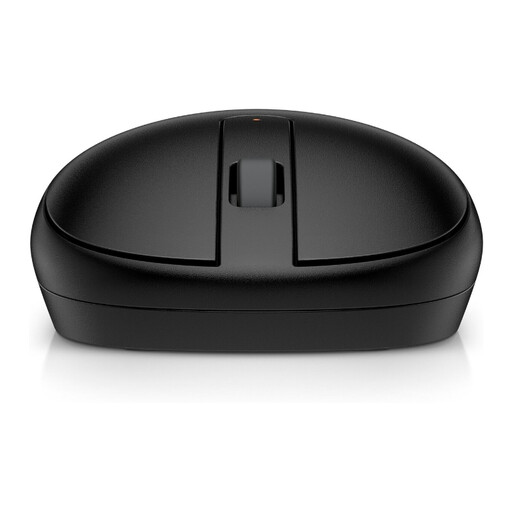
Why it suits this profile: This compact Bluetooth mouse is designed for everyday use with a laptop or PC, without the need for a separate dongle.
The product specifications list Bluetooth 5.1, so you don’t have to use up a USB port. Be sure to check Bluetooth compatibility first.
Ambidextrous design, optical sensor and 1600 DPI; according to the product information, it works with Windows, Mac and ChromeOS.
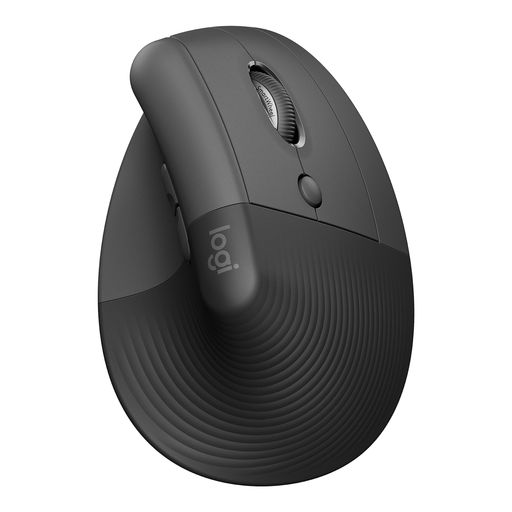
Why it suits this profile: Designed for long days working in the office or at home, for right-handed users with small to medium-sized hands.
Its shape is clearly specified as a vertical mouse, so you know in advance that your hand position will differ from that with a standard model.
Bluetooth and USB receiver, four programmable buttons, quiet clicks and support for up to three devices, according to the specifications.
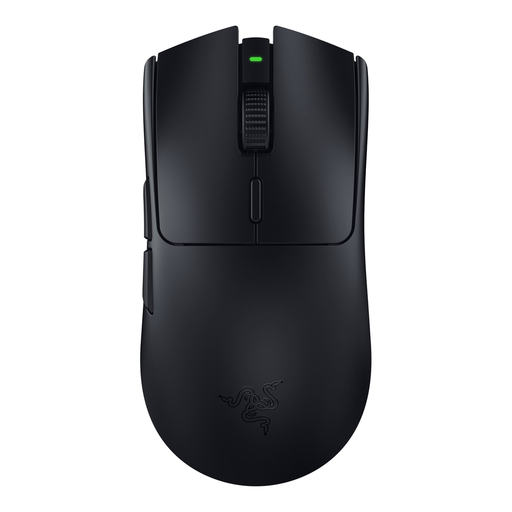
Why it suits this profile: A wireless gaming mouse for right-handed players looking for low latency, a light weight and adjustable sensitivity.
The product specifications list an optical Focus Pro sensor, adjustable DPI and a dedicated wireless connection. Make sure you connect the included receiver correctly.
82 grams, up to 30,000 DPI according to the product information, and a quoted battery life of up to 280 hours with one AA battery.

Why it suits this profile: Its roomy shape, quiet buttons and horizontal scrolling feature are well suited to spreadsheets, wide documents and shared workspaces.
The maximum DPI, connectivity and battery details are clearly stated. However, the mouse measures 120 × 75 × 45 mm, making it less suitable for small bags.
Connects to up to three devices, optical sensor up to 3200 DPI, rechargeable battery and an extra wheel for horizontal scrolling.
We’ve put together a complete, up-to-date list of products that meet these strict selection criteria and current European safety regulations.
No. A Bluetooth mouse requires Bluetooth support on your laptop. A model with a USB receiver needs a spare USB port. Also check which operating systems are supported and whether you need any software for programmable buttons.
It varies by model and usage. Manufacturers sometimes quote an estimated battery life, such as 18 months for the HP 285 or up to 280 hours for the Razer Viper V3 HyperSpeed. These figures are estimates based on the brands’ own product specifications; brightness, connection mode and intensity of use can affect actual battery life.
Yes, as long as the connection, sensor and polling rate suit the games you play. A wireless gaming mouse with a 2.4GHz connection is generally designed for low latency. A standard optical mouse may be enough for casual gaming, while competitive players are more likely to consider weight, programmable buttons and adjustable DPI.
