
Vandaag of morgen in huis

Kwaliteit gegarandeerd

Welkomstaanbiedingen ontgrendelen: GRATIS bezorging | Tot 80% korting | Gratis 30 dagen JoyPlus-proefperiode
Download de app
Buying a computer mouse seems straightforward, until you have to choose between a wireless mouse, wired mouse, silent mouse or ergonomic mouse. Marketing often focuses on high DPI, RGB lighting or long battery life. These features are not relevant to everyone. The wrong size, an awkward connection or an uncomfortable hand position, however, can affect you every day.
Pay particular attention to these three common pitfalls:
A wired mouse usually uses USB-A and works as soon as you plug it in. This is practical for a fixed workstation and means you do not need to replace batteries. The downside is having a cable on your desk.
A wireless mouse with a USB receiver gives you greater freedom of movement. Check in advance whether your laptop has a free USB-A port. A USB hub may be needed with a compact laptop.
A Bluetooth mouse is convenient for laptops, tablets and devices with limited connections. Check the Bluetooth version and supported operating systems. Some models can be paired with multiple devices, while others are designed for a single connection.
DPI stands for dots per inch and indicates how far the cursor moves with the same hand movement. A mouse with adjustable DPI is flexible: a lower setting can be comfortable for relaxed office work, while a higher setting may be suitable for large screens or certain games.
An optical mouse uses light to detect movement. This is generally practical for standard desks and mouse mats. Some laser mice are said to work on more surfaces, according to the product information, but always check the specifications of the model you choose.
A high value, such as 8,000 or 25,600 DPI, is mainly relevant to specific gaming or productivity situations. For email, word processing and browsing, a lower value is often sufficient.
Pay attention to the stated hand preference, dimensions and weight. A vertical mouse changes the angle of your hand compared with a traditional model. This may feel different and takes some getting used to. An ergonomic design does not guarantee the same experience for every user.
Also check:
When using a computer for long periods, taking breaks, working at a suitable height and maintaining a neutral posture remain important. A product claim about comfort or reducing strain should be viewed as information from the brand, not as a guaranteed health outcome.

Why it suits this profile: This compact mouse is aimed at home workers, office users and anyone looking for a straightforward mouse for their laptop.
The connection uses the included USB micro receiver. The product specifications list silent buttons and adjustable DPI from 800 to 1600.
Optical sensor, left- and right-handed design, silent clicking and a range of up to 8 metres according to the product description.
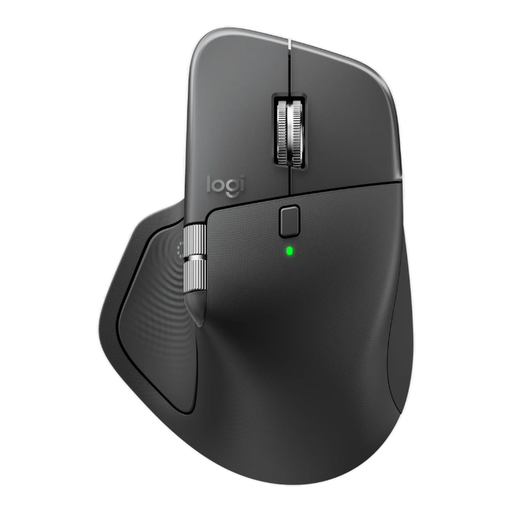
Why it suits this profile: Suitable for professionals who scroll frequently, switch between devices and want to assign multiple functions to the buttons.
The specifications mention both Bluetooth and a Logi Bolt receiver, horizontal scrolling and adjustable DPI up to 8,000.
Eight buttons, USB-C charging, support for up to three devices and silent clicking according to Logitech’s product information.

Why it suits this profile: This wired gaming mouse is designed for right-handed players who use extra buttons and high adjustable sensitivity.
The USB connection means you do not depend on batteries. However, check that your desk has enough room for the cable.
Optical sensor, up to 25,600 DPI, a polling rate of 1,000 Hz and multiple programmable buttons according to Logitech.
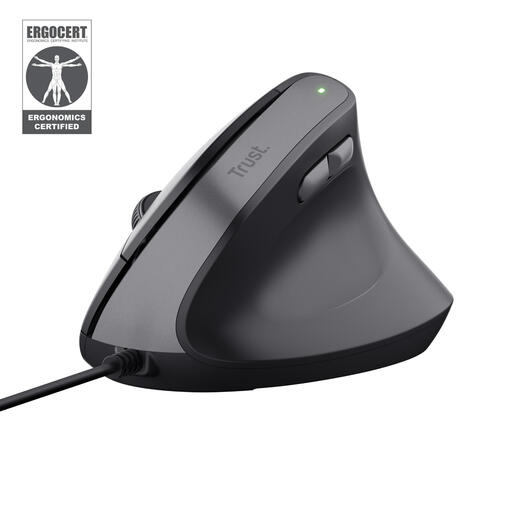
Why it suits this profile: An option for right-handed home workers with a fixed workstation who want to try a vertical mouse.
The product specifications clearly state a 57-degree angle, right-handed use and a wired USB connection.
Adjustable DPI from 800 to 2400, five buttons and a 1.5-metre USB cable according to the product details.
It depends on your workspace. A wired mouse is ready to use straight away and does not need a battery. A wireless mouse keeps your desk free from cables, but runs on batteries or a built-in rechargeable battery. With a Bluetooth mouse, check that your device supports Bluetooth.
Its lifespan depends on usage, construction, cable strain and battery type. A wired mouse can continue working as long as the cable and buttons function properly. With a wireless model, replacing the battery or recharging it are recurring considerations. Store the USB receiver carefully and keep it away from liquids.
With a model that uses AA or AAA batteries, you will eventually need to pay for replacements. A rechargeable mouse requires electricity and an available USB-C cable. So do not look only at the purchase price; also consider the power source, charging time and any additional receiver.
We have put together a complete, up-to-date list of products that fully meet these strict selection criteria and the applicable European safety regulations.
