
Vandaag of morgen in huis

Kwaliteit gegarandeerd

Welkomstaanbiedingen ontgrendelen: GRATIS bezorging | Tot 80% korting | Gratis 30 dagen JoyPlus-proefperiode
Download de app
A wireless gaming mouse gives you greater freedom of movement, but not every wireless model is suitable for fast-paced games. For example, a high DPI value on the packaging says little about how the mouse actually performs, while long battery life may come at the expense of features such as RGB lighting or a high polling rate.
Use these practical checkpoints to compare a wireless gaming mouse based on verifiable product specifications. You’ll then find a few recommendations for different types of users.
A gaming mouse with a high DPI sounds appealing, but maximum resolution is not the same as better performance. Most players use a lower sensitivity than the sensor’s maximum setting in FPS games. Adjustable DPI, stable tracking and the ability to save different profiles are more important.
Also check whether the software works on your system. Some features, such as macros, lighting or programmable buttons, may only be available through Windows software.
A polling rate indicates how often the mouse position is sent to the computer. At 1,000 Hz, this happens up to 1,000 times per second. An 8K polling rate mouse can report at up to 8,000 Hz, but it places greater demands on your computer and only makes a noticeable difference during fast movements and with suitable hardware.
Pay attention to how the manufacturer specifies this value. On some models, the highest polling rate is only available in wired mode or after using specific software. According to its product description, the Rapoo VT3 offers a native wireless 8,000 Hz connection without an additional wireless dongle.
A gaming mouse with long battery life may last for weeks or months, but the stated duration depends on factors including polling rate, lighting and connection mode. The Rapoo VT3 is specified to last up to 750 hours at 1,000 Hz. At a higher polling rate or with RGB lighting switched on, battery life may differ.
Also consider the power source. A built-in battery is convenient if you can recharge it via USB-C. A model with an AA or AAA battery can be put back into use quickly, but you’ll need to keep spare batteries available or buy replacements.
A lightweight gaming mouse weighing around 50 to 75 grams can support fast movements, particularly in FPS games. A low weight is not automatically more comfortable: the shape, grip and position of the thumb buttons determine whether the mouse suits your hand.
Consider your grip style:
An ergonomic gaming mouse is usually shaped for the right hand. Left-handed players or users who regularly switch hands should check whether the model is symmetrical.
A sensor offering 4,000 to 12,000 DPI is more than sufficient for many gamers. Higher values, such as 24,000 or 26,000 DPI, provide additional adjustment options, but are not essential for every game. Independent X/Y DPI settings are useful if you want to configure horizontal and vertical movements differently.
Also check:
A 2.4GHz connection via a USB receiver is generally designed to provide low latency while gaming. Bluetooth is useful for laptops, Macs and multiple devices, but check whether the gaming features remain available in this mode.
A tri-mode gaming mouse usually combines 2.4GHz, Bluetooth and USB-C. This is practical for gaming on both PC and Mac, but the software may be limited to Windows. For example, the ET wireless model states that its programmable software is only available for Windows and only works in wired mode.
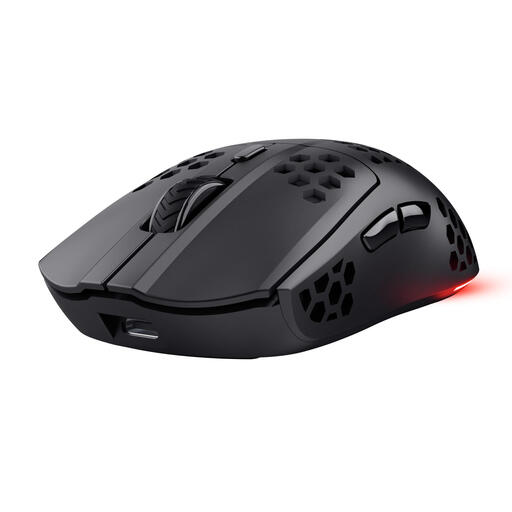
Why it suits this profile: This model combines 2.4GHz wireless connectivity with six programmable buttons and a rechargeable battery. It’s a straightforward starting point for PC gamers who don’t need complex settings.
The product specification lists not just the DPI, but also a 1,000 Hz polling rate and battery life of up to 80 hours. The stated usage time will still depend on how you use the mouse and which settings are enabled.
4800 DPI, RGB lighting, USB-C charging and play while charging.
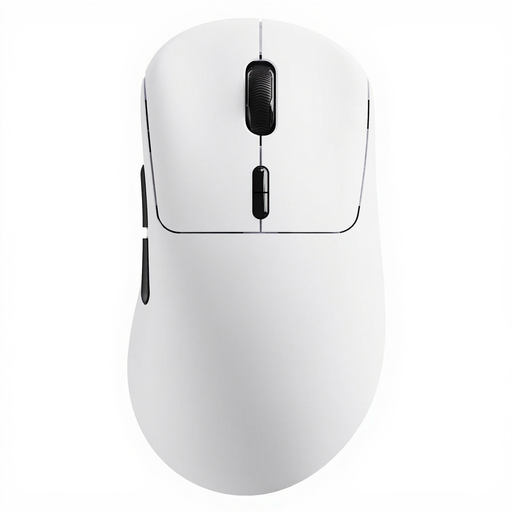
Why it suits this profile: Weighing 53 grams, with 26,000 DPI, ten programmable buttons and a native wireless 8,000 Hz polling rate, this mouse is well suited to players looking for extensive customisation options for FPS, MOBA and RTS games.
The product information distinguishes between battery use at 1,000 Hz and the higher 8,000 Hz mode. It also states that the mechanical switches retain an audible click.
53 grams, up to 750 hours at 1,000 Hz and A HUB software for Windows and Mac.
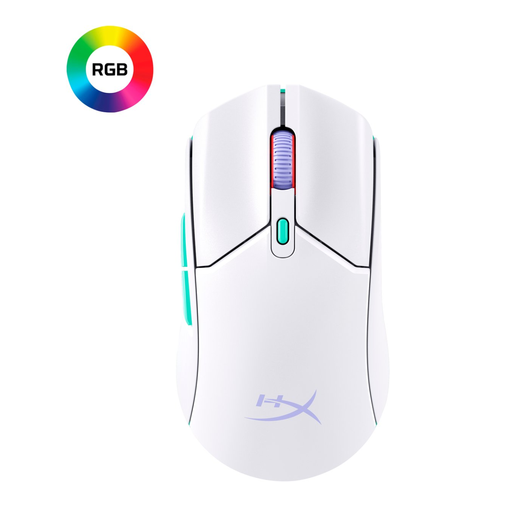
Why it suits this profile: According to the product information, this symmetrical model weighs around 70 grams and supports both 2.4GHz and Bluetooth. This is practical for gamers who switch between a desktop, laptop and different workspaces.
The specification lists the 1,000 Hz polling rate separately from the wireless modes. The AAA power source makes replacement easy, but spare batteries are an ongoing cost.
12,000 DPI, six buttons, 2.4GHz and Bluetooth, with stated battery life of up to 100 hours.
We’ve put together a complete, up-to-date list of products that fully meet these strict selection criteria and the applicable European safety regulations.
Insert the USB receiver directly into a USB port, or use Bluetooth if the model supports it. Only install the accompanying software via the manufacturer’s official product page. Then check:
A wireless mouse may work on a Mac for basic control, while advanced features are limited. Therefore, check the stated compatibility with macOS before buying.
Yes, provided the mouse has a stable 2.4GHz connection, adjustable DPI and a suitable polling rate. For competitive use, it’s advisable to check that the stated performance also applies in wireless mode.
Battery life varies considerably. Models with a built-in battery need to be recharged regularly; models with an AA or AAA battery can quickly be powered up again by replacing the battery. Switch off RGB lighting when you want to extend usage time.
A silent wireless mouse is primarily designed for office use, working from home or shared spaces. For gaming, you should also consider the sensor, polling rate, button layout and connection. Quiet operation alone says nothing about whether a mouse is suitable for fast-paced games.
