
Vandaag of morgen in huis

Kwaliteit gegarandeerd

Welkomstaanbiedingen ontgrendelen: GRATIS bezorging | Tot 80% korting | Gratis 30 dagen JoyPlus-proefperiode
Download de app
A 4K webcam can be a significant upgrade for working from home, online lessons, video calls or livestreams. However, “4K” alone does not tell you everything. A camera may advertise a high resolution but still be less enjoyable to use because of slow autofocus, mediocre audio or limited compatibility.
The following purchasing pitfalls are common:
A 4K webcam typically delivers an image of 3840 × 2160 pixels. This provides extra detail when your image is cropped or when software automatically frames the shot. Do check that 4K is actually available during video calls and streaming. Some platforms compress the image or support Full HD at most.
The sensor is just as important. According to the product description, a larger sensor can capture more light, but the final image also depends on the lighting, lens and software. The Insta360 Link 2 and Link 2C list a 1/2-inch sensor, HDR and improved low-light performance. Ideally, use a lamp in front of your face and avoid having a bright window directly behind you.
Also pay attention to the frame rate. 30 fps is sufficient for meetings and lessons. For fast movement, gaming or streaming, 60 fps can look smoother, provided the webcam and the software you use support it.
A webcam with autofocus is useful if you regularly hold documents, products or teaching materials up to the camera. PDAF, or Phase Detection Auto Focus, is listed for the Insta360 models as part of their autofocus system.
An AI-tracking webcam can automatically adjust the image as you move. This is useful for online teachers, presenters and streamers. Pay attention to the difference between tracking and auto-framing: tracking follows a person, while auto-framing adjusts the crop to keep an individual or group in the shot. Also check whether these functions need to be enabled through the supplied software.
A built-in microphone is convenient for a webcam with microphone, but also look for noise reduction. According to Insta360’s own product information, AI noise reduction is designed to reduce unwanted background noise. This does not guarantee that every sound will disappear. A quiet room and good positioning remain important.
For people working from home, a webcam with a privacy feature is a useful practical choice. A physical privacy cover or switch prevents the lens from remaining visibly active when you are not using the camera. Also check whether the webcam works via USB and whether your PC or Mac supports the required software. The Link 2C listing mentions compatibility with Microsoft Teams, Zoom and Twitch, among others, but also notes limitations for ARM-based Windows systems and Windows Hello.
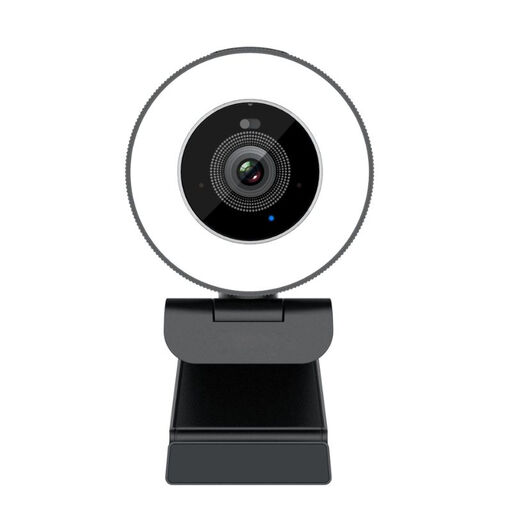
Why it suits this profile: The listing mentions 8 MP, autofocus, dual built-in microphones and a privacy cover. This makes it a practical webcam for PC or Mac, suitable for everyday video calls and online lectures.
The privacy cover means you do not have to rely solely on software. Autofocus reduces the chance of a blurry image when you bring something closer to the camera.
4K UHD, autofocus, dual microphones and a physical privacy cover according to the product listing.
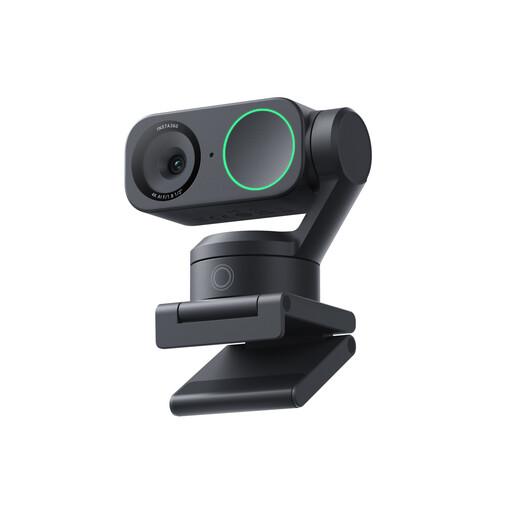
Why it suits this profile: This Insta360 Link 2 is aimed at users who combine presentations, meetings, streams and lessons. The product information lists 4K, a 1/2-inch sensor, AI tracking, auto-framing, HDR and PDAF autofocus.
The combination of autofocus and automatic framing reduces the need for manual adjustments. Do check in advance which functions are supported by your video platform.
4K resolution, 1/2-inch sensor, HDR, AI tracking, auto-framing and AI noise reduction according to the product description.
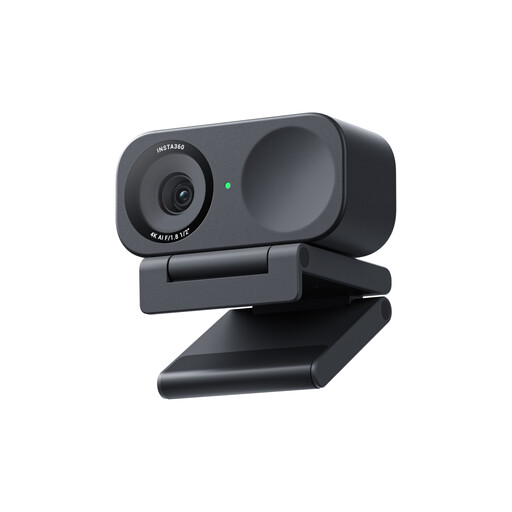
Why it suits this profile: This webcam is well suited to streamers, gamers, business users and content creators who want to combine automatic framing, portrait mode and software controls with 4K video.
The product information lists a physical privacy switch, so you are not solely dependent on a digital setting. Check the stated Windows limitations in advance.
4K video, HDR, PDAF autofocus, auto-framing, gesture control, portrait mode and AI noise reduction according to the product listing.
A compact digital camera with a “webcam function” is not automatically a good webcam for video calls. For example, the Songdian Pocket Camera models list a webcam function and autofocus, but their stated maximum video resolution is 1920 × 1080P, despite “4K” appearing in the product name. This makes them less suitable if genuine 4K webcam output is your main requirement.
A security camera, such as the TP-Link Tapo C200, is not a direct substitute either. This model is designed for indoor monitoring and offers 1080p, night vision and two-way audio. For a webcam for PC or Mac, USB connectivity, software support, viewing angle and screen mounting are more important than motion detection.
Check the following before buying:
We have put together a complete, up-to-date list of products that fully meet these strict selection criteria and the applicable European safety regulations.
A USB webcam will usually work with recent Windows and macOS computers, but features vary between models. Check the system requirements, USB connection and software compatibility. Some AI features only work through a separate programme.
For standard meetings, Full HD is often sufficient, particularly when the platform compresses the image. 4K is most useful when you want to crop automatically, move around in the frame or retain extra detail for presentations and content creation.
Its lifespan depends on usage, heat, cable strain and storage. Position the camera securely, keep the lens free from dust and do not pull the USB cable out while it is under tension. For models with a privacy cover or switch, use the physical cover when the camera is not active.
