
Vandaag of morgen in huis

Kwaliteit gegarandeerd

Welkomstaanbiedingen ontgrendelen: GRATIS bezorging | Tot 80% korting | Gratis 30 dagen JoyPlus-proefperiode
Download de app
A good set of streaming equipment needn’t be complicated. Even so, many people buy a camera or webcam based on one eye-catching feature, such as 4K, AI or long battery life. It is only when they start using the device that limitations around software, connections, sound or stability become apparent.
This guide helps content creators, vloggers, gamers, students, home workers and business teams compare products objectively. It focuses on verifiable specifications and on situations in which a device is actually used in the Netherlands.
A 4K webcam or 4K action camera can capture plenty of detail, but the final image quality also depends on the sensor, lighting, lens and internet connection. For a video call, 1080p with good lighting may be more practical than 4K with a dark background.
So don’t just check the maximum resolution. Also look at:
According to the product description, an AI tracking webcam can automatically track you or adjust the framing. That doesn’t mean every movement, group situation or background will be handled perfectly. Check the supported software and make sure features such as auto-framing, gesture control and portrait mode work on your computer.
For example, the Insta360 Link 2C states that ARM-based Windows systems and Windows Hello are not supported. This type of compatibility detail can be more important than an additional image feature.
A camera is just one part of a complete setup. Also consider a microphone, tripod, memory card, cables, lighting and mounting equipment. A vlogging camera without suitable storage or a webcam with no free USB port can quickly lead to extra costs.
For mobile filming, a selfie stick with tripod is useful, but check the maximum phone size, the stability of the legs and how the remote control connects.
For video calls, Twitch streams and online lessons, resolution and frame rate are the first things to check. 4K generally means 3840 × 2160 pixels, but also check whether 4K is available at the frame rate you want. Some modes only work with a particular codec or resolution.
According to the product information, a larger sensor can capture more light, but the result still depends on the room and lighting. A livestream camera with HDR can display differences between light and dark areas of an image more effectively. This is especially useful with a window behind you or in changing daylight.
Stabilisation is important for sport, cycling and walking. The SJCAM C400 specifies 6-axis gyro stabilisation, several recording modes and a waterproof housing rated to 30 metres. Only rely on the waterproofing claim when the housing has been closed correctly and conditions remain within the stated limits.
A sharp image is of little use if voices are difficult to understand. Check whether a camera has a built-in microphone, how many microphones it has and which software features are mentioned.
For a webcam with noise reduction, it is worth reading the description carefully. According to the product information for the Philips 2K QHD PC Webcam, it has a built-in microphone with noise reduction. This can help during ordinary conversations, but it is no substitute for a quiet room or a separate microphone.
The Insta360 Link 2 and Link 2C specify microphones with AI noise reduction. As this is a feature stated in the brand’s product description, you should regard it as a technical feature rather than a guarantee of a particular audio result.
Before buying, check:
For a webcam for PC and Mac, the operating system is not the only important consideration. Available ports, privacy features and software support also matter. If you stream regularly, you could also use a streaming controller or macro keyboard to control scenes, audio and applications at the press of a button.

Why it suits this profile: This desktop and laptop webcam is designed for video calls, online lessons and simple streams without the need for a separate camera setup.
The product specification mentions 2K QHD and a microphone with noise reduction, so you don’t immediately need to buy a separate camera and microphone.
2K QHD resolution, clip for a desktop or laptop and built-in microphone according to the product information.
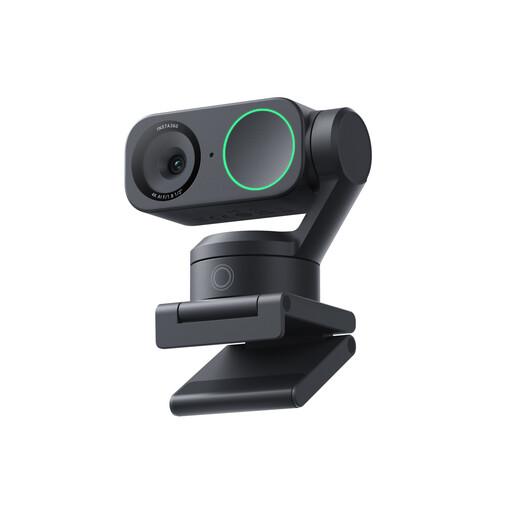
Why it suits this profile: Suitable for creators and business users who want to combine automatic framing, 4K video and gesture control.
The specifications mention AI tracking, auto-framing, PDAF autofocus and a microphone with AI noise reduction. Check beforehand that your software supports these features.
4K resolution, 1/2-inch sensor, HDR, 79.5° diagonal viewing angle and support for PC and Mac according to the product information.
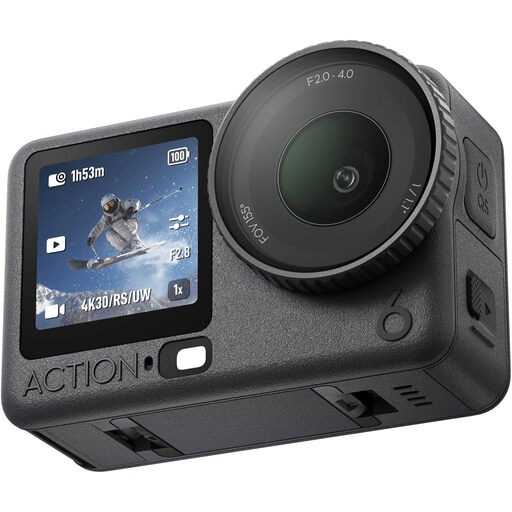
Why it suits this profile: This action camera is ideal for vloggers, cyclists and outdoor users who value portability, remote control and filming in changing conditions.
The product information mentions a variable aperture, a square 1/1.1-inch sensor, voice and gesture control, and filming up to 20 metres underwater without a housing.
Up to four hours of use under normal conditions, 50 GB of built-in storage and support for two DJI microphone transmitters according to the product description.
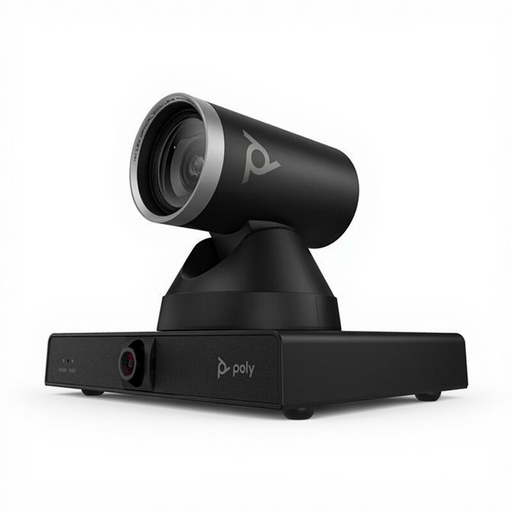
Why it suits this profile: The PTZ setup is designed for meeting rooms, presentations and larger workplaces where optical zoom and network connectivity are useful.
According to the specifications, the camera uses 12× optical zoom and PTZ control. This means you don’t have to rely solely on digital zoom for a presentation.
4K at up to 60 fps, 12× optical zoom, presenter tracking, smart group framing and PoE+ support according to the product data.
We’ve put together a complete, up-to-date list of products that fully meet these strict selection criteria and the applicable European safety regulations.
The right accessories depend on how you work:
For video calls or a simple livestream, a webcam is often sufficient. Choose an action camera when filming outdoors, during sport or while travelling. For presentations in a large room, a PTZ camera with optical zoom is more suitable. Always check compatibility with your streaming platform and computer.
No. 4K is particularly useful if you want to crop the image, use a larger frame or capture a high level of detail. For a standard video call, lighting, autofocus and the microphone may be more important. Also check whether your platform and internet connection can handle 4K.
In addition to the purchase price, you may incur costs for memory cards, extra lighting, microphones, cables, tripods and software. Some features only work with an app or desktop programme. Before ordering, also check battery life, charging time and the availability of spare parts.
