
Vandaag of morgen in huis

Kwaliteit gegarandeerd

Welkomstaanbiedingen ontgrendelen: GRATIS bezorging | Tot 80% korting | Gratis 30 dagen JoyPlus-proefperiode
Download de app
Whether you're working from home, studying, streaming, or keeping an eye on things, a good camera is essential. But the market for webcams and IP cameras is flooded with technical specs and marketing promises. It's easy to overpay for features you don't need or, conversely, to cut corners on the wrong things. Before you make a choice, it's wise to understand the most common pitfalls.
Two frequent mistakes are fixating on high resolution and ignoring sound quality. A 4K webcam sounds impressive, but for most daily video calls, a Full HD webcam (1080p) is more than sufficient and often provides a more stable connection. On the other hand, a razor-sharp image is worthless if your voice sounds tinny or unintelligible. A good webcam with a microphone is therefore not a luxury, but a necessity.
To avoid a bad purchase, it's best to focus on a few objective specifications that directly impact performance.
Resolution determines the sharpness of the image. Frame rate, expressed in frames per second (fps), determines how smooth the motion is.
The field of view determines how much fits into the frame. This is crucial and depends on your use case.
A built-in microphone is standard, but the quality varies enormously. Look for models with dual microphones or noise cancellation, which filters out distracting background sounds. For specific applications like a baby monitor with camera or an IP camera, features such as night vision, motion detection, and 360-degree rotation (pan/tilt) are essential.
Below is a selection of cameras, linked to specific user profiles, to help you find a model that aligns with your needs.
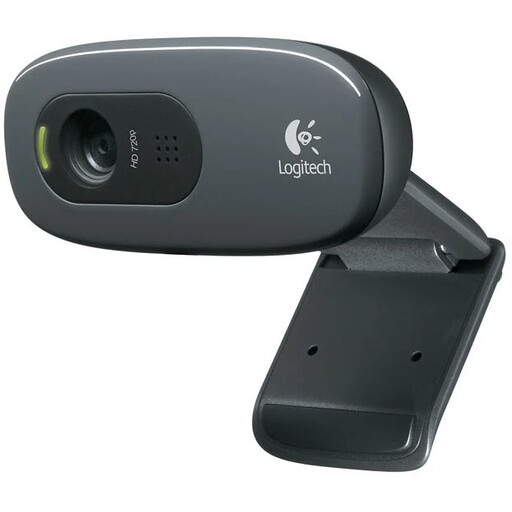
Why This Fits Their Persona: For daily online meetings and calls with colleagues or fellow students, a reliable and straightforward solution is needed. This Logitech webcam is a workhorse that gets the job done without any fuss.
This model doesn't focus on an unnecessarily high resolution, instead delivering solid 720p HD quality. The built-in microphone with noise reduction ensures you are clearly understood, thus avoiding the pitfall of poor audio.
Simple plug-and-play installation via USB and broad compatibility with all popular video calling apps. The automatic light correction ensures a clear image, even in less-than-ideal lighting conditions.
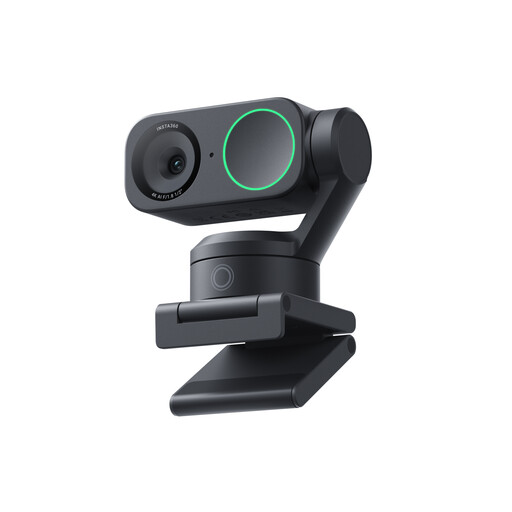
Why This Fits Their Persona: For those producing professional streams, tutorials, or videos, the highest image quality is a must. This streaming camera not only offers 4K but also smart features that simplify production.
Here, 4K is not a gimmick but a functional requirement. The camera combines this with a large 1/2" sensor for superior low-light performance. The microphone with AI noise cancellation tackles the audio problem professionally.
The AI tracking automatically keeps you centred in the frame, even when you move. Features like HDR and gesture control give you full command over your recordings without having to be at your computer.
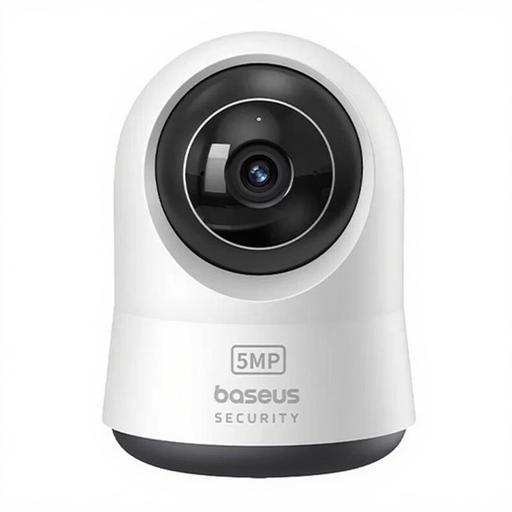
Why This Fits Their Persona: Ideal for anyone who wants to keep an eye on their home, pets, or baby. This IP camera is specifically designed for monitoring and offers features that a standard webcam lacks.
This camera bypasses the pitfall of a limited field of view. With 360° pan and tilt functions, you can survey the entire room via your smartphone. The two-way audio is practical for communication, not just for being heard.
Specific features like night vision and AI-powered motion and cry detection make this an effective indoor security camera or baby monitor with camera. Recordings can be stored locally on a microSD card.
We have compiled a complete, up-to-date list of products that fully meet these strict selection criteria and local regulations.
For most users, no. If you primarily use your webcam for video calls with colleagues, family, or friends on platforms like Teams, Zoom, or Google Meet, a 1080p (Full HD) webcam is the ideal choice. It provides excellent image quality that is optimally supported by most platforms. A 4K webcam is mainly an investment for professional content creators who record and edit videos in the highest resolution.
Very important. Good audio is just as crucial as good video for effective communication. A poor microphone can make you unintelligible, even if your video is perfect. When purchasing a webcam with a microphone, look for specifications like noise cancellation, which filters out ambient sounds for a clearer conversation.
While a standard webcam can technically be used for monitoring, it is not designed for that purpose. A dedicated IP camera or indoor security camera offers essential features that a webcam lacks, such as night vision, a wide and remotely controllable field of view (pan/tilt), motion detection with notifications to your phone, and specific recording options. For reliable security or monitoring, a purpose-built camera is the better choice.
