
Vandaag of morgen in huis

Kwaliteit gegarandeerd

Welkomstaanbiedingen ontgrendelen: GRATIS bezorging | Tot 80% korting | Gratis 30 dagen JoyPlus-proefperiode
Download de app
A wireless gaming mouse needs to offer more than a high DPI figure on the packaging. For fast-paced FPS games, MOBA games and RTS games, tracking, connectivity, weight and battery life are more important than eye-catching marketing terms. According to the product information, the RAPOO VT9Pro wireless gaming mouse combines a 4K connection, a PixArt PAW3398 sensor, 10 programmable buttons and a stated battery life of 180 hours.
However, not every mouse described as “ultralight”, “low latency” or “professional” will automatically suit your setup. Pay particular attention to these common pitfalls.
A gaming mouse with 26000 DPI may offer a wide adjustment range, but most players use a much lower sensitivity in practice. DPI indicates how quickly the cursor moves; it does not, on its own, say how accurately the sensor performs in every situation.
So also look at the sensor, adjustment options and the way the mouse stores its settings. A mouse with on-board memory is practical when switching between computers or when you do not want to install software repeatedly.
With a 4K polling rate gaming mouse, the mouse position is reported up to 4,000 times per second according to the product specifications. This may appeal to players using high refresh rates who want to minimise every small input delay.
However, a higher polling rate can also increase CPU usage. RAPOO warns in the product information that, if you experience frame drops, you should check whether your PC is powerful enough or switch back to 1000 Hz. 4K is therefore a setting to use selectively, not a guarantee of better performance in every game.
An ultralight wireless mouse weighing 68 grams can make quick movements easier, but shape and grip remain important. A symmetrical mouse suits both left- and right-handed users, while a distinctly ergonomic design may be more comfortable for a particular hand position.
Also check the dimensions, the position of the thumb buttons and whether you use a fingertip, claw or palm grip. A lightweight mouse that does not sit comfortably in your hand may be less pleasant in practice than a slightly heavier model.
According to the product description, the RAPOO VT9Pro uses a PixArt PAW3398 sensor with a stated resolution of up to 26,000 DPI, 650 IPS and 50G acceleration. These are verifiable product specifications. They indicate the technical range, but your actual experience will also depend on your mouse mat, in-game settings and grip.
For FPS games, stable, predictable tracking is generally more relevant than an extremely high DPI value. For MOBA and RTS games, extra buttons and quickly switching between profiles may make a greater difference.
According to RAPOO, the VT9Pro supports a wireless polling rate of up to 4000 Hz. Use the included wireless receiver and check that your PC has enough USB ports and processing power. For a laptop, 1000 Hz may be a practical standard when battery life or CPU load is more important.
Also consider the connection method. A wireless gaming mouse for PC and laptop usually works via a USB receiver. Bluetooth is convenient for portability, but it is not available on every gaming model. Check in advance which modes are actually supported.
According to the product information, the RAPOO VT9Pro has a built-in 800mAh Li-Po battery with a stated usage time of up to 180 hours. Actual battery life may vary depending on the polling rate, intensity of use and other settings.
The mouse is charged via USB-C and, according to the description, can be used while charging. Support for a wireless charging mat is also mentioned, but this requires the separately available P3 Wireless Charging Module. Do not connect the USB-C cable at the same time as wireless charging; RAPOO warns that doing so may damage the product.

Why it suits this profile: A straightforward entry-level model for PC and laptop gamers who want to play wirelessly without immediately opting for 4K polling or an exceptionally high DPI class.
The specifications mention a 1000 Hz polling rate, 4800 DPI and battery life of up to 80 hours. This makes expectations clearer than vague claims about extreme speed.
75 grams, 2.4GHz connection, USB-C charging, six programmable buttons and, according to the product information, up to 80 hours of battery life.
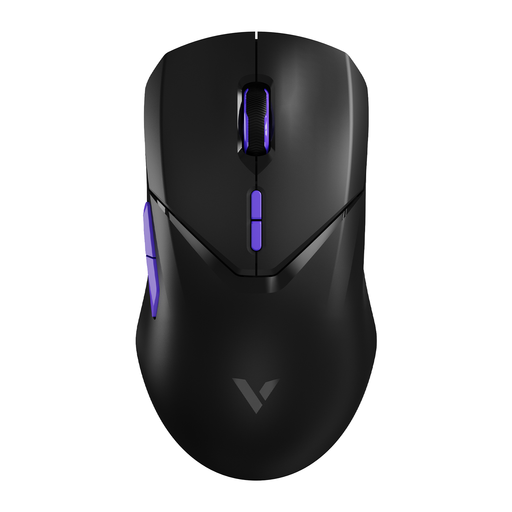
Why it suits this profile: Designed for players who want to combine extensive adjustment options, low weight and plenty of buttons in a single wireless mouse.
The product information specifically lists 4000 Hz, 26,000 DPI, 68 grams, 10 programmable buttons and on-board memory. The warning about CPU usage at 4K remains relevant.
PixArt PAW3398 sensor according to RAPOO, symmetrical shape, USB-C charging and a stated battery life of up to 180 hours.
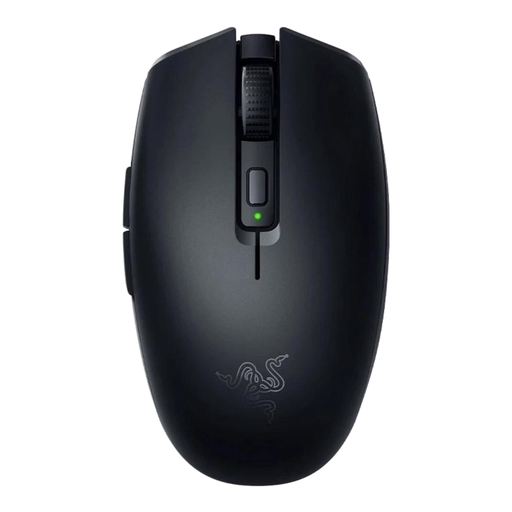
Why it suits this profile: Suitable for players looking for a compact mouse for gaming at home, on the go or across multiple devices.
The product specifications list a weight of 60 grams, six programmable buttons and two wireless modes. The mouse does not use a built-in rechargeable battery, but one AA or AAA battery.
18,000 DPI, Bluetooth and Razer HyperSpeed Wireless; according to the product description, up to 450 hours via HyperSpeed and up to 1000 hours via Bluetooth.
We have put together a complete, up-to-date list of products that fully meet these strict selection criteria and the applicable European safety regulations.
Use this quick checklist before making your choice:
Not always. According to RAPOO, 4000 Hz can increase CPU usage. If you experience frame drops, try 1000 Hz or check whether your PC is suitable for the higher polling rate.
The product information states a battery life of up to 180 hours. This is a stated maximum and may vary depending on the polling rate, wireless mode and usage. Charging is via USB-C.
According to the product description, the mouse has a symmetrical design intended for left- and right-handed use. However, check that the button layout and shape suit your grip and hand size.
