
Vandaag of morgen in huis

Kwaliteit gegarandeerd

Welkomstaanbiedingen ontgrendelen: GRATIS bezorging | Tot 80% korting | Gratis 30 dagen JoyPlus-proefperiode
Download de app
A wireless gaming mouse gives you more freedom of movement at your desk, but not every model is suitable for competitive gaming. A high DPI rating or impressive polling rate says little about day-to-day use on its own. Battery claims, software and the shape of the mouse can also be more important in practice than the marketing copy suggests.
As a Joybuy Product Recommendation Officer, I therefore focus mainly on verifiable specifications: weight, sensor, connectivity, battery type, buttons and support for Windows or macOS.
A gaming mouse with a high DPI rating might support 26,000, 30,000 or even 44,000 DPI. That does not mean you need to play every game at that setting. Many FPS players actually use lower sensitivity for more controlled movements.
So do not focus only on the maximum figure. Also consider:
According to the product descriptions for the Rapoo VT3 and VT2 MAX, these models support independent X/Y DPI adjustment. This can be useful if you want to configure horizontal and vertical movements differently.
A wireless gaming mouse with an 8K polling rate sends information to the computer more frequently each second. This can provide finer movement registration, but it also places greater demands on your system and game. On some systems, a high polling rate can create additional CPU load.
Therefore, check:
For example, the Rapoo VT9Pro lists a maximum wireless polling rate of 4,000 Hz and warns that a high setting may increase CPU load. If you are unsure, 1,000 Hz is a practical setting for everyday use.
A gaming mouse with long battery life may quote different runtimes for different settings. According to their product information, the Rapoo VT3, VT3 MAX and VT2 MAX offer up to 750 hours at 1,000 Hz with power-saving mode enabled. A higher polling rate, lighting and intensive use can affect the actual runtime.
Also consider the battery type:
A lightweight gaming mouse weighing around 53 to 70 grams can be comfortable for fast flicks and frequent repositioning. A heavier model may feel more stable. Weight is therefore not a mark of quality, but a matter of grip, game type and personal preference.
Also check:
For FPS games, many players choose a lightweight, symmetrical or right-handed shape. For MMO and strategy games, more programmable buttons may be more practical.
Polling rate is measured in Hz. At 1,000 Hz, the mouse reports its position up to 1,000 times per second; at 8,000 Hz, that figure is higher. The visible difference depends on your monitor, game, PC and personal sensitivity.
An optical sensor works without physical contact with the surface and is standard on many modern gaming models. As well as DPI, look at the specified speed, acceleration and software support. Claims about tracking accuracy come from the manufacturer's product information and should not be regarded as a guarantee for every surface or user.
A programmable gaming mouse is useful for macros, shortcuts and game profiles. However, more buttons are not always better. For an esports gaming mouse, five to six easily accessible buttons are often clearer and easier to manage than ten buttons that you might press accidentally.
Check whether:
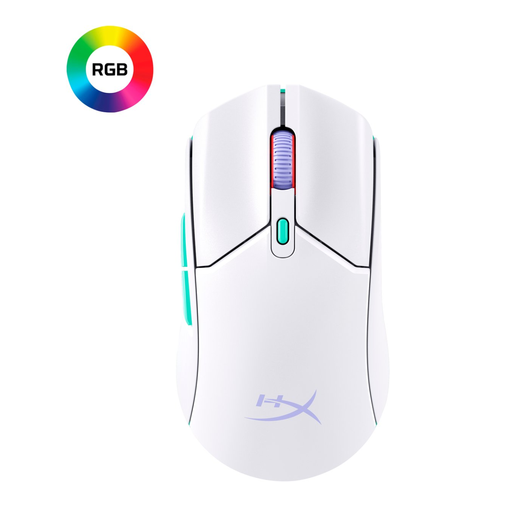
Why it suits this profile: An accessible wireless mouse for PC with Bluetooth and 2.4GHz connectivity, weighing around 70 grams and featuring a sensor of up to 12,000 DPI.
The specifications are straightforward: a 1,000 Hz polling rate, six buttons and a replaceable AAA battery. You are not paying for features you may never use.
Bluetooth 5.2, 2.4GHz connectivity, six buttons and up to 100 hours of use according to the product description.

Why it suits this profile: Designed for FPS players looking for a compact, lightweight shape and a high polling rate without Bluetooth.
The product information explicitly states that 8K functions require software support. It also quotes battery life of up to 95 hours rather than an unspecified runtime.
53 grams, HERO 2 optical sensor, up to 44,000 DPI and a specified polling rate of up to 8,000 Hz.

Why it suits this profile: For long gaming sessions and users who want to combine extensive customisation options, low weight and long battery life.
The product description distinguishes between 1,000 Hz and the maximum 8K mode. According to Rapoo, the latest driver is required for power-saving mode.
53 grams, optical switch with a specified lifespan of 120 million clicks, up to 30,000 DPI and up to 750 hours at 1,000 Hz according to the manufacturer.

Why it suits this profile: An interesting option for anyone combining gaming with work and wanting to switch between multiple devices via HyperSpeed and Bluetooth.
The vertical shape and 150-gram weight make it clear that this is not a lightweight gaming mouse for fast FPS movements. Choose this model only if its shape suits the way you use it.
Bluetooth, 2.4GHz and USB-C, six programmable buttons, an optical sensor of up to 30,000 DPI and a specified battery life of up to six months.
We have put together a complete, up-to-date list of products that fully meet these strict selection criteria and the applicable European safety regulations.
Bluetooth can be suitable for everyday use, laptops and less demanding games. For competitive FPS games, a 2.4GHz receiver is usually more practical because it is designed with gaming connectivity in mind. Always check the maximum polling rate for each connection mode; Bluetooth does not automatically support the same features as a wireless dongle.
Its lifespan depends on the battery or rechargeable battery, switches, charging habits and intensity of use. Product claims such as 100, 200 or 750 hours come from the manufacturer and may vary depending on the settings. According to the product specifications, an optical switch may have a higher click lifespan, but normal maintenance and careful use remain important.
With a rechargeable mouse, you mainly pay for electricity and any replacement required once the internal battery has worn out. Models with AA or AAA batteries involve ongoing battery costs unless you use rechargeable batteries. So do not look only at the purchase price. Also consider the battery type, charging cable, included receiver and the features you actually need.
