
Vandaag of morgen in huis

Kwaliteit gegarandeerd

Welkomstaanbiedingen ontgrendelen: GRATIS bezorging | Tot 80% korting | Gratis 30 dagen JoyPlus-proefperiode
Download de app
A TV stand may seem like a simple purchase, until you discover that not every TV stand is compatible with every screen. The wrong VESA size, insufficient weight capacity or an unstable surface can mean your television doesn’t fit properly or starts to wobble. Marketing terms such as “universal” don’t tell you much either if the exact measurements aren’t listed.
In this buying guide, you’ll find out what to look for in a TV stand, TV base or TV wall mount. Then you’ll find recommendations for different uses, from a compact tabletop TV stand to a motorised solution for large screens.
A 55-inch TV won’t automatically fit every TV stand for 55-inch screens. Weight and VESA size are just as important. Two televisions with the same screen diagonal can have different mounting points and weights.
Always check:
A universal TV stand often supports several VESA patterns, but there are limits. A tabletop stand that supports VESA sizes from 100 x 100 to 400 x 400 mm won’t fit a screen with a larger or different pattern. Some models require optional VESA conversion plates.
Measure the distance between the horizontal and vertical screw holes on the back of the television. Also check that the screws and spacers supplied are suitable for your model.
A narrow TV stand on a lightweight cabinet can become unstable if knocked or placed on an uneven surface. When choosing a tabletop TV stand, consider the material, the size of the base and how the television is secured.
A glass base can provide enough stability, but it needs to stand on a flat, non-slip surface. If you’re using a TV cabinet stand, make sure the cabinet itself can support the combined weight.
VESA refers to the distance between the mounting holes on the back of a screen. Common sizes include:
A VESA TV stand must support your screen’s pattern. If your size isn’t listed in the product specifications, don’t rely on the word “universal” alone.
Choose a stand with a maximum weight capacity greater than the weight of your television. For example, a model with a weight capacity of 40 kg is suitable for a TV that weighs well below that. Never exceed the stated limit.
Models with a weight capacity of up to 110 kg are available for business presentation screens and large televisions. For these solutions, the wall structure or floor base must also be suitable for the total weight.
A fixed TV stand is suitable if your viewing position doesn’t change. A swivel TV stand is more convenient in a living room with several seating areas. A height-adjustable TV stand can help if you want to position the TV above a soundbar or need different viewing heights.
Check whether the adjustment is continuous or limited to preset positions. Some tabletop models, for example, have three fixed height settings, while a motorised TV mount offers a greater range of movement.
The following options are based on verifiable product specifications, such as screen size, VESA compatibility, weight capacity and adjustability. The technical details are taken from the product information provided by the brands and supplier.
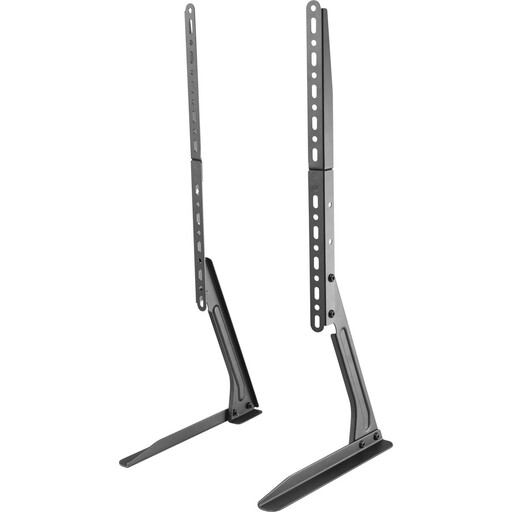
Why it suits this profile: This tabletop stand is designed for anyone looking for a separate TV stand without drilling into the wall. It supports screens from 23 to 70 inches and has a weight capacity of 50 kg.
Compatibility is clearly specified: VESA sizes from 75 x 75 to 800 x 400 mm. Make sure you check your screen’s pattern before ordering.
Suitable for a wide range of screen sizes, with a low profile and designed for use on a TV cabinet or other unit.
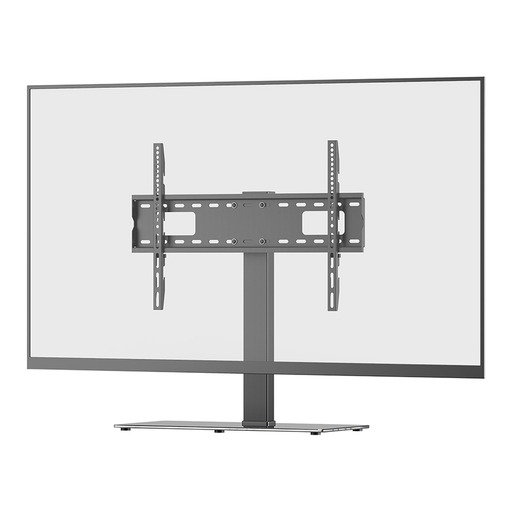
Why it suits this profile: This model combines a glass base with a swivel function and three height settings. It’s a good fit for a living room where the viewing direction often changes.
The maximum load of 40 kg, screen range of 37 to 70 inches and supported VESA sizes can all be checked in advance. Place the base on a flat surface.
Swivels up to 70°, adjusts to three height positions and includes cable clips for a tidier set-up.
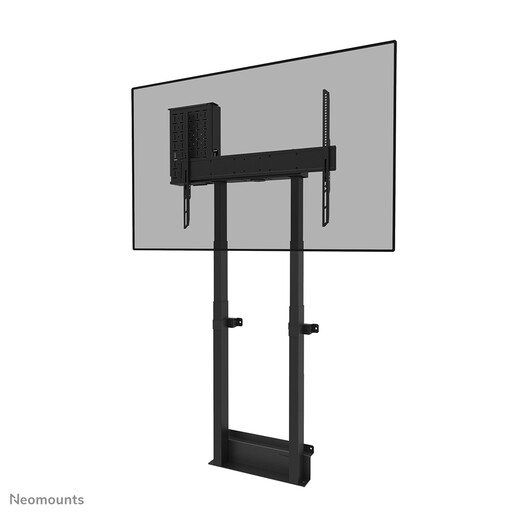
Why it suits this profile: This motorised TV wall mount is designed for large screens in meeting rooms, reception areas and other business settings where the height needs to be adjusted regularly.
The model supports screens from 55 to 100 inches, VESA sizes from 100 x 100 to 800 x 600 mm and a maximum weight of 110 kg. It must still be installed on a load-bearing wall by a qualified person.
Motorised height adjustment from 98 to 163 cm, a wired remote control, cable management and an anti-collision function, according to the product description.
If you don’t want to drill, a tabletop stand or TV cabinet stand is usually the best choice. The Neomounts DS42-430BL12 attaches to a table and supports screens from 23 to 43 inches, weighing up to 50 kg, with VESA sizes from 100 x 100 to 200 x 200 mm. The model swivels up to 60°.
For a larger television without its original stand, the Neomounts DS42-430BL14 is suitable for screens from 32 to 55 inches, with a weight capacity of 50 kg and VESA support up to 400 x 400 mm. The base is secured to the desk or unit using the mounting hardware. It isn’t a TV stand that requires no fixing, but it is an alternative to wall mounting.
A proper TV wall mount saves space on your furniture, but you’ll need a suitable wall and secure fixings. For plasterboard, brick or concrete, check which fixings you need. A motorised model also requires a power supply and enough room to move.
We’ve put together a complete, up-to-date list of products that meet these strict selection criteria and the applicable European safety regulations.
Start by checking the screen weight, screen diagonal and VESA size. The TV stand must support all three. If you’re unsure, consult your television’s manual or measure the distance between the mounting holes.
That depends on the base, the installation and the surface. A wide or heavy base can help improve stability, but the television must also be secured correctly to the VESA mount. Place a swivel TV stand on a flat, sturdy surface and check the screws regularly.
Power consumption depends on the model and how often you use the motor. A motorised mount mainly uses energy when it’s being adjusted. Check the technical specifications before buying, and make sure the remote control and cables are safely tucked away.
