
Vandaag of morgen in huis

Kwaliteit gegarandeerd

Welkomstaanbiedingen ontgrendelen: GRATIS bezorging | Tot 80% korting | Gratis 30 dagen JoyPlus-proefperiode
Download de app
The Insta360 Flow 2 Pro is worth considering if you’re a vlogger, livestreamer, traveller or simply want to shoot stable video on your smartphone. But a long list of features doesn’t automatically mean a gimbal is right for you. Compatibility, tracking and accessories can all bring surprises in everyday use.
A phone gimbal with tracking may sound impressive, but how well it works depends on the operating system, the app you use and sometimes your smartphone model. According to the product description, the Flow 2 Pro uses Apple DockKit to support tracking in more than 200 compatible iOS apps. That doesn’t mean every app or Android phone supports the same features.
Before buying, check:
A gimbal with tripod and selfie stick is handy on a table, windowsill or flat surface. On an uneven quay, lawn or busy campsite, an integrated tripod may be less stable. A heavy smartphone, large case or extended selfie stick can also shift the centre of gravity.
Use the built-in legs mainly for short hands-free recordings. For a fixed setup outdoors, a separate tripod may be more suitable. Check the maximum load and tighten all fastenings securely.
The stated battery life is a product specification based on certain conditions. Tracking, lighting, Bluetooth, high phone screen brightness and charging your smartphone can all affect how long it lasts. Treat “up to 10 hours” as a guide, not a guarantee of a full day’s recording.
Also check whether a USB cable or charger is included. The Flow 2 Pro bundle mentioned here lists a USB-C to USB-A charging cable. You may need to buy a mains adaptor separately.
3-axis stabilisation corrects movement around several pivot points. This helps when walking, panning and vlogging. Stabilisation alone won’t make your footage look professional: a steady walking style, sufficient light and a well-balanced phone are still important.
Pay attention to how the phone is mounted, too. Use the magnetic phone holder as instructed and check that your smartphone is securely attached before filming.
An AI smartphone gimbal can follow a person, but features vary by model. The Insta360 Flow 2 and Flow 2 Pro both list features including multi-person tracking. This is useful for group photos, family videos or presentations where you want to keep several people in frame.
The Flow 2 Pro description also lists 360° infinite pan tracking and tracking with up to 15× active zoom in certain situations. According to the product information, this zoom tracking is designed for uses including sport, wildlife and performances. Check the compatibility restrictions: the listed feature is available on iPhone 12 to 17 Pro and Pro Max models.
A foldable smartphone gimbal is easier to carry in a rucksack or hand luggage. Don’t just look at its folded size; check what’s included in the box as standard, too. A teleprompter, spotlight, AI tracker or extra phone holder may vary by bundle.
If you use Android, it’s a good idea to check your phone’s exact width, its weight with the case on and which app you’ll need. If you use an iPhone, Apple DockKit may offer extra features, but availability still depends on compatible apps and devices.
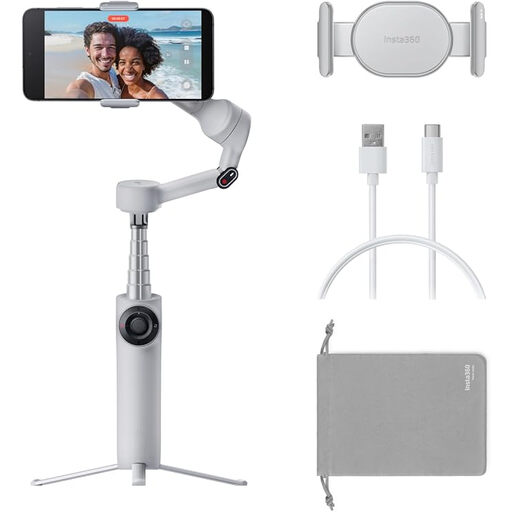
Why it suits this user: This foldable smartphone gimbal combines a built-in tripod, selfie stick and remote control for iPhone and Android recording. That means you may not need to buy extra accessories straight away.
The product description explicitly mentions compatibility with iPhone and Android, as well as multi-person and pet tracking. Be sure to check your specific phone and app in advance.
3-axis stabilisation, up to 10 hours of stated battery life, a built-in tripod and gesture control, according to the product information.
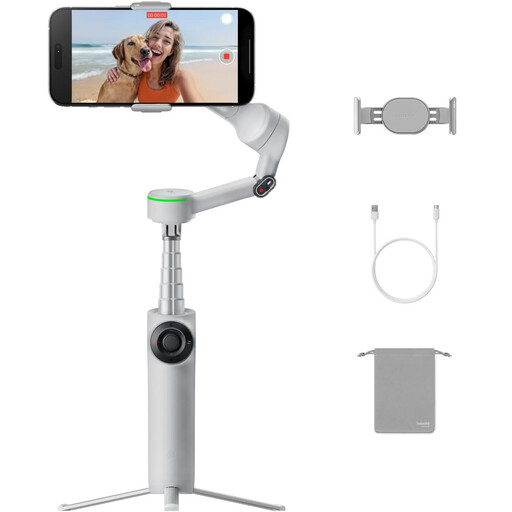
Why it suits this user: For iPhone users who often livestream, present or film themselves, this bundle offers several tracking options and extra tools for hands-free content creation.
According to the product description, Apple DockKit is supported in more than 200 compatible iOS apps. The included AI tracker is designed to work across different platforms, but you should check app support.
3-axis stabilisation, multi-person tracking, 360° pan tracking and a built-in spotlight, according to the stated product specifications.
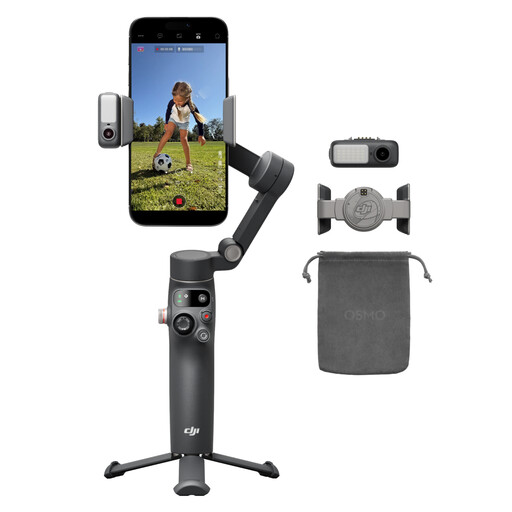
Why it suits this user: A good choice if you often take a foldable gimbal with you and want to combine tracking, lighting and longer recording sessions in one system.
The specifications list a built-in extension rod of up to 215 mm, a tripod and a multifunctional module. Before buying, check that the stated tracking features work with your phone platform.
3-axis stabilisation, unrestricted 360° pan rotation, ActiveTrack 7.0, a 3350 mAh battery and USB-C reverse charging, according to the product information.
We’ve put together a complete, up-to-date list of products that meet these strict selection criteria and current European safety regulations.
The product information mentions support for smartphones and AI tracking across different platforms. The full DockKit integration is for compatible iOS devices. Before buying, check the latest compatibility list, your Android model and the app you want to use.
According to the product description, the Insta360 Flow 2 Pro supports multi-person tracking. It’s designed to keep a group in frame during family videos, trips or presentations, for example. How well it works in practice may depend on distance, lighting, movement and the app you use.
The Flow 2 Pro is rated for up to 10 hours of use. This is a guide based on the product information. Tracking, using the spotlight, charging your phone and other settings can affect actual battery life. Check the charge level before a long day of recording and take a suitable USB charging option with you if needed.
