
Vandaag of morgen in huis

Kwaliteit gegarandeerd

Welkomstaanbiedingen ontgrendelen: GRATIS bezorging | Tot 80% korting | Gratis 30 dagen JoyPlus-proefperiode
Download de app
A smartphone gimbal can reduce shaky footage, but not every model is automatically suitable for vlogging, livestreaming or travel. With the Insta360 Flow 2 Pro smartphone gimbal in particular, it is important to look beyond terms such as AI tracking, 360° tracking and “all-in-one”.
The three most common buying pitfalls are:
Tracking that does not work everywhere
Some features depend on a specific app, smartphone or operating system. Apple DockKit, for example, does not work in the same way on iPhone and Android. Always check in advance which tracking modes your phone supports.
A bundle with missing accessories
A built-in tripod or selfie stick does not always mean that all additional accessories are included. Check the contents of the box. With some Insta360 products, a microSD card, additional tracker or invisible selfie stick are sold separately.
Confusing stabilisation with image quality
A 3-axis gimbal helps counter hand movements, but it is not the only factor that determines how good your video looks. Your phone, lighting, microphone, app support and filming technique also affect the final result.
A smartphone gimbal with AI tracking can attempt to keep one person, several people or sometimes a pet in the frame. According to Insta360’s product information, the Flow 2 supports features such as multi-person tracking, gesture control and tracking in more than 200 compatible apps on models with DockKit support.
That does not mean every feature is available in every app. Pay attention to:
If you mainly create TikToks, YouTube Shorts or livestreams, app support is often more important than a long list of theoretical features.
A 3-axis gimbal for iPhone and Android generally corrects movement in three directions: roll, tilt and pan. When walking, travelling and filming handheld, this usually produces smoother footage than filming without a stabiliser.
Also consider the construction:
A lightweight foldable phone stabiliser is convenient for everyday use, but a heavier model may feel more stable. The right choice depends on the balance between portability and usage time.
A built-in selfie stick and tripod save space in your bag. According to Insta360’s product information, the Flow 2 and Flow 2 Pro models offer features such as an integrated tripod, built-in selfie stick and remote control. The Flow 2 Pro Bundle Gray also lists an AI Tracker.
Always check the exact contents of the bundle you choose. Also look at:
Battery-life and tracking claims come from the manufacturer’s product information. Actual usage time may vary depending on tracking, screen brightness, app usage and temperature.
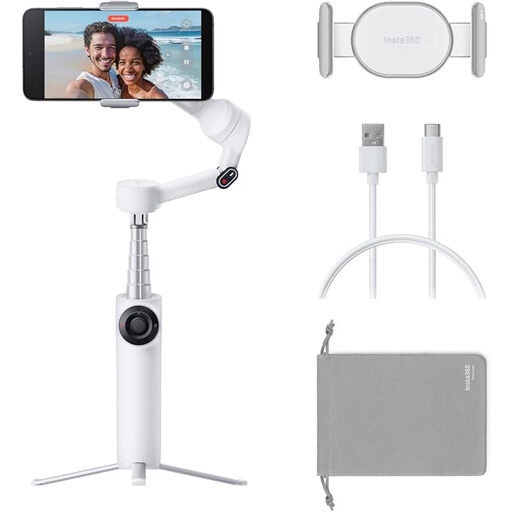
Why it suits this profile: This model is aimed at users who want to get started with vlogging, travel or filming for social media without buying lots of separate accessories. According to Insta360, the Flow 2 offers features including multi-person tracking, gesture control, and a built-in tripod and selfie stick.
The integrated features reduce the need to buy a separate tripod or selfie stick straight away. Before buying, check which phone models and app features are supported.
3-axis stabilisation, multi-person tracking, remote control and a foldable design according to the product listing.
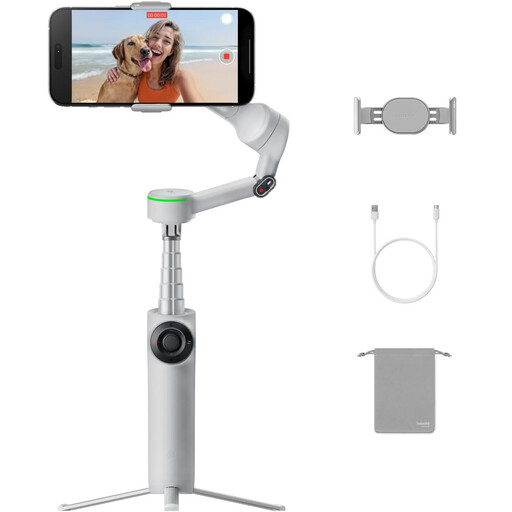
Why it suits this profile: The Pro bundle is a good match for creators who value tracking across multiple apps, group recordings and hands-free filming. According to Insta360, this model supports Apple DockKit and 360° pan tracking.
The bundle lists a separate AI Tracker and phone holder, so you are less likely to need to search for a tracking accessory separately. Check the box contents for each offer.
DockKit support, multi-person tracking, built-in tripod and selfie stick according to the product description.
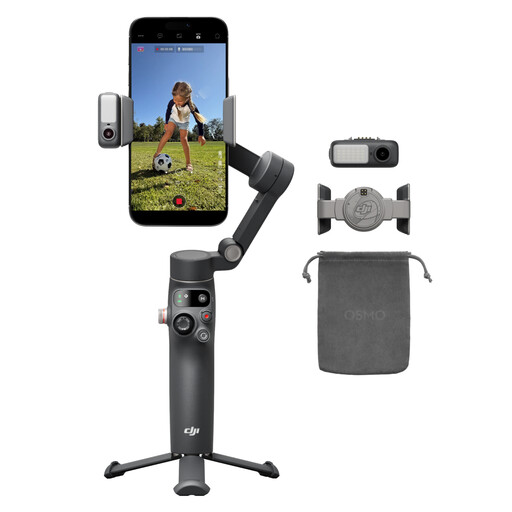
Why it suits this profile: This model is well suited to travellers and creators who value longer recording times, an integrated extension rod and continuous pan movement. The product information lists ActiveTrack 7.0, a 215 mm extension rod and a 3350 mAh battery.
The stated usage time and integrated components make extended filming more practical. If portability is a deciding factor, check the weight of approximately 370 grams in advance.
3-axis stabilisation, 360° unlimited pan rotation, built-in tripod and up to approximately 10 hours of use according to the product listing.
We have put together a complete, up-to-date list of products that fully meet these strict selection criteria and the applicable European safety regulations.
The product listings mention support for iPhone and Android. Specific features, such as Apple DockKit and tracking in third-party apps, may vary by device and operating system. Before buying, check the compatibility list and the required app version.
Not always. A phone tripod may be sufficient for static videos. A gimbal for TikTok and YouTube is particularly useful when you are filming while walking, want to be followed automatically or need to switch quickly between vertical and horizontal recording.
Its lifespan depends on the hinges, motors, battery usage and transport. Keep the gimbal dry, avoid drops and overloading, and charge it according to the instructions. Also check whether firmware updates and replacement accessories remain available. Battery-life claims are provided by the manufacturer and may vary in practice.
