
Vandaag of morgen in huis

Kwaliteit gegarandeerd

Welkomstaanbiedingen ontgrendelen: GRATIS bezorging | Tot 80% korting | Gratis 30 dagen JoyPlus-proefperiode
Download de app
Shaky video can ruin your best shot. Whether you're creating a travel vlog, capturing an event, or producing content for social media, stability is crucial. A smartphone gimbal seems like the perfect solution, but the market is flooded with models that overpromise and underdeliver. Many users end up with a device that collects dust in a closet after just a few uses.
Before you invest in a phone stabiliser, it's important to recognize the common pitfalls that lead to a disappointing purchase.
gimbal for iPhone or gimbal for Android model renders the entire device unusable.To avoid wasting money, focus on the specifications that truly matter. Don't get distracted by marketing buzzwords and check these three points.
A true gimbal for smartphone offers 3-axis stabilization. This means it corrects movement on three axes:
Cheaper stabilisers sometimes only have 1 or 2 axes, which is insufficient for smooth footage while in motion. For a professional-looking stabilizer for filming, a 3-axis gimbal is the standard.
Always check if the gimbal is compatible with the dimensions and weight of your smartphone, including its case and any additional lenses. A gimbal that can't handle your phone's weight will struggle to balance and put unnecessary strain on the motors. The specifications always list a maximum payload capacity. Compare this with the weight of your phone.
A good gimbal is quick and easy to use. Look for models with a magnetic clamp or an intuitive folding mechanism. You don't want to spend minutes balancing your phone. A gimbal with tripod (built-in or detachable) is also a major plus, as it allows you to easily create stable time-lapses or static shots without carrying extra accessories.
Not everyone has the same needs. Here are some popular choices, matched to specific user profiles.
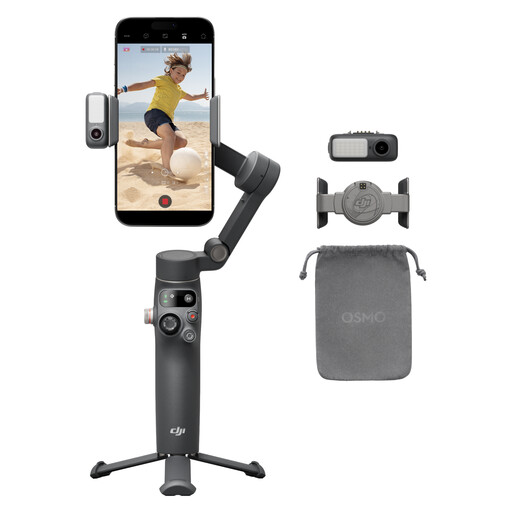
Why This Fits Their Persona: For the vlogger or influencer who needs reliability and advanced features. This is a workhorse for creating professional content without compromise.
According to DJI, its ActiveTrack 7.0 technology is refined and reliable, avoiding the pitfall of unusable "smart" tracking. The robust build quality and strong motors counteract the problem of weak hardware.
Powerful 3-axis stabilization and seamless integration with the DJI Mimo app. The built-in extension rod and tripod offer extra creative freedom.
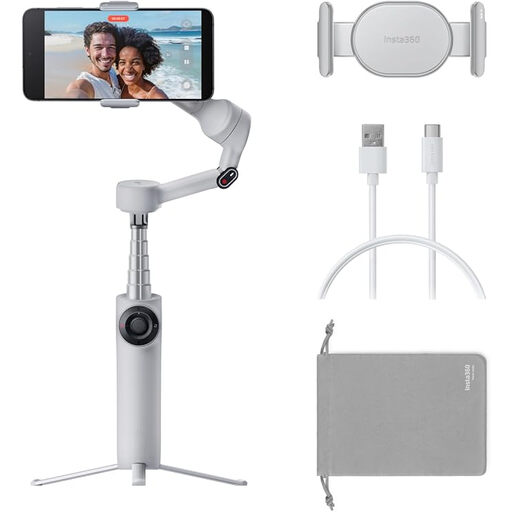
Why This Fits Their Persona: Ideal for travellers and hobbyists who want an all-in-one solution. Its compact, foldable design makes it easy to carry without extra bags.
This model integrates a gimbal, selfie stick, and tripod into one device, so you don't have to carry separate, fragile accessories. The quick setup avoids the frustration of a complex installation.
All-in-one functionality: built-in tripod and selfie stick. According to Insta360, the device has a 10-hour battery life and can even charge your phone.
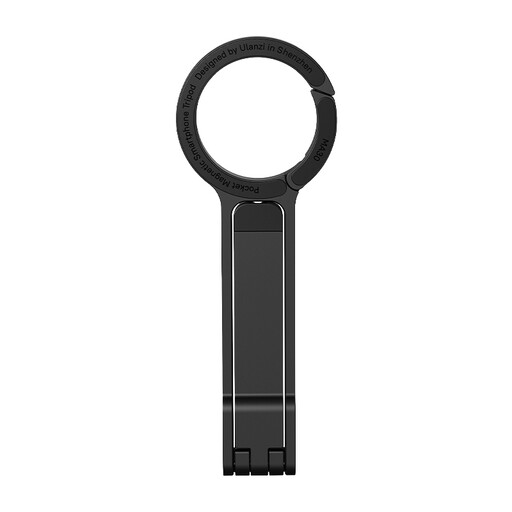
Why This Fits Their Persona: For the user who finds a full gimbal too large and cumbersome but still wants a stable grip and tripod function. Perfect for quick, static shots and selfies.
This isn't a 3-axis gimbal, and it doesn't pretend to be. It avoids the pitfall of overpromising by focusing on what it does well: being an ultra-compact, sturdy magnetic mount and tripod.
Extremely portable thanks to its carabiner-style design. The strong MagSafe-compatible magnet ensures a quick and secure attachment for recent iPhone models.
We've compiled a complete, up-to-date list of products that meet these selection criteria. Find the perfect stabiliser for your needs.
Battery life varies greatly by model, typically between 6 and 15 hours. Models like the DJI Osmo Mobile 7P offer up to 10 hours of use time, according to the manufacturer. The actual duration depends on how hard the motors have to work to balance your phone. Heavier phones or significant movement will consume more power.
Most modern gimbals are designed to work with both iPhone and Android devices. The physical clamp is usually adjustable. However, the most important factor is the software. Always check app store reviews and the manufacturer's specifications to see if the companion app is well-supported for your specific phone model and operating system.
If your vlog gimbal is primarily used while you are walking or moving, 3-axis stabilization is essential. It corrects the unavoidable shakes and rotations that occur with movement, resulting in smooth, professional-looking footage. For static shots from a table, a simpler gimbal with tripod or even a standard phone tripod is sufficient. For dynamic content, however, the difference in video quality is night and day.
