
Vandaag of morgen in huis

Kwaliteit gegarandeerd

Welkomstaanbiedingen ontgrendelen: GRATIS bezorging | Tot 80% korting | Gratis 30 dagen JoyPlus-proefperiode
Download de app
A smartphone gimbal can reduce shaky walking footage, wonky horizons and awkward selfies. However, not every model is suitable for every type of recording. A compact phone holder with tracking may seem convenient, but can disappoint if your smartphone is too heavy, the app does not work properly or the tripod is not stable enough.
Pay particular attention to these three common pitfalls:
A gimbal for iPhone and Android does not automatically work with every phone in the same way. Check:
For example, the Insta360 Flow 2 Pro Bundle Gray lists Apple DockKit support for native tracking in more than 200 compatible iOS apps. According to the product description, the included AI Tracker is designed for use with various platforms and devices. Check the manufacturer's current compatibility list before buying.
A 3-axis smartphone stabiliser corrects movement in three directions: tilting, rotating and horizontal panning. This is particularly useful when you are walking, travelling or following a subject.
Stabilisation does not automatically make footage look professional. The phone, lens, lighting and walking speed still matter. Also consider the gimbal's range. A long arm, heavy phone or additional accessory can affect balance and battery life.
A phone gimbal with tracking is useful for vlogs, livestreams, group videos and video calls. However, check how the feature is activated and whether the subject stays within the frame.
Useful additional specifications include:
Do not use a gimbal in rain or damp conditions unless the manufacturer explicitly states a suitable protection rating. The Insta360 Flow 2 Pro and DJI Osmo Mobile 7P are not described as fully waterproof in the product information provided.
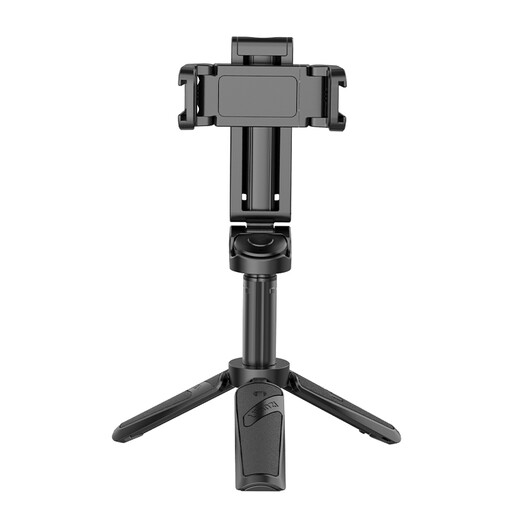
Why it suits this profile: This is a straightforward starting point for anyone mainly looking for a selfie stick, compact tripod and remote control without immediately investing in a motorised gimbal.
Its low complexity makes it clear what you are buying: a phone tripod with Bluetooth remote control, not a full 3-axis stabiliser. Note the warning that the remote control is not waterproof.
3-in-1 design, extendable selfie stick, mini tripod and remote operation for iPhone and Android.
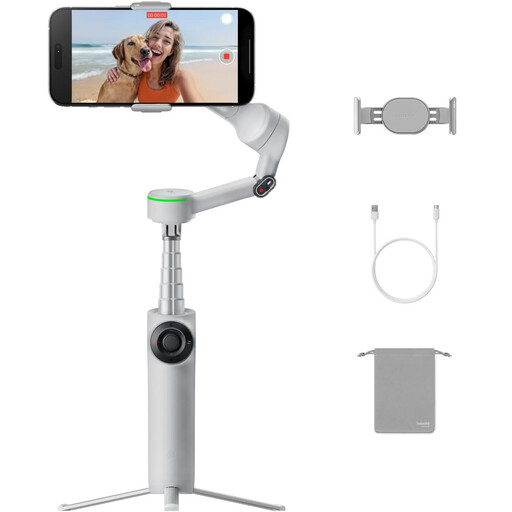
Why it suits this profile: The combination of 3-axis stabilisation, built-in tripod, selfie stick and tracking is ideal for vloggers and travellers who want to carry fewer separate accessories.
The product description clearly mentions DockKit for more than 200 compatible iOS apps. This avoids assuming that native tracking works on Android or in every app.
AI Tracker, multi-person tracking, 360° pan tracking and, according to the product information, up to approximately 10 hours of battery life.
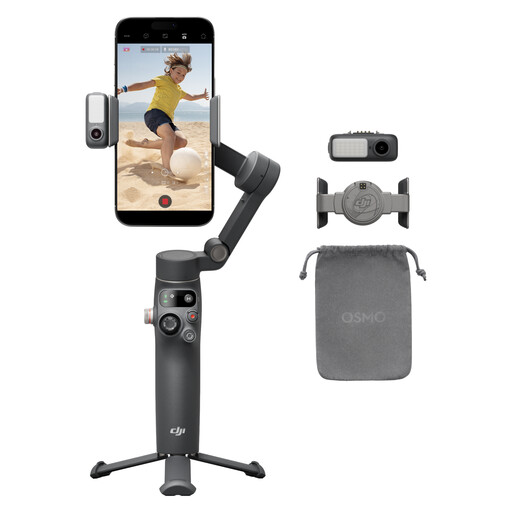
Why it suits this profile: This model is well suited to users who regularly vlog, livestream or create social media content and want to combine operation, tracking and stabilisation in one system.
The listed features are specific: 3-axis stabilisation, built-in extension rod and tripod. According to DJI, ActiveTrack 7.0 is included; however, check that it works with your chosen app.
ActiveTrack 7.0, built-in lighting and receiver module according to the product description, plus a stated operating time of up to 10 hours.
A smartphone tripod with selfie stick is useful when you do not always need motorised tracking. For a desk, video call or fixed livestream, a simple phone holder may be more practical.
For magnetic models, check compatibility with MagSafe or an included ring. According to the product information, the Ulanzi MA38 is suitable for MagSafe iPhones and Android phones with a ring, has a head adjustable up to 180° and supports an Arca-Swiss connection. Keep magnets away from pacemakers, medical devices and magnetic cards.
For a more flexible setup, the Ulanzi MT30 magnetic flexible tripod may be worth considering. If you are looking for additional lighting and control, take a look at the Ulanzi CG02 Smartphone Mount. Always check the attachment, load capacity and stability on the surface when choosing accessories.
We have compiled a complete, up-to-date list of products that fully meet these strict selection criteria and the applicable European safety regulations.
No. Check the maximum phone weight, dimensions, holder and app support. Tracking can also vary between operating systems and apps. With features such as DockKit, compatibility with specific iOS devices and apps is relevant.
That depends on how you plan to use it. A gimbal provides motorised stabilisation and can follow a moving subject. A separate stand is usually simpler for static videos, calls or livestreams. For travelling, a foldable gimbal can save space, while a compact tripod may need charging less often.
Battery life varies depending on the model, tracking function, lighting and charging habits. Some of the models provided list approximately 10 hours, but actual battery life depends on the conditions. Charge the device in a dry, well-ventilated place and allow it to cool down after intensive use, following the manufacturer's safety instructions.
