
Vandaag of morgen in huis

Kwaliteit gegarandeerd

Welkomstaanbiedingen ontgrendelen: GRATIS bezorging | Tot 80% korting | Gratis 30 dagen JoyPlus-proefperiode
Download de app
Buying a gaming mouse seems simple enough – until you have to choose between DPI, polling rate, weight, shape, lighting and the number of buttons. Marketing copy often focuses on impressive figures, but they do not tell the whole story. A high DPI value does not automatically make a mouse suitable for your playing style.
The key question is therefore not which mouse has the longest list of specifications, but which features suit your games, hand and desk.
A gaming mouse with 26,000 DPI sounds impressive, but many players actually use a much lower sensitivity. High resolution is mainly useful if you can adjust the setting precisely and your game or software supports it properly.
So, check:
A lightweight gaming mouse can be comfortable for fast movements, but weight is only one part of overall comfort. The length, width, height and position of the thumb buttons all help determine whether your hand remains relaxed.
Check before buying:
An RGB gaming mouse can complement your desk setup, but lighting has no direct effect on tracking or response speed. Also check whether the RGB can be adjusted via software, how many effects are available and whether you can switch the lighting off.
Wireless models introduce another consideration: check the connection, battery type and whether you can continue playing while the mouse is charging. A wired gaming mouse does not need a battery, but the cable can get in the way on a small desk.
DPI stands for dots per inch and indicates how sensitively the sensor responds to movement. A gaming mouse with adjustable DPI is practical when you switch between games. Lower sensitivity can be useful for a shooter, while a higher setting may be suitable for menus or everyday use.
An optical sensor tracks movement using light and generally works well on a suitable, even mouse mat. Keep the sensor free from dust and preferably use a surface that is not highly reflective.
Pay attention to the difference between:
A polling rate of 1,000 Hz is sufficient for many users. Models with higher values, such as 8,000 Hz, put more demand on the computer and do not offer a noticeable benefit in every game.
A weight of around 50 to 70 grams is often chosen by players who make fast, sweeping movements. A heavier model may feel more stable. As well as the weight, consider the dimensions and shape.
An ergonomic gaming mouse is usually designed for a specific hand position, often for right-handed use. A symmetrical mouse may be more flexible, but that does not automatically mean that all buttons are positioned identically for left- and right-handed users.
Extra buttons are particularly useful in MMO, MOBA and RTS games. For straightforward shooters, five or six buttons may provide a more streamlined experience. Check whether the buttons are genuinely programmable and whether the software is compatible with your operating system.
Also pay attention to claims about switch durability. Phrases such as “up to 90 million clicks” are manufacturer-stated specifications and not a guarantee for every user. According to Razer’s own information, for example, the Cobra has switches with a stated lifespan of 90 million clicks. Treat figures like these as a point of comparison, rather than a certainty.
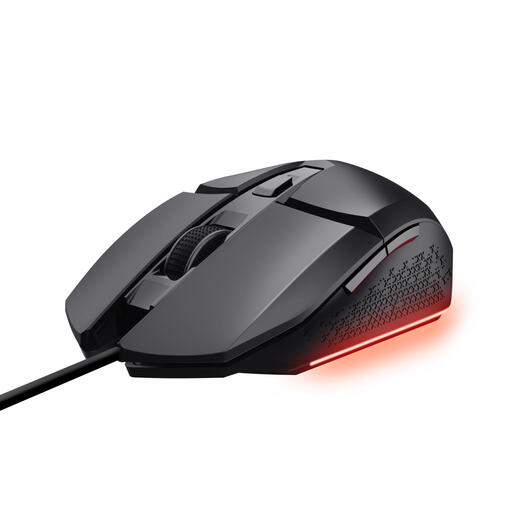
Why it suits this profile: This wired gaming mouse offers adjustable DPI, six buttons and RGB lighting without the need for a wireless connection or battery.
The DPI can be adjusted from 200 to 6,400, and according to the product description, the software supports buttons, lighting and macros.
Optical sensor, six buttons, three RGB settings and a 1.5-metre cable.
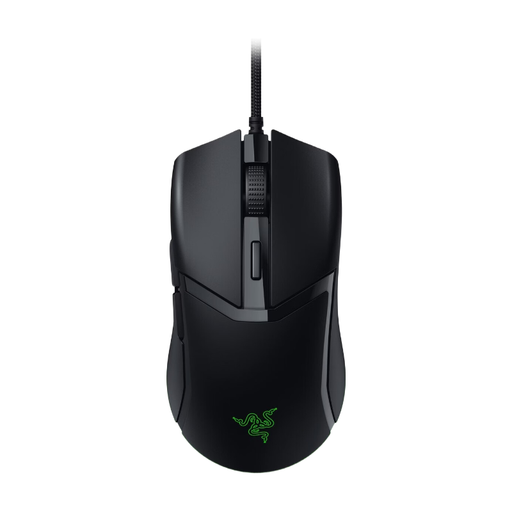
Why it suits this profile: A compact model for PC and Mac users who want to combine a direct USB connection, RGB and adjustable sensitivity.
The product information lists 50 DPI steps, so you are not limited to choosing between a few coarse presets.
According to the product description: adjustable optical sensor up to 8,500 DPI, six buttons, Chroma RGB and PTFE feet.
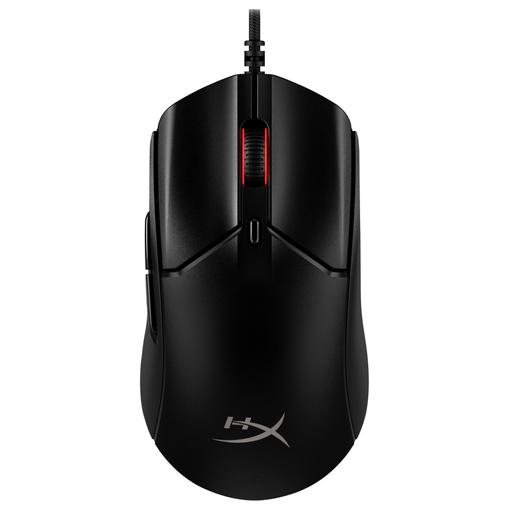
Why it suits this profile: Designed for players looking for a lightweight, symmetrical mouse with extensive adjustment options and support for multiple platforms.
The specifications state a weight of 52 grams without the cable, but also check whether this low weight suits your grip and movement style.
HyperX lists a 26K optical sensor, polling rate of up to 8,000 Hz, six programmable buttons and compatibility with PC, PlayStation and Xbox.

Why it suits this profile: Handy for users who switch between a PC, laptop and other devices and want a cable-free setup.
According to the product description, the mouse supports 2.4 GHz, Bluetooth and wired use. The programming software only works in wired mode, according to the same information.
Adjustable DPI up to 10,000, eight programmable buttons, rechargeable USB-C connection and seven RGB modes according to the product description.
A mouse mat also affects the amount of room you have to move. According to its product specifications, the Corsair MM700 RGB Cloth Gaming Mouse Pad has a surface measuring 930 × 400 mm, a rubber anti-slip base and two USB ports. Take a look at the Corsair MM700 RGB mouse mat if you want to place your keyboard and mouse on one large surface.
We have put together a complete, up-to-date list of products that fully meet these strict selection criteria and the applicable European safety regulations.
A wired connection means you do not have to recharge a battery and provides a direct USB connection. Modern wireless models can also be suitable for gaming, but check the connection used, battery life and whether you can continue playing while the mouse is charging.
That depends on your screen, game and personal preference. Above all, look for a wide adjustment range and small DPI steps. A maximum value of 26,000 DPI is not necessary for every player; the ability to fine-tune the setting comfortably and accurately is more important.
Unplug a wired model or switch off a wireless mouse. Use a dry or slightly damp, lint-free cloth for the casing. Clean the optical sensor carefully and prevent moisture from entering the openings. Also check the mouse feet regularly and keep your mouse mat free from dust.
