
Vandaag of morgen in huis

Kwaliteit gegarandeerd

Welkomstaanbiedingen ontgrendelen: GRATIS bezorging | Tot 80% korting | Gratis 30 dagen JoyPlus-proefperiode
Download de app
A wireless gaming mouse gives you more freedom of movement during gaming sessions, but not every model is suitable for competitive gaming. You’ll notice the difference quickly in FPS and MOBA games, particularly when it comes to tracking, weight, connectivity and battery management.
Marketing copy often focuses on extremely high DPI figures or an impressive polling rate. However, these numbers don’t tell the whole story. Always check how the mouse connects, how much it weighs and which features genuinely suit your play style.
A gaming mouse with a high DPI can move the cursor very quickly. That doesn’t automatically mean you’ll aim more accurately. Many FPS players actually use lower sensitivity with a large mouse mat. What matters more is that the sensor tracks consistently at your chosen setting.
So check:
A gaming mouse with a high polling rate sends position updates to your computer more times per second. 1,000 Hz is a common setting; 4,000 Hz or 8,000 Hz may appeal to competitive players with a powerful PC.
According to some brands’ product information, a higher polling rate can use more CPU resources. If you experience frame drops, it may be better to switch back to 1,000 Hz. So the higher setting isn’t essential for every computer or game.
A gaming mouse with long battery life can be handy for everyday use, but check the battery type too. Some models use a replaceable AA battery, while others have a built-in rechargeable battery and charge via USB-C. A charging dock, spare battery or wireless charging module may add to the cost.
Also look out for conflicting information in product listings. For example, different weights are listed for the Logitech G309 Lightspeed, depending on whether it’s used with an AA battery or a Powerplay system. So check the current specifications on the product page before ordering.
A 2.4GHz gaming mouse usually uses a USB receiver. This connection is designed to link directly to your PC with minimal delay. Ideally, place the receiver close to the mouse and avoid unnecessary sources of interference.
A Bluetooth gaming mouse is handy for laptops, office work and devices without a spare USB port. However, Bluetooth isn’t always the first choice for competitive FPS games. A tri-mode gaming mouse typically combines:
Check whether the USB receiver is included and whether your computer has a suitable USB-A or USB-C port.
An ultra-light gaming mouse weighing around 54 to 68 grams can feel comfortable for large arm movements and low sensitivity settings. A heavier model may feel more stable. The right weight depends on your grip, mouse mat and play style.
Also check:
A compact, symmetrical model won’t necessarily suit every hand. Compare its dimensions with a mouse you already find comfortable.
Optical sensors are common in gaming mice. Don’t just look at DPI: check the stated tracking speed, acceleration and available settings too. Programmable buttons are useful for macros, shortcuts or abilities in MOBA games. FPS players may find a simpler layout helps avoid mistakes.
You may need software to adjust DPI, polling rate, button functions and profiles. Check whether the model works with Windows, macOS or both. Built-in profile memory is handy if you use the mouse with more than one computer.
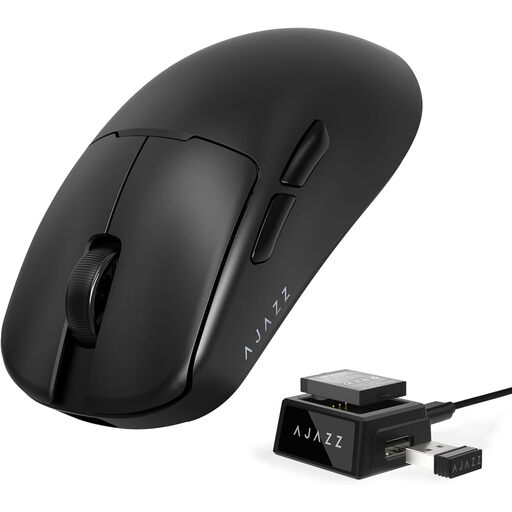
Why it suits this profile: This mouse combines a low stated weight with three connectivity options and a replaceable battery system. That makes it a good choice for players who want to try wireless gaming without committing to a single charging solution.
The product information lists Bluetooth, 2.4GHz and USB-C, along with two replaceable batteries. This means you’re less reliant on having a single charging window.
54 grams according to the product information, up to 24,000 DPI and a stated polling rate of up to 1,000 Hz.

Why it suits this profile: This model is aimed at players looking for a lightweight, right-handed mouse with USB-C charging and a built-in rechargeable battery for FPS games and everyday use.
The product page lists a weight of 60 grams, USB-C and LIGHTSPEED connectivity. Be sure to check the exact sensor and polling rate details when you buy.
HERO sensor listed, up to 32,000 DPI in the product description and a rechargeable battery.
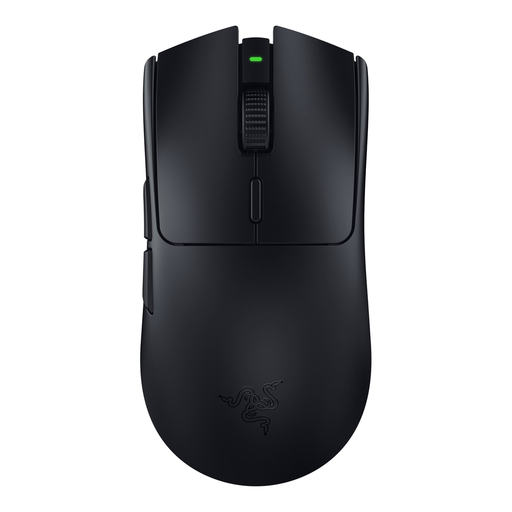
Why it suits this profile: This model is a good fit for players who want to enjoy long sessions with an AA battery and a right-handed shape with multiple buttons.
The product information lists an AA battery and battery life of up to 280 hours. Actual battery life depends on your settings and how you use it.
82 grams, up to 30,000 DPI according to the product specifications and six buttons, with programmable functions listed.
Many competitive gamers choose 2.4GHz because this connection uses a USB receiver designed for fast communication. Bluetooth is handy for laptops, tablets and office work. A tri-mode gaming mouse offers both options, so you can switch between devices.
Its lifespan depends on the switches, battery, charging habits and everyday use. A mouse with a replaceable battery can stay in use for longer if you can easily swap the battery. With a built-in rechargeable battery, proper charging is important. Keep the mouse dry and clean the sensor with a dry cloth or carefully use compressed air.
Not necessarily, but higher settings can put more load on the CPU. Check that your system maintains a stable frame rate while gaming. If you run into problems, 1,000 Hz is often a practical setting.
We’ve put together a complete, up-to-date list of products that meet these strict selection criteria and the applicable European safety regulations.
