
Vandaag of morgen in huis

Kwaliteit gegarandeerd

Welkomstaanbiedingen ontgrendelen: GRATIS bezorging | Tot 80% korting | Gratis 30 dagen JoyPlus-proefperiode
Download de app
A wireless gaming mouse gives you more freedom to move without a cable on your desk. However, a high DPI figure or eye-catching RGB design doesn’t automatically mean a mouse is right for your play style. Sensor performance, weight, connection and shape are what make the difference, especially in FPS, MOBA and action games.
Look out for these common pitfalls before you buy:
A high-DPI gaming mouse offers plenty of adjustment options, but how useful they are depends on the sensor and software. DPI determines how quickly the cursor moves; it doesn’t directly tell you how accurately the mouse will perform in every situation.
For PC gaming, it’s worth looking for:
A higher polling rate records the mouse’s position more often. 1000Hz is enough for many users. A 4K polling rate or 8K polling rate may appeal to competitive players, but it demands more from your computer and won’t make a noticeable difference in every game.
A lightweight gaming mouse weighing around 50 to 85 grams often feels more responsive at low sensitivity and when making large arm movements. A heavier model may feel more stable for office work or a palm grip.
Before you buy, check:
An ergonomic gaming mouse won’t necessarily suit everyone. Left-handed players may be better off looking for a symmetrical model or one designed specifically for left-handed use.
A 2.4GHz dongle is usually designed to provide a fast connection for gaming. Bluetooth is handy for laptops and everyday use, but check whether the gaming features are still available in that mode. A gaming mouse with Bluetooth and 2.4GHz gives you more flexibility.
Also look at:
A gaming mouse with long battery life may be more practical than a model with more lighting or a higher polling rate, especially if you often play on the go.
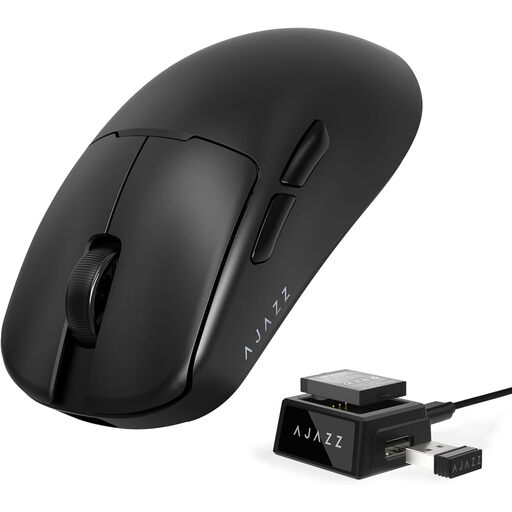
Why it suits this profile: This tri-mode model combines Bluetooth, 2.4GHz and USB-C with a low stated weight of around 54 grams. That makes it a good choice for new gamers who also want one mouse for their laptop and everyday use.
Replaceable batteries reduce your reliance on long charging times. The stated polling rate of up to 1000Hz is easy to manage with standard PC configurations.
PAW3311 sensor, adjustable up to 24,000 DPI, three connection modes and two replaceable 300 mAh batteries.
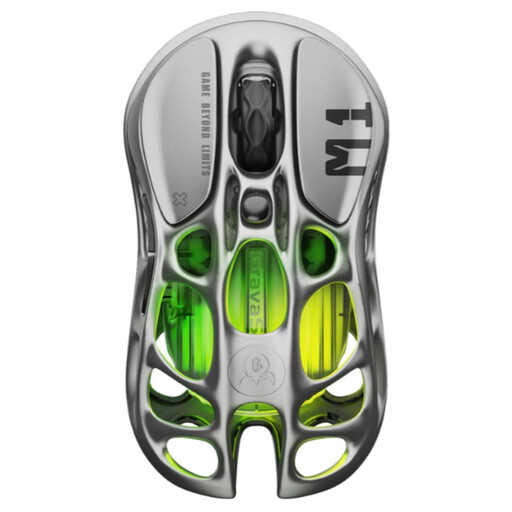
Why it suits this profile: Its magnesium alloy construction, skeletal design and tri-mode connection will appeal to users who value build quality, weight and adjustability.
The product information makes it clear that 4K only works with the 4K receiver, which is sold separately. Check what’s included in the box before counting on this feature.
PAW3395 sensor, up to 26,000 DPI, five programmable buttons and a stated weight of 88 grams.

Why it suits this profile: This model is aimed at players who value low weight, plenty of buttons and long battery life for extended gaming sessions.
The manufacturer quotes battery life of up to 750 hours at 1000Hz. Power consumption and system load may differ when using 8K.
53 grams, up to 8K wireless polling rate, 10 programmable buttons and a sensor with up to 26,000 DPI.
Ideally, place the wireless receiver close to the mouse and away from several potential sources of interference. For competitive games, use the 2.4GHz connection if the manufacturer recommends it. Bluetooth is particularly handy for laptops, office work and devices you don’t want to connect a dongle to.
Only install the relevant software from the manufacturer’s official website or the product page. Start with a moderate DPI setting, then adjust the polling rate. This will help you see whether your game remains stable and the controls feel comfortable.
We’ve put together a complete, up-to-date list of products that meet these strict selection criteria and the applicable European safety regulations.
Yes. Models with a 2.4GHz receiver are designed for this. Check the stated polling rate, software support and compatibility with your PC. Bluetooth isn’t always the recommended mode for fast-paced competitive games.
It varies considerably depending on the model, connection, lighting and polling rate. A mouse with an AA battery can last for hundreds of hours, while models with a built-in battery need charging via USB-C from time to time. Always compare the quoted battery life for each mode.
That depends on your monitor, game and PC. 1000Hz is enough for many players. 4K or 8K may be useful for fast-paced competitive games, but requires more system resources and sometimes only works with a specific receiver.
