
Vandaag of morgen in huis

Kwaliteit gegarandeerd

Welkomstaanbiedingen ontgrendelen: GRATIS bezorging | Tot 80% korting | Gratis 30 dagen JoyPlus-proefperiode
Download de app
If you spend long days working at a computer, you’ll soon notice that the mouse itself isn’t the only thing that matters. The shape, connection, sensitivity and how your hand rests on it all determine whether a mouse remains comfortable to use. An ergonomic vertical mouse could be worth considering if you want to keep your wrist and forearm in a less twisted position.
But be wary of marketing claims. An ergonomic mouse is not a treatment for RSI or other conditions. If you have persistent pain or tingling, it’s wise to seek medical advice. For everyday computer use, the choice comes down to finding a posture that suits you, having enough space, and picking a mouse that fits the way you work.
Some mice only have a rubber grip or a rounded casing, but still keep your hand almost horizontal. If you’re specifically looking for an ergonomic vertical mouse, check the angle and hand position. According to the product information, the Trust Bayo II has a vertical angle of 57 degrees.
A high DPI value sounds appealing, but for word processing, email and spreadsheets, an extremely high setting is usually unnecessary. What matters more is that you can adjust the speed to suit your screen, desk and working style. The Bayo II switches between 800 and 2400 DPI. That’s practical for both calm, precise navigation and faster work on a large screen.
A vertical mouse with a cable has no battery and never needs charging. On the flip side, a 1.5-metre cable needs space and can snag on a laptop stand or monitor base. For a fixed workstation, a wired mouse can actually be tidy and reliable. If you prefer a clean, wireless desk, it’s better to look at a cordless model.
A vertical shape is only useful if your hand rests comfortably on the casing. So check whether the model is designed for right-handed or left-handed use. The Trust Bayo II is a right-handed ergonomic mouse: left-handed users will need to look for a different design.
Its dimensions are roughly 12 × 7.7 × 7.3 cm and it weighs 121 grams. That matters for grip. If you have small hands, pay extra attention to the distance to the buttons. With very large hands, a compact model may offer less full hand support.
A USB mouse usually works as soon as you plug it in. The Bayo II is a wired mouse with a fixed USB cable and, according to the product information, works without any installation. Check beforehand that your computer has a suitable USB port. If your laptop only has USB-C, you may need an adapter.
A wired connection also avoids the hassle of batteries, pairing or a flat battery. That makes this type of mouse suitable for a fixed home office or desk at work.
The Bayo II has five buttons, including two thumb buttons for forward and backward navigation in a browser. The DPI button is on the mouse, so you can change the cursor speed without opening any software.
For daily work, it’s useful to look beyond just the maximum DPI number. Also consider the button placement, the click resistance and whether you can hold the mouse in a relaxed way. A good working posture also involves a neutral wrist, enough forearm support and regular short breaks.
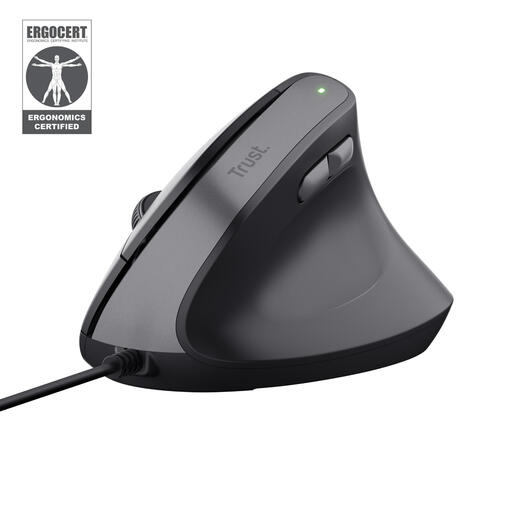
Why this fits the profile: This black ergonomic mouse combines a vertical shape with a direct USB connection. That suits home workers and office users who don’t want a wireless link or batteries.
The 57-degree angle makes it clear this is a vertical design, while the adjustable DPI stops you being stuck with one fixed cursor speed.
57° vertical angle, 800–2400 DPI, five buttons, fixed 1.5-metre USB cable and a product weight of 121 grams.

Why this fits the profile: This isn’t a vertical mouse, but it’s a spacious office option for users who work with multiple devices and wide spreadsheets.
The specifications make the difference from a vertical mouse clear: this model opts for comfort, multi-device use and horizontal scrolling, not a vertical wrist position.
Connection with up to three devices, rechargeable battery, adjustable sensor up to 3200 DPI and an extra side wheel for horizontal scrolling.
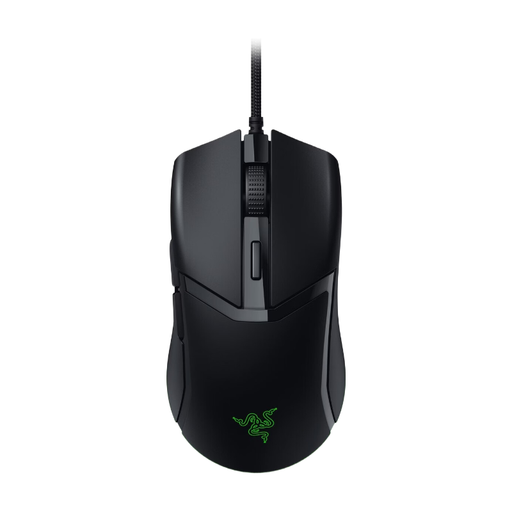
Why this fits the profile: For users who mainly want fast tracking and programmable buttons, for example alongside office work or for gaming.
The fixed USB cable and DPI setting are clearly stated. However, the shape is not vertical, so this isn’t a direct choice if wrist position is your top priority.
Optical sensor up to 8500 DPI, six buttons, programmable functions and a 1.8-metre cable.
We’ve put together a full, up-to-date list of products that fully meet these strict selection criteria and comply with current European safety regulations.
An ergonomic mouse for wrist problems can help position your hand differently, but the effect varies from person to person. According to Trust’s product information, the 57° shape of the Bayo II is designed to place your wrist and forearm in a more natural position. That’s not a medical guarantee and doesn’t replace professional advice.
A mouse for long working days isn’t automatically better just because it’s wired or wireless. A wired USB mouse has no battery to replace or recharge and is ready to use straight away. A wireless model gives you more freedom of movement. Choose based on your desk, the distance to your computer and the way you work.
The lifespan depends on usage, cable strain, cleaning and click frequency. Don’t let the cable bend sharply, keep liquids away from the casing and use the mouse on a suitable surface. According to the product information provided, the Trust Bayo II comes with a five-year manufacturer’s warranty; your statutory warranty rights also remain in effect.
