
Vandaag of morgen in huis

Kwaliteit gegarandeerd

Welkomstaanbiedingen ontgrendelen: GRATIS bezorging | Tot 80% korting | Gratis 30 dagen JoyPlus-proefperiode
Download de app
An ergonomic mouse can be a more comfortable alternative to a standard mouse if you spend a lot of time working at a PC or laptop every day. However, not every mouse labelled “ergonomic” is automatically suitable for your hand, posture or intended use. A high DPI rating, RGB lighting or a large number of buttons also says little about comfort.
Pay particular attention to the shape, dimensions, connectivity and software features. Below, you’ll find the common pitfalls to look out for and the specifications to check before making a purchase.
A vertical mouse keeps your hand in a more sideways position. This may feel natural for some users, but getting used to it can take time. Pay attention to the hand orientation: many vertical models are designed exclusively for right-handed use.
Check the dimensions too. A mouse that is too small can leave your fingers hanging over the buttons. With a model that is too large, you may have to reach too far. A good ergonomic shape is therefore personal and is no universal guarantee of comfort.
DPI determines how far the cursor moves for the same physical mouse movement. A high-DPI mouse can be useful with large screens or for fast movements, but not everyone needs an extremely high maximum value. For office work, adjustable settings between around 800 and 2400 DPI are often sufficient.
Gamers should also consider polling rate, sensor tracking and weight. These features have more impact on control than simply choosing the highest DPI figure on the box.
A wireless mouse keeps your desk tidy, but it needs a battery, charging cable or replaceable batteries. Check how it is charged, which connections are available and whether a USB receiver is included. Bluetooth is useful for laptops and tablets, while a 2.4GHz connection is often used for gaming.
A wired mouse avoids charging interruptions and usually works straight away via USB. The trade-off is having a cable on your desk. For a fixed workstation, this can be a practical choice.
First, check whether the model is suitable for left- or right-handed use. A symmetrical mouse may be suitable for either hand, but that does not automatically mean that all buttons are available on both sides.
Next, pay attention to:
An ergonomic office mouse does not need to have the same shape as an ergonomic gaming mouse. For office use, the focus is usually on relaxed navigation and minimal cable interference. For gaming, speed, weight, sensor performance and button response also matter.
An optical sensor uses a light source and camera to register movement. Wherever possible, use the mouse on a suitable, even surface. Some models are described as being suitable for multiple surfaces, but performance may vary depending on the surface.
Pay attention to these values:
For everyday work, an adjustable sensor is more important than an extremely high maximum value. For competitive games, low weight, a high polling rate and an accurate sensor can be relevant.
Extra programmable mouse buttons are useful for shortcuts, browser navigation or macros. Check that the configuration software works with your operating system. With some models, features or macro settings are limited to Windows or to use in wired mode.
An RGB mouse can match your desk to your setup, but lighting uses power and does not directly improve ergonomics. With a silent mouse, it is worth checking whether only the click is quieter, or whether the scroll wheel and other buttons are quieter too.
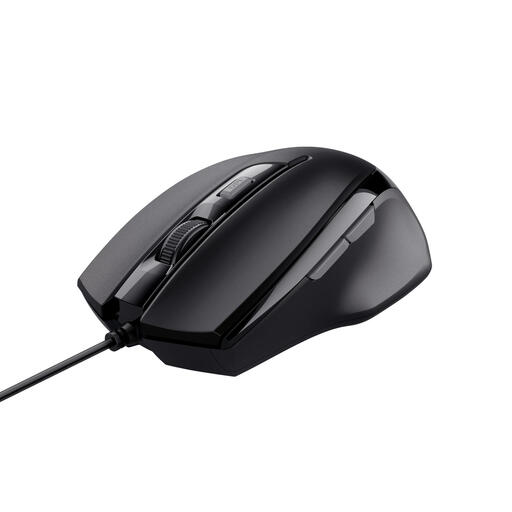
Why it suits this profile: This wired mouse is designed for everyday office work, working from home and laptop use with a USB port. Plug-and-play functionality means you don’t need to install software first.
No exaggerated DPI figure: you can choose from four settings ranging from 800 to 2400 DPI. The fixed USB connection means you won’t run out of battery.
Ergonomic shape, six buttons, 160 cm cable and optical sensor with adjustable DPI.

Why it suits this profile: Suitable for right-handed users who want to combine a vertical mouse with wireless working, multi-device use and extensive settings.
The specifications clearly state the right-handed design, dimensions of 111 × 88 × 79 mm and a weight of 150 grams. This makes it easier to assess the fit in advance.
Up to 30,000 DPI, six programmable buttons, Bluetooth and Razer HyperSpeed. According to the product description, the battery life is up to six months.
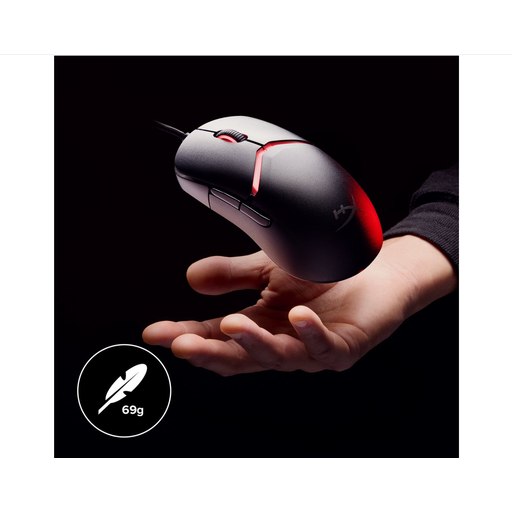
Why it suits this profile: This gaming mouse is aimed at users who value low weight, a high polling rate and an adjustable grip during extended gaming sessions.
The cable is flexible and the weight is specified as 69 grams. This makes it clear which features contribute to fast movements, independently of the RGB lighting.
Sensor offering up to 26,000 DPI, polling rate of up to 8000 Hz, optical switches and adjustable RGB lighting via software.
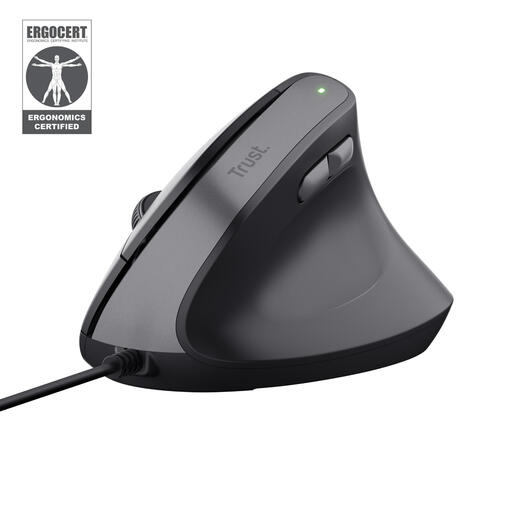
Why it suits this profile: A practical choice for anyone working in a fixed location who doesn’t want to charge a battery. The vertical shape and USB connection are clearly suited to office and home use.
The 57-degree angle, right-handed design and maximum dimensions are clearly specified. You can therefore see in advance that this is not a universal left- and right-handed model.
Wired plug-and-play connection, five buttons, two thumb buttons and adjustable DPI from 800 to 2400.
We’ve put together a complete, up-to-date list of products that fully meet these strict selection criteria and the applicable European safety regulations.
A mouse designed for wrist problems can make your hand position feel different, particularly with a vertical design. This does not mean that symptoms are guaranteed to disappear. Take regular breaks, set up your workstation correctly and stop using the mouse if you experience pain, tingling or numbness. If symptoms persist, seeking professional advice is advisable.
A wired mouse is ready to use immediately and does not need charging. A wireless model offers greater freedom of movement and is convenient with a laptop or flexible workstation. As well as the price, compare the charging time, connection method and whether a USB receiver is included.
Its lifespan depends on daily use, cleaning, cable strain and the quality of the switches. Keep the sensor and mouse feet clean, do not pull on the cable and keep liquids away from the device. Specifications such as a stated click lifespan are manufacturer information and do not guarantee performance in every use case.
