
Vandaag of morgen in huis

Kwaliteit gegarandeerd

Welkomstaanbiedingen ontgrendelen: GRATIS bezorging | Tot 80% korting | Gratis 30 dagen JoyPlus-proefperiode
Download de app
If you work at a computer every day, you may find that a standard mouse becomes uncomfortable over time. Your hand turns inwards, your wrist stays at a fixed angle and small movements can become tiring. An ergonomic vertical mouse can change the position of your hand and arm, but not every model will suit every workspace or hand.
When choosing one, don’t focus only on terms such as “ergonomic” or “comfortable”. Pay particular attention to the shape, connectivity, DPI settings and controls. Here are the key things to consider, along with a few suitable product options.
A mouse may look ergonomic but still not fit your hand properly. Vertical models are usually designed for a handshake grip, with your thumb resting on one side and your fingers on the other. It feels different from using a flat mouse and may take some getting used to.
So check the dimensions. The Trust Bayo II, for example, is approximately 12 cm long, 7,70 cm wide and 7,30 cm high. It is designed for right-handed use, with a vertical palm grip. The shape may feel less natural if you have particularly small or large hands.
A wireless mouse keeps your desk free of cables, but it needs batteries or a rechargeable battery. That means charging it, replacing batteries or keeping an eye on the charge during the working day.
A wired vertical mouse is less convenient when you’re on the move, but it connects directly via USB and doesn’t need charging. It can be a practical choice for a fixed home office or desk at work. Just check that your computer has a suitable USB port and that a 1,50-metre cable gives you enough room.
DPI determines how quickly the cursor moves across the screen. A higher setting isn’t automatically more comfortable. For word processing, spreadsheets and admin tasks, a lower speed may give you more control. A higher setting can be useful with a large screen or a wide workspace.
A mouse with adjustable DPI lets you change the speed to suit the task. According to the product specifications, the Trust Bayo II switches between 800 and 2400 DPI.
According to Trust’s product description, the Bayo II has an angle of 57 degrees. Trust says this angle is designed to place your wrist and forearm in a more natural position. Think of it as a design feature, not a medical treatment or a guarantee that discomfort will disappear.
If you’re looking for an ergonomic mouse for wrist discomfort or a mouse for RSI, it’s also worth adjusting your whole workspace. Keep the mouse close to your keyboard, relax your shoulder and take regular short breaks. If your symptoms persist or get worse, it’s wiser to seek advice from a healthcare professional than simply buy a different mouse.
Choose a USB mouse if you want to get started without installing anything or managing a rechargeable battery. The Trust Bayo II is plug-and-play via USB. A wireless model is more convenient if you want a tidy desk or use several workspaces, but check whether it connects via Bluetooth or a USB receiver.
Extra thumb buttons can be useful for browsing. The Trust Bayo II has forward and back buttons. Also check the number of main buttons, the position of the DPI button and the scroll function. Buttons that are too close together may become irritating during long periods of use.
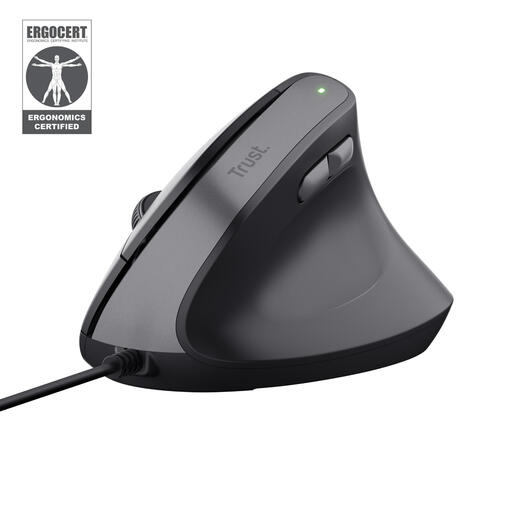
Why it suits this user: This right-handed mouse is a good fit for a fixed home office or desk at work where a USB cable isn’t a problem. It works without installation or charging.
The product description lists a 57-degree vertical angle, a USB connection and adjustable DPI. So you won’t need to manage a rechargeable battery or loose batteries.
57-degree design, 800–2400 DPI, two thumb buttons, five buttons in total and a 1,50-metre cable.

Why it suits this user: This model is a good choice for right-handed users who want to work wirelessly and appreciate extra customisation options, whether at a fixed or flexible workspace.
The specifications list both Bluetooth and a USB receiver. This means you’re not limited to one connection type, and you can adjust the DPI.
57-degree vertical design, up to 4000 DPI, rechargeable battery and support for Bluetooth and a USB receiver.
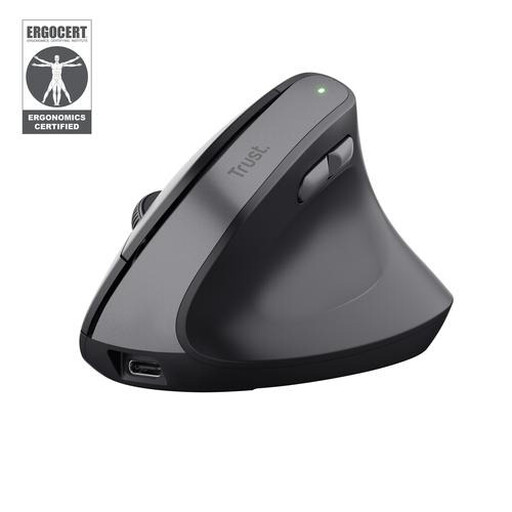
Why it suits this user: This wireless model is a good fit for people who work from home intensively and want a vertical mouse without a cable on the desk. It connects via a 2,4GHz USB receiver.
The product specifications list a rechargeable battery, a USB receiver and DPI settings of up to 2400. Do check in advance that you have a spare USB port.
Wireless RF connection, rechargeable battery, optical sensor, right-handed vertical design and adjustable DPI up to 2400.
We’ve put together a complete, up-to-date list of products that meet these strict selection criteria and the applicable European safety regulations.
A vertical mouse can change how your hand and forearm rest. Whether it feels more comfortable depends on your hand size, grip and desk set-up. Give your hand time to adjust and don’t force it into a position. Regular breaks are still important, even when you use an ergonomic office mouse.
It depends on how you use it. A USB mouse is ready to use straight away, doesn’t need a battery and suits a fixed workspace. A wireless mouse keeps your desk tidier and is more convenient if you switch between devices or desks. So compare the power source, range and available ports.
Its lifespan depends on how often you use it, strain on the cable, cleaning and the quality of its switches and casing. Don’t run the cable tightly along a sharp desk edge, keep liquids away from the mouse and avoid pressing the buttons harder than necessary. When buying, check the warranty and returns policy too.
