
Vandaag of morgen in huis

Kwaliteit gegarandeerd

Welkomstaanbiedingen ontgrendelen: GRATIS bezorging | Tot 80% korting | Gratis 30 dagen JoyPlus-proefperiode
Download de app
An ergonomic vertical mouse may be worth considering if you use a mouse a lot at work and your hand, wrist or forearm tires easily. Its vertical shape positions your hand differently from a traditional mouse. It may not feel natural straight away, but with the right size, grip and posture, it could feel more comfortable.
Be wary of marketing claims. A vertical mouse is not a medical treatment and will not automatically prevent discomfort. The wrong size, a cursor speed that is too high or a tense working posture could make it uncomfortable to use. So if you’re looking for an ergonomic mouse for wrist discomfort or a mouse to prevent RSI, it’s worth looking beyond the word ‘ergonomic’ on the packaging.
Not all vertical mice have the same angle, dimensions or hand support. An angle of around 57 degrees is often used to position the hand in a more natural, upright position. Even so, fit is a personal thing. Check the mouse’s length, width and height, and compare them with your hand.
A mouse that’s too small may leave your fingers cramped. With a model that’s too large, you may have to stretch further to reach the buttons. The Trust Bayo II measures 12 × 7,7 × 7,3 cm and is designed for right-handed use.
DPI indicates how sensitively the cursor responds to movement. A high DPI setting is mainly useful for specific applications, such as gaming at a high screen resolution. For word processing, spreadsheets and browsing the internet, a lower or mid-range setting is often easier to control.
If possible, choose a mouse with adjustable DPI, so you can set the speed to suit your desk, monitor and working style. The Trust Bayo II switches between 800 and 2400 DPI using a physical button.
A wireless mouse keeps your desk tidy, but it needs to be charged or uses a battery. For a fixed workstation, a wired ergonomic mouse may be simpler: plug it in and get to work, without having to charge it or pair it via Bluetooth.
Do check the cable length and the position of your USB port. The Trust Bayo II has a fixed 1,5-metre USB cable. This will usually work well with a desktop computer or laptop on your desk, but may not be long enough if your computer is further away.
A 57-degree angle is a specific technical detail, but it doesn’t tell you everything about comfort. The shape of the thumb rest, the position of the buttons and the width of the palm rest matter too. A right-handed vertical mouse is also unsuitable for left-handed users.
Use the mouse next to your keyboard, so your arm doesn’t have to stretch out to the side all the time. Keep your shoulder relaxed and your wrist as straight as possible. Take regular short breaks during long working days; even an ergonomically designed product can’t completely eliminate prolonged static strain.
A USB mouse will generally work as soon as you plug it in. Laptops without a USB-A port may need an adapter, so check your computer’s connections in advance.
The Bayo II is a USB mouse with a plug-and-play connection. According to the product information, no installation is required, and the mouse is compatible with various operating systems, including Android. The cable can’t be detached, and the mouse isn’t wireless.
Extra thumb buttons can be useful for moving forwards and backwards in your browser. The Bayo II has five buttons, including two thumb buttons, and weighs 121 grams. A heavier mouse may feel more stable, while a lighter model is easier to move around. It mainly comes down to personal preference and working style.
According to the product information, the Trust Bayo II has a three-star ErgoCert rating. This is a product specification, not a guarantee that every user will experience less strain or discomfort.
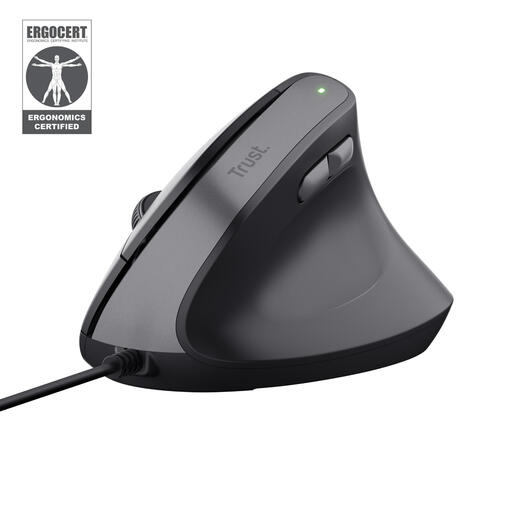
Why it suits this profile: This black vertical mouse is designed for right-handed office and home workers looking for a straightforward USB connection and a clearly defined ergonomic shape.
The 57-degree angle, dimensions and adjustable DPI are clearly stated. That means you don’t have to rely solely on general comfort claims.
57-degree angle, 800–2400 DPI, five buttons, USB plug-and-play and a 1,5-metre cable.

Why it suits this profile: Ideal for users who want a vertical design alongside Bluetooth, a USB receiver and the ability to use the mouse with multiple devices.
The product information lists the 57-degree angle, connection options and battery life. This makes it easier to weigh up the convenience of wireless use against the need to recharge.
4000 DPI, adjustable cursor speed, Bluetooth, USB receiver and rechargeable battery.
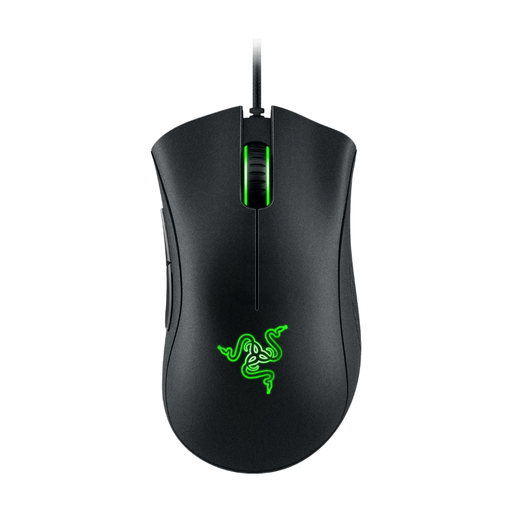
Why it suits this profile: An option for anyone who games as well as works, and is mainly looking for a wired USB mouse with high DPI and extra buttons. This is not a vertical mouse.
The product description clearly identifies its standard ergonomic shape. This means you won’t mistake this gaming mouse for a vertical mouse designed for a specific hand position.
6400 DPI, five buttons, USB connection, adjustable DPI and a 2,1-metre cable.
We’ve put together a complete, up-to-date list of products that meet these strict selection criteria and current European safety regulations.
It depends on your hand, grip and workspace. A vertical design may feel different from a standard mouse. Choose a model with suitable dimensions, adjustable DPI and enough support. Alternate mouse use with keyboard shortcuts and take regular breaks.
A mouse can’t be presented as a solution for RSI or other medical conditions. An ergonomic design may help you be more mindful of your working posture. If you have persistent pain, tingling or numbness, it’s sensible to seek professional advice.
Not necessarily. A wired mouse is ready to use straight away and doesn’t need charging. A wireless model gives you more freedom of movement and fewer cables on your desk. For a fixed workstation, a USB connection is often practical; for flexible workspaces, wireless may be more convenient.
