
Vandaag of morgen in huis

Kwaliteit gegarandeerd

Welkomstaanbiedingen ontgrendelen: GRATIS bezorging | Tot 80% korting | Gratis 30 dagen JoyPlus-proefperiode
Download de app
An ergonomic vertical mouse can be a sensible choice if you work at a computer every day and want to keep your wrist in a less rotated position. However, a vertical design does not guarantee a comfortable fit for every hand. The angle, dimensions, connectivity and buttons all determine whether a mouse is right for your workspace.
Right-handed office and remote workers also face several common purchasing pitfalls. Below, you’ll discover what to consider before buying a right-handed vertical mouse or an ergonomic mouse for wrist discomfort.
A high DPI setting may sound appealing, but an extremely high value is not automatically useful for office work. DPI determines sensor sensitivity: at a higher setting, the cursor moves farther with the same hand movement. For documents, email and spreadsheets, settings between approximately 800 and 2400 DPI are often practical.
More important is whether the mouse with adjustable DPI offers multiple settings, allowing you to tailor the cursor speed to your screen and working style. Also check whether you can change the DPI directly using a button or whether dedicated software is required.
A standard mouse with rubberised sides may feel comfortable, but it does not position your hand in the same way as a vertical mouse. Conversely, not every vertical design is automatically suitable for every user. Pay attention to:
The Trust Bayo II positions the grip at an angle of 57 degrees. According to the product information, this is intended to place the wrist and forearm in a more natural position. This is a product specification, not a medical guarantee. If discomfort persists or worsens, consult an appropriate healthcare professional.
A wireless mouse keeps your desk tidy, but it runs on batteries or a built-in rechargeable battery. You therefore need to consider charging, replacing batteries and the possibility of misplacing a USB receiver.
A wired ergonomic mouse or USB mouse is often simpler for a permanent workstation. It draws power from the computer and does not need to be charged. The trade-off is that the cable takes up space and may occasionally rub against the edge of your desk.
The dimensions should suit your hand. A vertical mouse that is too small may provide insufficient support, while one that is too large can feel cumbersome. Check the stated measurements and, if possible, compare them with your current mouse.
The Trust Bayo II measures approximately 12 x 7.7 x 7.3 cm and weighs 121 grams. This model is designed exclusively for right-handed use and intended for a vertical palm grip. That makes it less suitable if you regularly work with your left hand or are looking for a symmetrical mouse.
Check which type of USB connection your computer has. The Bayo II uses a fixed 1.5-metre USB cable and, according to the product description, works immediately without installation. This is convenient for a desktop computer, docking station or permanent laptop setup.
A cable is less practical if you frequently move between workspaces. In that case, consider a wireless model with a USB receiver or Bluetooth instead. Keep in mind that an RF mouse usually requires an available USB port.
For office work, five to six buttons are often sufficient. Two thumb buttons, for example, can make it easier to navigate forwards and backwards in a browser. The Trust Bayo II has five buttons and a DPI button with a range of 800 to 2400 DPI.
The product information also lists a three-star ErgoCert rating. Treat this as an additional verifiable product feature, not as evidence that the mouse prevents or treats discomfort for everyone.
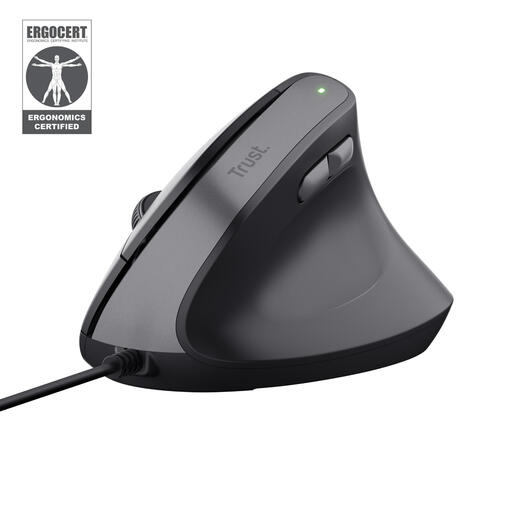
Why This Fits Their Persona: Ideal for anyone with a permanent home office who wants to start using a vertical mouse without worrying about charging.
The specifications clearly state the vertical angle, right-handed design and wired USB connection. This makes it clear in advance that it is neither wireless nor ambidextrous.
57-degree angle, five buttons, adjustable DPI from 800 to 2400 and a 1.5-metre cable.
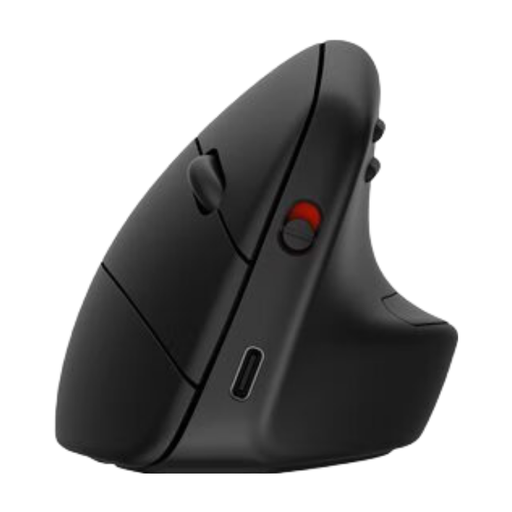
Why This Fits Their Persona: A strong match for tidy desks and users who switch between laptops, desktops and other devices.
You are not tied to a fixed cable. However, check that Bluetooth or the included receiver is compatible with your devices.
Vertical design, six buttons, RF plus Bluetooth, rechargeable battery and adjustable resolution up to 4000 DPI.

Why This Fits Their Persona: Suitable for anyone working with wide spreadsheets, using multiple devices and appreciating quiet buttons.
This is not a vertical mouse. That helps you avoid buying a conventional ergonomic design when what you specifically want is a vertical hand position.
Supports up to three devices, horizontal scroll wheel, quiet buttons, rechargeable battery and DPI up to 3200.
Place the mouse close to your keyboard so that your arm does not have to reach sideways constantly. Keep your shoulder relaxed and rest your hand lightly on the mouse. A vertical mouse feels different at first, so give yourself a few working days to adjust to the grip.
With a wired model, avoid running the cable tightly along a sharp desk edge. Take regular short breaks and alternate between typing and mouse use. An RSI mouse is not a treatment for RSI; its main purpose is to help you tailor your posture and controls more effectively to your situation.
Browse a current selection of mice and compare connectivity, sensor, DPI, dimensions and intended use before placing your order.
That depends on your hand size, grip and working posture. A vertical mouse may distribute forearm rotation differently, but comfort varies from person to person. Choose a model with suitable dimensions and take breaks during prolonged use.
A USB mouse does not require batteries or a rechargeable battery and works as long as the computer supplies power. A wireless model offers greater freedom of movement, but requires charging or battery replacement. For a permanent workstation, a wired mouse can therefore be practical and predictable.
The Trust Bayo II is a right-handed mouse. Always check this in the product specifications. An ambidextrous model, such as some Logitech mice, can be used with either hand, but it does not automatically offer the same vertical ergonomic design.
