
Vandaag of morgen in huis

Kwaliteit gegarandeerd

Welkomstaanbiedingen ontgrendelen: GRATIS bezorging | Tot 80% korting | Gratis 30 dagen JoyPlus-proefperiode
Download de app
A wireless gaming mouse keeps your desk looking tidy and prevents a cable from rubbing against your mouse mat. However, wireless does not automatically mean that every mouse is suitable for fast-paced games. Weight, connectivity and software support can make a significant difference, particularly in FPS, esports and competitive PC games.
Marketing for a wireless gaming mouse often focuses on extremely high DPI, impressive polling rates and RGB lighting. Those figures are not always the most important buying criteria. Below, you’ll find out which features you should really check and which models suit different types of user.
A high-DPI gaming mouse can make the cursor respond very sensitively. This is useful when you want to cover a large screen area with little hand movement. In FPS games, however, many players deliberately use lower sensitivity for more controlled movements.
So, you do not need to use a sensor with 24,000 or 44,000 DPI at its maximum setting. Above all, check whether the DPI can be adjusted and whether you can easily change the sensitivity using software or a DPI button.
The polling rate indicates how often the mouse reports its position per second. 1000 Hz means up to 1000 reports per second. A 4K polling rate gaming mouse can increase this to 4000 reports per second, while some models even quote 8000 Hz.
A higher value can theoretically reduce reporting latency, but it also puts greater demands on your system. According to RAPOO’s product information, 4000 Hz can increase CPU usage. If you experience frame drops, switching back to 1000 Hz may be sensible. So, do not just look at the highest figure; also consider your PC’s performance and your game settings.
Long battery life sounds appealing, but operating time depends on the polling rate, lighting, connection mode and settings. Also check how the mouse is charged:
A lightweight gaming mouse weighing around 53 to 75 grams often feels nimble during fast movements. A heavier model may feel more stable instead. Also pay attention to the dimensions and grip style: palm grip, claw grip and fingertip grip each require a different shape.
Check the hand orientation too. Some mice have a symmetrical shape but are not necessarily fully suitable for left-handed use. According to the product information, the Trust GXT 929 Helox is a right-handed model, for example. The HyperX Pulsefire Haste 2 Core WLS, on the other hand, has a symmetrical design and is listed as suitable for both left- and right-handed use.
An optical gaming mouse uses an optical sensor to register movement. Important factors include stable tracking, adjustable DPI and operating system support. A high DPI range mainly offers flexibility; on its own, it does not indicate how comfortable or precise the mouse will feel with your settings.
Also watch out for conflicting specifications on product pages. If the description and table show different values, check the latest information with the seller before placing your order.
For gaming, a 2.4GHz receiver is usually more practical than Bluetooth alone. Bluetooth is useful when you want to use the same mouse with a laptop, tablet or second computer. A tri-mode mouse generally combines 2.4 GHz, Bluetooth and USB-C.
A gaming mouse with programmable buttons is particularly useful for MMO, MOBA and simulation games. For a simple FPS setup, five or six buttons are often enough. Check whether macros and button assignments only work through Windows software and whether settings can be saved to the mouse’s internal memory.

Why it suits this profile: The combination of an optical sensor up to 4800 DPI, a weight of 75 grams and up to 80 hours of battery life makes this an accessible starting point for PC and laptop gamers.
The specifications mention both the wireless 2.4GHz connection and the 1000Hz polling rate, as well as USB-C charging. This makes it clear what you are getting, rather than relying on a vague claim about speed.
75 grams, six programmable buttons, RGB lighting and the ability to play while charging.

Why it suits this profile: This compact model is designed for players who value low weight, high sensor resolution and a high polling rate in competitive games.
The weight of 53 grams and the compact dimensions are clearly stated. The mouse has five buttons and no lighting, keeping the focus on control and weight.
53 grams, HERO 2 optical sensor up to 44,000 DPI, adjustable buttons and a maximum polling rate of 8000 Hz.
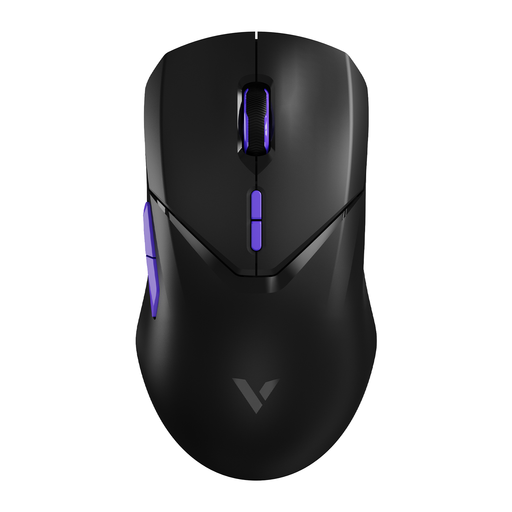
Why it suits this profile: This mouse is designed for players who want to combine high reporting rates, plenty of programmable buttons and long battery life.
The product information mentions the potential additional CPU load at 4000 Hz. You can therefore make an informed choice between a high polling rate and a lighter load on your system.
68 grams, PAW 3398 optical sensor up to 26,000 DPI, ten programmable buttons and, according to the product information, up to 180 hours of battery life.
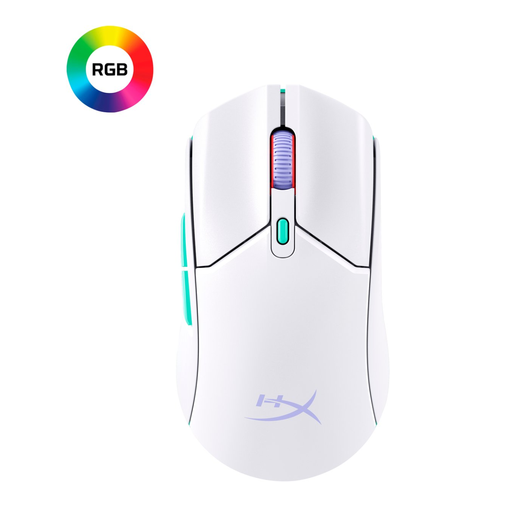
Why it suits this profile: The combination of 2.4GHz and Bluetooth is practical for anyone who games on a desktop and also uses a laptop.
You are not dependent on a single connection method. Use 2.4GHz for gaming and Bluetooth with compatible devices.
Approximately 70 grams, up to 12,000 DPI, 1000 Hz polling rate, six buttons and, according to the product information, up to 100 hours of use with an AAA battery.
We’ve put together a complete, up-to-date list of products that fully meet these strict selection criteria and the applicable European safety regulations.
Yes, provided the model has a stable 2.4GHz connection, an optical sensor and a suitable polling rate. Also check the shape and weight, as these directly affect your movement control.
This varies by model and settings. The stated figures in this selection range from approximately 80 to 180 hours, while models with an AA battery may have a longer quoted operating time. RGB lighting and a high polling rate can increase power consumption.
Not necessarily. 1000 Hz is a practical setting for many gamers. A higher polling rate may be worthwhile for fast-paced competitive games, but check that your PC can handle the additional CPU load and that your game supports the setting properly.
