
Vandaag of morgen in huis

Kwaliteit gegarandeerd

Welkomstaanbiedingen ontgrendelen: GRATIS bezorging | Tot 80% korting | Gratis 30 dagen JoyPlus-proefperiode
Download de app
A wireless gaming mouse gives you more freedom of movement and keeps your desk tidy. But wireless isn’t automatically the right choice for every PC gamer. A high DPI rating might sound impressive, but it says little about comfort, connectivity or battery life. A mouse that feels comfortable during a short session may also prove less suitable after a few hours.
In this buying guide, you’ll find out what to look for, which marketing claims to treat with caution and which type of mouse best suits your play style.
A high-DPI gaming mouse can be set to a very high sensitivity. DPI stands for dots per inch: at a higher setting, the cursor moves further with the same hand movement. Many players actually use low or medium sensitivity in FPS games for greater control.
So, a sensor rated at 18,000, 30,000 or 44,000 DPI is primarily quoting a maximum technical value. Check whether you can adjust the DPI and whether the software supports profiles.
A Bluetooth wireless gaming mouse is handy for laptops, tablets and everyday use. Many models also offer their own 2.4GHz connection via a USB receiver. This is generally designed for a fast response, while Bluetooth is often more practical for longer battery life and connecting to multiple devices.
Before you buy, check whether the receiver is included, which type of USB port your PC has and whether the mouse can also be used wired.
A lightweight gaming mouse weighing around 53 to 68 grams can feel comfortable for fast movements and FPS games. A heavier model with a thumb rest and extra buttons may be a better fit for MMO games, strategy games or productivity.
Consider the dimensions, hand orientation and grip style. An ergonomic gaming mouse designed for right-handed use won’t necessarily suit a claw grip or smaller hands. Shape matters just as much as weight.
Look for an optical sensor, adjustable DPI and a way to save profiles. A lower setting is already sufficient for everyday PC use and most games. A mouse with 26,000 or 35,000 DPI mainly gives you more room to adjust the settings; it doesn’t guarantee better performance.
The polling rate tells you how often the mouse sends its position to the computer. 1,000 Hz theoretically means one report every millisecond. Models with 4,000 or 8,000 Hz can report more often, but they often use more power and require support from the mouse, receiver and software.
For many players, 1,000 Hz offers a practical balance. A higher rate is mainly worth considering if you have a modern esports setup and will actually use the extra settings.
Check whether the mouse uses a built-in rechargeable battery, an AA battery or an AAA battery. Also look for:
Battery life claims depend on lighting, polling rate, software and usage conditions. Product information may therefore give different battery life estimates for each mode.
A gaming mouse with programmable buttons is handy for shortcuts, macros or extra actions. Five or six buttons are often enough for FPS players. MMO and productivity users may appreciate having more.
RGB lighting is mainly a style choice. An RGB gaming mouse can match your desk setup, but lighting may affect power consumption. Also check that the required software works with your operating system.
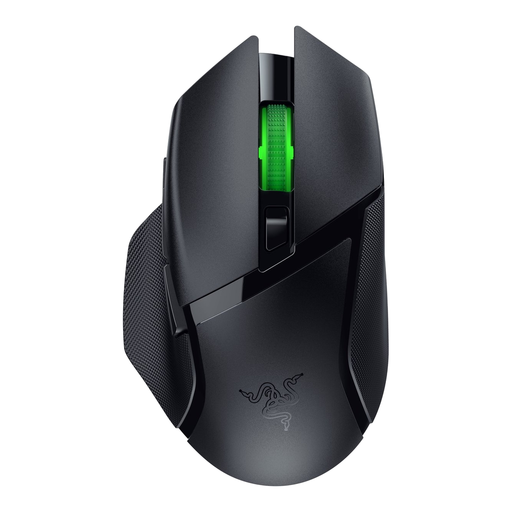
Why it suits this profile: A versatile choice if you’re new to wireless gaming and want both a 2.4GHz connection and Bluetooth, plus extra buttons for games and everyday use.
The choice isn’t based on DPI alone: the mouse has an ergonomic shape, 9 programmable buttons and two wireless modes.
18,000 DPI, Bluetooth, HyperSpeed Wireless and a stated battery life of up to 535 hours via Bluetooth.

Why it suits this profile: Designed for players looking for a compact, lightweight model with a rechargeable battery and a high polling rate.
At 53 grams, its low weight means you don’t have to choose based on sensor specs alone. Its compact shape is also worth considering if you have smaller hands.
HERO 2 sensor with up to 44,000 DPI, a polling rate of up to 8,000 Hz, 5 buttons and a stated battery life of up to 95 hours.
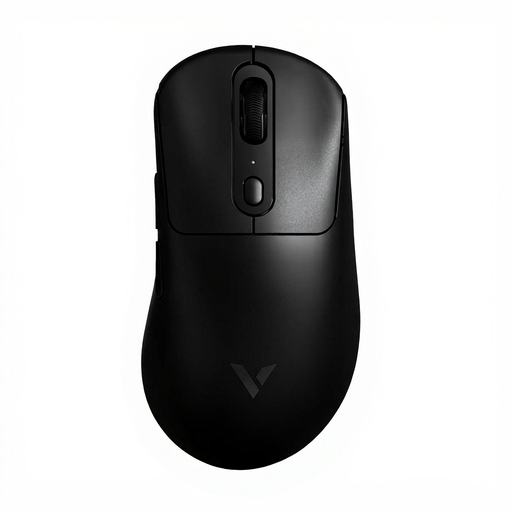
Why it suits this profile: A compelling option for FPS and esports players who prioritise very low weight, a high polling rate and plenty of customisation.
As well as the DPI rating, the product information lists a weight of 59 grams, independent X/Y DPI settings and 8,000 Hz wireless polling.
PAW 3950 sensor, up to 30,000 DPI, 1+8 programmable buttons and a stated battery life of up to 200 hours.
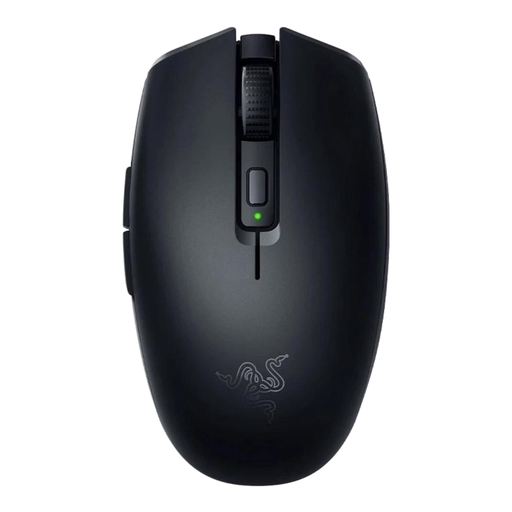
Why it suits this profile: A compact option if you want to carry your mouse between your work desk and gaming setup, or prefer a symmetrical shape.
The specs cover more than just 18,000 DPI: they also include its 60-gram weight, symmetrical shape and two connection options.
6 programmable buttons, Bluetooth, HyperSpeed Wireless and a stated battery life of up to 1,000 hours via Bluetooth.
We’ve put together a complete, up-to-date list of products that meet these strict selection criteria and current European safety regulations.
Yes, as long as the model supports a stable 2.4GHz connection via a USB receiver and has a shape that suits your grip. Also consider its weight, polling rate and how precisely you can adjust the DPI. Bluetooth alone isn’t always the most practical choice for competitive FPS gaming.
It varies by model and usage mode. RGB lighting, high polling rates and lots of movement can all increase power consumption. Models with AA batteries sometimes claim hundreds of hours of use, while rechargeable models often have a shorter stated battery life per charge. Always check whether the quoted figure applies to Bluetooth or 2.4GHz.
Not necessarily. A wireless mouse gives your PC setup a tidier look and lets you move freely. A wired mouse doesn’t need charging and is often simpler to use. To find the right one, compare connectivity, weight, shape, battery management and software rather than focusing only on the word ‘wireless’.
