
Vandaag of morgen in huis

Kwaliteit gegarandeerd

Welkomstaanbiedingen ontgrendelen: GRATIS bezorging | Tot 80% korting | Gratis 30 dagen JoyPlus-proefperiode
Download de app
For many, transitioning to a dynamic workspace is no longer a luxury but a necessity. A sit-stand desk is a central component of this shift. However, the market is flooded with models that look good on the surface but fall short in practice. Before you invest in a new height-adjustable desk, it's crucial to know what to look for. Many buyers fall into the same traps, leading to a wobbly, noisy, or impractical workspace.
Here are the three most common mistakes and how you can avoid them.
A desk that is stable at sitting height can transform into a wobbly structure at standing height. This is one of the biggest annoyances. Marketing photos always show a perfectly stable desk, but the reality is often different. A light touch is enough to make your monitor shake, which is detrimental to your concentration. This is usually caused by a weak frame construction or legs that are too thin.
Many entry-level models use a single motor to keep costs down. This might suffice for a light laptop setup. But as soon as you place two monitors, a PC tower, and some books on it, the motor starts to struggle. The adjustment becomes slow, jerky, and noisy. In the long term, this leads to faster wear and tear and a shorter lifespan for your electric adjustable desk.
People often focus on the dimensions of the desktop but forget the minimum and maximum height of the frame. Are you taller or shorter than average? Then it's crucial that the desk can go low and high enough for a correct ergonomic posture. A desk that is still too low at its highest setting, or blocks your chair's armrests at its lowest, is a bad purchase.
To bypass the pitfalls above, focus on a few key technical specifications. These determine the quality and usability of your standing desk for years to come.
The choice between a single or dual motor is fundamental.
An electric desk frame with a motor in each leg is almost always the more stable choice.
Stability at standing height depends on the leg construction.
Always check the maximum load capacity. Add up the weight of your monitors, laptop, PC tower, and other equipment. Choose a desk with a capacity well above that total.
Useful features that enhance usability include:
Not every desk is right for everyone. Below, we match some popular choices with specific user profiles, so you can find a model that truly fits your situation.
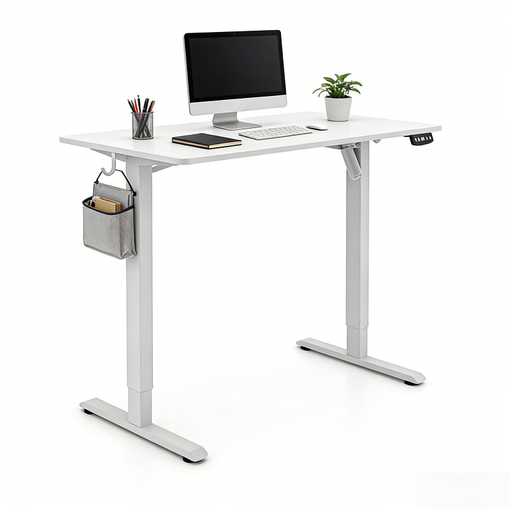
Why This Fits Their Persona: Ideal for those seeking a complete, compact solution without a large investment. Perfect for a dorm room or a smaller home office with a laptop and a single monitor.
This is a complete system where the motor (70 kg capacity) is matched to the size of the desktop. This avoids the pitfall of overloading a weak motor in a light setup.
Complete set (frame + top), ready to use out of the box. The compact 120x60 cm size fits in almost any space.

Why This Fits Their Persona: For the professional who works from home daily and needs more workspace and smart features. The spacious desktop and memory presets enable an efficient and comfortable workflow.
The memory function helps you build a consistent ergonomic routine, ensuring you don't forget the correct heights. The included cable management options prevent a cluttered workspace.
Large work surface (160x70 cm) for multiple monitors. Includes handy extras like memory presets, a storage pouch, hooks, and a USB-C port.
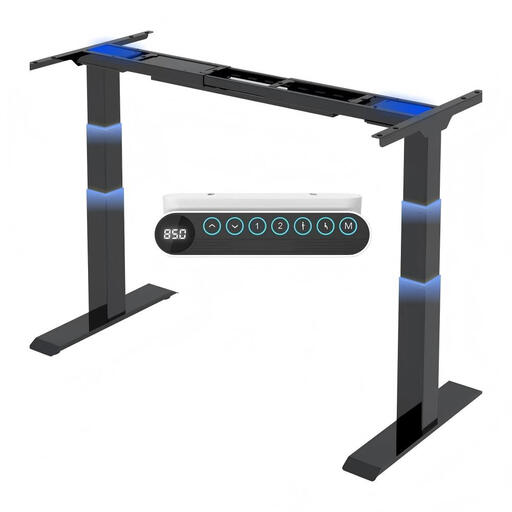
Why This Fits Their Persona: For the user who refuses to compromise. Ideal for gamers, video editors, or programmers with multiple heavy monitors and equipment who require maximum stability and load capacity.
This frame directly tackles the 'wobble test' and 'single motor' pitfalls. The dual-motor, 3-stage legs, and a load capacity of 160 kg ensure a rock-solid foundation, even at the highest setting and under full load.
Very high load capacity (160 kg) and superior stability. Gives you the freedom to choose your own desktop and create a fully personalized workspace.
We have compiled a complete, up-to-date list of products that fully meet these strict selection criteria.
The power consumption is surprisingly low. In standby mode, consumption is negligible, comparable to a TV that is turned off. Only during height adjustment is more power briefly consumed. You will hardly notice the difference on your annual energy bill.
Generally, no. Most frames come with a clear manual and the necessary tools. Assembling the frame itself is usually manageable on your own. However, for placing a heavy desktop onto the frame, it is advisable to do this with two people to prevent damage.
A good rule of thumb for both sitting and standing is that your elbows should form an angle of about 90 degrees when your arms are resting relaxed on the desk. When sitting, your feet should be able to rest flat on the floor. When standing, a straight wrist and back posture is important. Using the memory presets on your desk is a convenient way to consistently switch between your personally set, ideal heights.
