
Vandaag of morgen in huis

Kwaliteit gegarandeerd

Welkomstaanbiedingen ontgrendelen: GRATIS bezorging | Tot 80% korting | Gratis 30 dagen JoyPlus-proefperiode
Download de app
Long days spent behind a screen, whether you're working from home, at the office, or studying, can take their toll. A stiff neck, sore shoulders, and a nagging lower back are common complaints. A sit-stand desk offers a practical solution by allowing you to change your posture throughout the day.
However, the market for a height-adjustable desk is vast, and it can be challenging to navigate all the options. This guide is designed to help you make an informed decision. We focus on the specifications and practical features, so you can find a product that truly fits your home office setup and needs.
Before you make a choice, there are a few key considerations. Paying attention to these points will help you avoid a bad purchase and invest in a durable, ergonomic desk solution.
The first choice you need to make is between a completely new desk and a converter for your current one.
electric desk that adjusts in height at the touch of a button. This is a stable and integrated solution, ideal if you're completely redesigning your workspace.sit-stand desk converter is a flexible and often more cost-effective option if you're happy with your current desk but want the benefits of a standing desk.The way the desk adjusts in height determines its ease of use.
Always check the dimensions of the work surface. Do you have enough space for your monitor(s), laptop, keyboard, and other essentials? Also, pay attention to the maximum load capacity. Especially if you use multiple heavy monitors or other equipment, it's crucial that the desk can stably support this weight, both in its lowest and highest positions.
Based on functionality and specifications, we have selected a few popular choices for you.
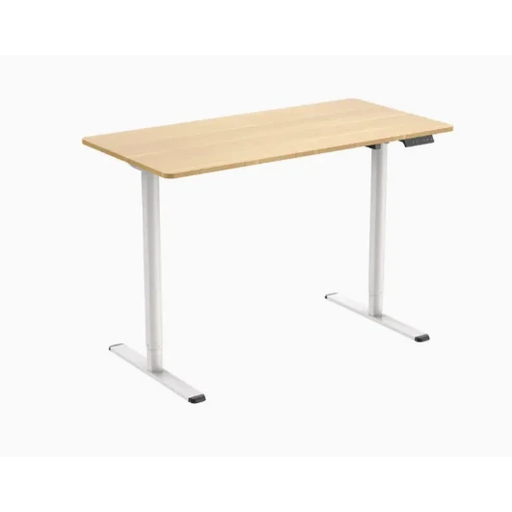
Why It Stands Out: This is a complete electric desk that offers a full-fledged upgrade for any workspace. The electric motor ensures a smooth and effortless transition between sitting and standing. With four memory presets, you can save your ideal heights and recall them with a single touch.
Key Features:
Who Is It For? Ideal for professionals, freelancers, and students who want to completely overhaul their workspace with a stable and user-friendly electric solution.
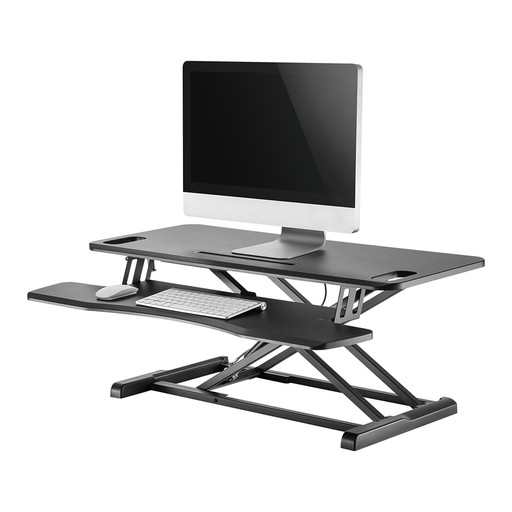
Why It Stands Out: This sit-stand desk converter transforms your existing desk into an ergonomic workspace in an instant. The product arrives fully assembled; you just unbox it, place it on your desk, and you're ready to go. The gas spring makes adjustment easy, even with your equipment on it.
Key Features:
Who Is It For? Perfect for anyone who wants to keep their current desk but still enjoy the flexibility of a sit-stand solution. A practical choice for both office and home workers looking for a quick and easy upgrade.
View the Neomounts NS-WS300BLACK on Joybuy.nl
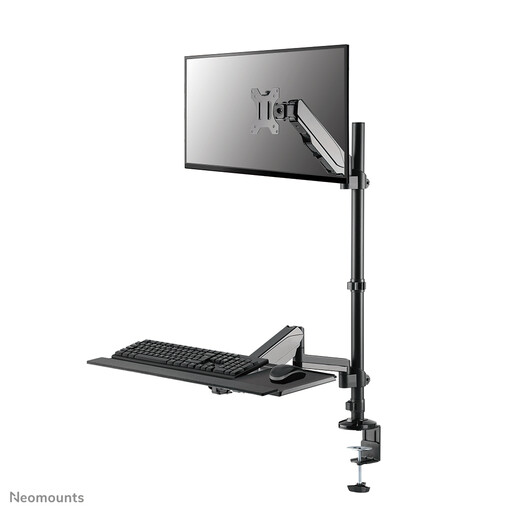
Why It Stands Out: This solution is different from the others: it's a desk-mounted workstation arm. You clamp it to your desk, which keeps your work surface free. The arm features a monitor mount and a separate tray for your keyboard and mouse. Both the monitor arm and the keyboard tray are height-adjustable via a gas spring.
Key Features:
Who Is It For? Suitable for users with limited desk space or for those who want a 'floating' and highly flexible setup. A great choice for gamers and professionals who need to precisely adjust their screen position.
View the Neomounts DS90-325BL1 on Joybuy.nl
If the perfect solution for your workspace isn't listed here, don't worry. Everyone has different requirements for size, material, and functionality. Fortunately, a wide range of options is available. Browse our full collection to compare more models.
View all our sit-stand desks
There's no strict rule, but many ergonomists recommend changing your posture every 30 to 60 minutes. The most important thing is to listen to your body and switch when you notice you've been in the same position for too long. The alternation is what matters.
Both have their own advantages. A full electric desk often offers more stability, a larger work surface, and a sleeker look. A sit-stand desk converter, on the other hand, is more flexible, more affordable, and doesn't require a complete furniture replacement. The choice depends on your budget, your current desk, and your personal preference.
