
Vandaag of morgen in huis

Kwaliteit gegarandeerd

Welkomstaanbiedingen ontgrendelen: GRATIS bezorging | Tot 80% korting | Gratis 30 dagen JoyPlus-proefperiode
Download de app
A gaming desk needs to do more than look modern. You need enough space for a monitor, keyboard, mouse and, if required, speakers or a laptop. At the same time, you do not want a wobbly desktop, cables trailing across the floor or RGB lighting that demands attention without adding much value.
For gamers, homeworkers, students and PC users, these are the most common buying pitfalls:
The most practical sizes for a gaming desk are often 120 cm, 140 cm or 160 cm wide. A 120 cm gaming desk is easier to fit into a student room or bedroom. It is suitable for one monitor and a compact set-up.
A 140 cm gaming desk offers more room for a second monitor, larger speakers or documents. If you combine gaming with working from home, you could also consider a large home-working desk measuring 160 cm wide. As well as the width, pay close attention to the depth:
Measure the available space beforehand and allow for cables, an office chair and any nearby drawers or doors.
A desk with a steel frame and a particleboard desktop can be a stable combination, provided the joints are assembled correctly. Check the stated maximum static load capacity. This is the total weight that the desk can carry while stationary according to the product information; it does not automatically indicate how the desk will respond to pushing, leaning or being moved.
Adjustable feet are useful on an uneven floor. They can compensate for small differences in height, but they are no substitute for a level, stable surface. Always position the desk in accordance with the safety instructions and do not exceed the stated load capacity.
A desk with a monitor stand frees up space on the desktop and can help position the screen higher. A desk with a headphone hook keeps your headset off the desktop. A desk with a CPU holder keeps the computer off the floor, but check the holder’s maximum dimensions and load capacity.
With a gaming desk with RGB lighting, the controls, connection and positioning are important. According to SEVEN WARRIOR’s product information, the lighting can be controlled via an app, with colour modes and timers available. The RGB function does require power, and electronic components must be kept away from liquids.
An electric sit-stand desk or height-adjustable desk is worth considering if you want to work both sitting down and standing up. Look at the height range, load capacity, noise level and any memory settings. A motorised desk also needs additional space to move safely up and down.

Why it suits this profile: This compact computer desk is a good fit for a student room, bedroom or simple home office. Its dimensions help keep the space tidy, while the design is suitable for working, studying or light gaming.
The product information specifies the dimensions, a steel frame, adjustable feet and a maximum static load capacity of 50 kg. This means you do not have to rely solely on vague marketing terms.
80 x 50 x 76 cm; particleboard with a steel frame; adjustable feet for stable positioning.

Why it suits this profile: A good choice for homeworkers and PC users who want to alternate between sitting and standing. The four memory settings make it easier to return to your preferred working heights.
The product information states a height range of 72 to 120 cm, a maximum static load capacity of 70 kg, four memory settings and a USB-C port. Do note the specified pause during prolonged adjustment, and keep liquids away from the electrical components.
Electric adjustment from 72 to 120 cm; four memory settings; cable management, USB-C port and three hooks.
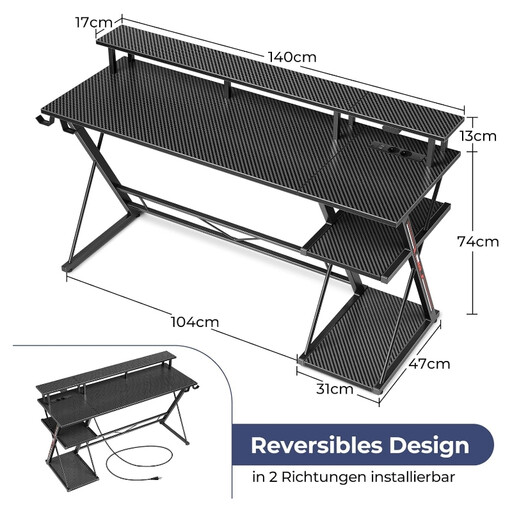
Why it suits this profile: This model is designed for gamers who want a permanent PC set-up with additional accessories. The integrated monitor stand, headphone hook, CPU holder and RGB lighting are practical when you want to organise several components in one place.
The product description specifies a metal frame, particleboard, app-controlled RGB lighting, two power sockets, two USB ports and a CPU stand for towers up to 47 cm. Before buying, check that your PC fits within these dimensions.
140 cm wide; monitor stand and headphone hook; CPU holder; RGB lighting; two power sockets and two USB ports.
A desk is only truly practical when you have enough clear space for your mouse. A gaming mouse mat protects the desktop and makes mouse movements more predictable. If you want to add lighting, you can choose an RGB mouse mat.
According to the product information, the Razer Firefly V2 Pro has a surface measuring 360 x 278 mm, a thickness of 4.6 mm and 15 individually customisable RGB zones. At 480 x 400 mm, the Sony INZONE Mat-F is more spacious and has a thickness of 6 mm, a water-repellent coating and a non-slip base. Choose the size based on your mouse settings and the available space on the gaming desk.
For one monitor and a compact set-up, a width of 120 cm may be sufficient. Choose 140 cm for extra room or two screens. If you combine gaming with working from home and handling documents, you will often benefit more from 160 x 80 cm. Always check the depth and the available width of the room.
An electric height-adjustable desk uses power while it is being adjusted and when connected accessories are charged via USB. Consumption depends on how often you adjust the height and which devices you connect. Only use the USB port and power sockets within the manufacturer’s specifications.
Its lifespan depends on assembly, load, moisture, cleaning and everyday use. A steel frame, correctly tightened joints and adjustable feet all help create a stable set-up. Do not place equipment weighing more than the stated load capacity on the desk, and protect particleboard from liquids.
We have put together a complete, up-to-date list of products that fully meet these strict selection criteria and the applicable European safety regulations.
