
Vandaag of morgen in huis

Kwaliteit gegarandeerd

Welkomstaanbiedingen ontgrendelen: GRATIS bezorging | Tot 80% korting | Gratis 30 dagen JoyPlus-proefperiode
Download de app
A computer desk needs to do more than simply support a screen. It should fit the available space, remain stable during everyday use and provide enough room for equipment, books and accessories. Yet many buyers focus mainly on colour and price. This can lead to problems such as a wobbly desktop, insufficient legroom or a desk that will not fit through the door or up the stairs.
In this buying guide from the Joybuy Product Recommendation Officer, we compare the key considerations and several suitable computer desks for different uses.
A desk measuring 160 × 80 cm can be practical for multiple monitors, but it will not automatically fit in a compact bedroom. So do not just measure the wall. Also take into account:
For a small home office or study desk, 80 × 50 cm is often easier to accommodate. If you work with two monitors, a laptop and a printer, a large desk will usually be more suitable.
A product listing may state a maximum static load capacity. This figure does not automatically indicate how comfortable the desk is to use every day. Check the construction as well: a metal frame, additional support bars and adjustable feet can be useful when the floor is not completely level.
With an electric height-adjustable desk, you should also check the maximum load, adjustment range and safety instructions. Do not place the desk directly against the wall if it may move while being adjusted.
A desk with drawers or open compartments can help organise loose items, but drawers sometimes reduce legroom. A gaming desk may instead feature a monitor stand, headphone hook or CPU holder. Check in advance that these components are compatible with your computer case and equipment.
For integrated USB ports, sockets and LED lighting, check the supplied adapter, cable routing and the warnings in the manual. According to the product description from the manufacturer, liquids should not come into contact with electronic components on some models.
Choose the size based on your equipment:
A corner desk or L-shaped desk makes efficient use of a corner. With a reversible design, however, check which side the drawers and shelves will be positioned on.
Many affordable desks combine chipboard with a steel frame. Chipboard is not solid wood; the finish and edge protection also affect how well the desktop withstands everyday use. A powder-coated metal frame can provide additional support, but always check the assembly instructions and maximum load.
Adjustable feet are useful on an uneven floor. However, they cannot compensate for incorrectly assembled joints or excessive weight. Tighten all fixings according to the instructions and check them again after some time.
A fixed-height desk is often easy to assemble and has fewer parts that can wear out. An electric height-adjustable desk offers greater flexibility between sitting and standing. Look at:
The stated operation and features are based on the product descriptions. According to a brand’s own research, certain features may be described as quiet, sturdy or ergonomic; treat this as a supplier claim and focus primarily on the specific specifications.

Why it suits this profile: The compact size is ideal for a bedroom, student room or small home office. The black finish has a simple look for work, study or light gaming.
The stated dimensions and 50 kg load capacity make it easier to compare the available space and your equipment in advance.
80 × 50 × 75.5 cm, steel frame, adjustable feet and a stated maximum static load of 50 kg.

Why it suits this profile: For professionals or families who need plenty of workspace, this brown desk provides a 160 × 80 cm desktop.
The spacious desktop prevents your monitor, laptop and documents from being placed directly on top of one another. Adjustable foot caps help with minor floor unevenness.
160 × 80 × 75 cm, metal frame, additional supports and a stated load capacity of 400 kg according to the product listing.
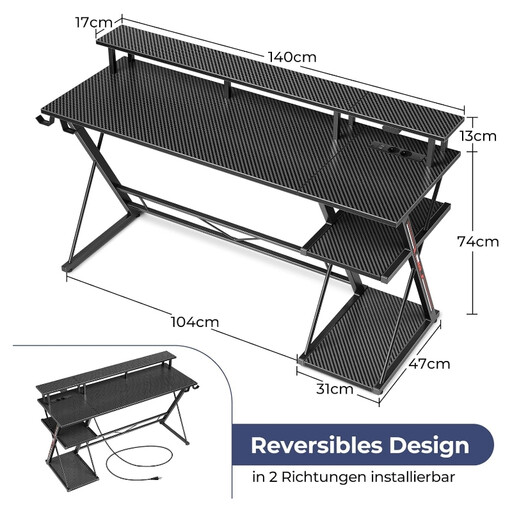
Why it suits this profile: This gaming desk is designed for an extensive PC setup, with a monitor stand, headphone hook, CPU stand, LED lighting and charging ports.
Dedicated space for accessories and cables reduces the number of loose items on the desktop. Check the dimensions of your PC case and the maximum load in advance.
140 cm wide, metal frame, monitor stand, CPU stand, two USB ports and two sockets according to the product description.

Why it suits this profile: A home worker who regularly changes working position may find the electric height adjustment and memory functions useful.
The 72–120 cm adjustment range and maximum static load of 70 kg are clearly stated. Bear in mind the pause required when making repeated adjustments over a prolonged period.
120 × 60 cm, memory function, USB-C port, cable management and three hooks according to the product information.
We have put together a complete, up-to-date list of products that fully meet these strict selection criteria and the applicable European safety regulations.
Before buying, check that all parts, fixings and instructions are included. A numbered parts list can make assembly more straightforward. Place the desk on a level surface and use the adjustable feet carefully.
Position heavy equipment as far as possible above the load-bearing parts of the frame. With a desk featuring drawers, cables and extension leads can be kept out of sight more easily, but make sure cords do not become trapped. With an electric model, the power supply must remain dry and the desk must be able to move freely.
For a laptop or one monitor, 80 × 50 cm may be sufficient. For two monitors, speakers and documents, 120 × 60 cm or larger is more practical. Also measure the available legroom and walking space.
Many fixed-height desks are approximately 75 cm high. With an electric height-adjustable desk, you can adapt the height to your chair, height and equipment. Check that there is enough room for your knees, cables and armrests.
Its lifespan depends on the material, assembly, load and maintenance. A metal frame and correctly tightened fixings can contribute to stable use. Protect a chipboard desktop from prolonged exposure to moisture and do not exceed the stated maximum load.
