
Vandaag of morgen in huis

Kwaliteit gegarandeerd

Welkomstaanbiedingen ontgrendelen: GRATIS bezorging | Tot 80% korting | Gratis 30 dagen JoyPlus-proefperiode
Download de app
More and more people are discovering the benefits of a dynamic workspace, both at home and in the office. A sit-stand desk is a popular choice in this regard. But with a growing number of options, it's easy to fall into a few common pitfalls. The wrong choice not only leads to regret but also to a desk you'd rather not use after a few months. Let's look at the most common mistakes and how you can avoid them.
A desk that feels stable at sitting height can turn into a wobbly structure at standing height. This is a common problem with budget-friendly models that have a weak frame. As soon as you type more vigorously or rest your arms on the desktop, your monitor starts to shake. This is not only distracting but also undermines the entire concept of a comfortable workspace.
The core of an electric adjustable desk is its motor. A noisy motor can be a serious distraction, especially in a quiet (home) office environment. Another point of frustration is a slow motor. If it takes too long to switch from sitting to standing height, you're likely to use the feature less often, or even stop using it altogether over time.
A basic model often only has up and down buttons. This might seem sufficient at first, but in practice, you'll quickly miss features that make daily use much easier. Think of a desk with memory presets to switch to your favourite heights with a single button press, or built-in cable management solutions that prevent a tangle of cords.
To make the right choice, it's smart to focus on a few objective specifications. These determine the long-term quality and user-friendliness of your height-adjustable desk.
An ergonomic desk must be sturdy. The key to stability is the base. Always opt for a frame made of steel. This material provides the rigidity needed to prevent wobbling at maximum height. Also, check the maximum load capacity. Most desks have a capacity of around 70 kg. This is more than enough for a setup with two monitors, a laptop, and other accessories. A higher load capacity is often an indicator of a more robust construction.
The right size depends on your available space and your work. A 120x60 cm desk is a popular and compact size, ideal for a home office desk in a smaller room. It offers enough space for a laptop and an extra monitor. Do you work with multiple large screens or need a lot of physical documents? Then consider a wider top of 140 cm or 160 cm for more workspace and a calmer setup.
The controls determine how pleasant the desk is to use in practice. A desk with memory presets is a valuable upgrade. It allows you to save multiple heights (for sitting, standing, and an active chair, for example) and recall them with a single button press. Some models offer extras like a USB port to charge your phone, built-in storage compartments, or hooks for your headphones. These small additions contribute to a tidy and efficient workspace.
Based on these criteria, we have selected a few popular choices that suit different users.
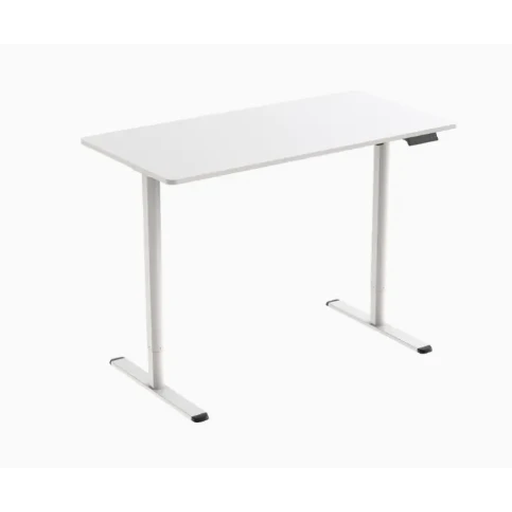
Why it's a match: Ideal for students or home workers looking for a functional and compact sit-stand desk without breaking the bank. The 120x60 cm size fits perfectly in most rooms.
This desk focuses on the essentials: a stable steel frame. This directly addresses the pitfall of a wobbly base at standing height.
Smooth, electric operation in a compact size. Functional and without unnecessary extras, which keeps the price attractive.

Why it's a match: For the daily home worker who values convenience and a tidy workspace. The extra features make switching between sitting and standing effortless.
This model bypasses the pitfall of 'missing extras'. The memory function and USB-C port are precisely the details you'll appreciate in the long run.
Four memory presets for quick height adjustment and a built-in USB-C port. Includes a storage compartment and hooks for an organised desk.
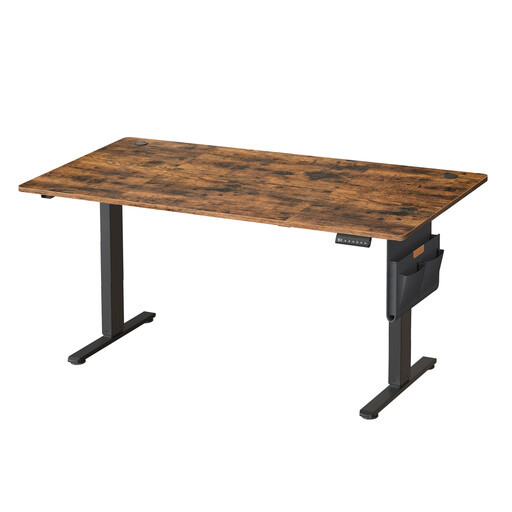
Why it's a match: Perfect for professionals with multiple monitors, creatives who need drawing space, or anyone who wants a spacious and uncluttered desktop.
The generous 160 cm wide desktop prevents a cramped workspace, a common frustration with standard desks. The sturdy frame ensures stability, even with a heavy setup.
A very spacious work surface (160 x 70 cm) combined with a stable, height-adjustable frame and a quiet motor. Includes memory presets.
We've compiled a complete, up-to-date list of products that meet these selection criteria.
The power consumption is surprisingly low. The motor only uses energy while adjusting the height, which amounts to a few seconds at a time. In standby mode, the consumption is negligible, comparable to that of a charger left plugged into the wall.
Yes, provided you choose a model with a solid base and sufficient load capacity. A desk with a steel frame and a load capacity of 70 kg can easily support a setup with two or even three monitors. Always check this specification before making a purchase.
Most sit-stand desks are designed for self-assembly. They come with clear instructions and numbered parts. However, it is advisable to assemble it with two people, especially when placing the heavy desktop onto the frame. This makes the process much easier and safer.
