
Vandaag of morgen in huis

Kwaliteit gegarandeerd

Welkomstaanbiedingen ontgrendelen: GRATIS bezorging | Tot 80% korting | Gratis 30 dagen JoyPlus-proefperiode
Download de app
You've got an Xbox Series X or Series S, but the out-of-the-box setup quickly starts to feel limiting. You're looking for better control, more immersive sound, or simply an extra controller for when friends come over. However, the market for Xbox Series X accessories is a maze of marketing promises and technical specifications. Many gamers fall into the same traps, spending money on products that need replacing after just a few months.
As a Joybuy Product Recommendation Officer, I'm here to help you recognize those pitfalls. We're not looking at the hype; we're focusing on the facts. These are the most common missteps and how to avoid them.
To avoid wasting your money, there are a few core specifications you should always check. These determine the lifespan and performance of your purchase.
This is arguably the most important point when choosing a new Xbox controller. Most standard controllers, including the official ones, use potentiometers. These are mechanical sensors that measure the stick's position through physical contact. This contact causes wear and tear, which eventually leads to stick drift.
A pro Xbox controller worthy of the name should have Hall effect joysticks. This technology uses magnets and sensors to determine the position without physical contact. The result is a much longer lifespan and sustained precision, even with heavy use.
In competitive shooters and racing games, every millisecond counts. Your accessory's connection plays a key role here.
For racing game enthusiasts, an Xbox steering wheel is a popular upgrade. However, the term "Force Feedback" is used for all sorts of things. Cheaper wheels often use a simple vibration mechanism. For a realistic experience, you want a system that actually simulates the forces of the car. Technologies like Logitech's TRUEFORCE or belt-driven systems (as found in some Thrustmaster models) offer much more detailed and immersive feedback, allowing you to truly "feel" the car.
Based on these objective criteria, we have selected a few products that suit different types of gamers.
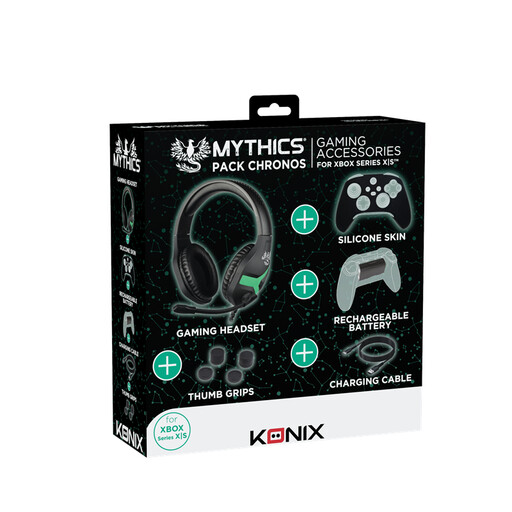
Why This Fits Their Persona: Ideal for the new Xbox owner who wants an all-in-one solution. This bundle includes the basic necessities without breaking the bank or worrying about compatibility.
You avoid the pitfall of buying accessories separately that might not work well together or end up being unexpectedly expensive. Everything you need to get started is in one box.
A complete starter kit with a gaming headset for Xbox, a rechargeable battery, a long charging cable, and protective grips for your controller.
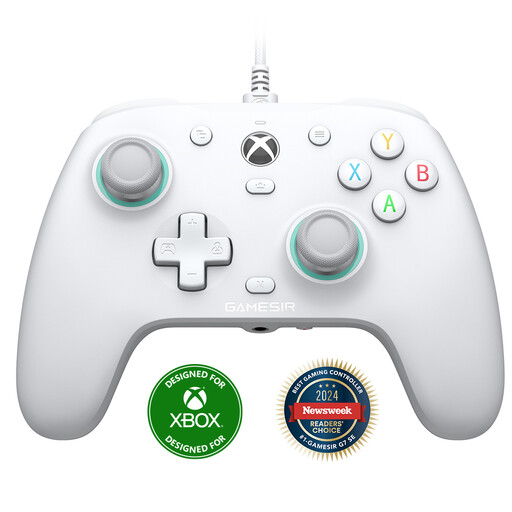
Why This Fits Their Persona: For the player who prioritizes performance above all else. This controller is built for precision and durability, essential for anyone who plays competitively online and won't settle for standard hardware.
Tackles the "Pro Controller Trap" head-on. Thanks to the Hall effect sticks, you don't have to worry about stick drift, a common and frustrating problem with standard controllers.
Offers drift-free precision and a stable, fast wired connection for minimal input lag. The extra programmable back buttons provide a tactical advantage.
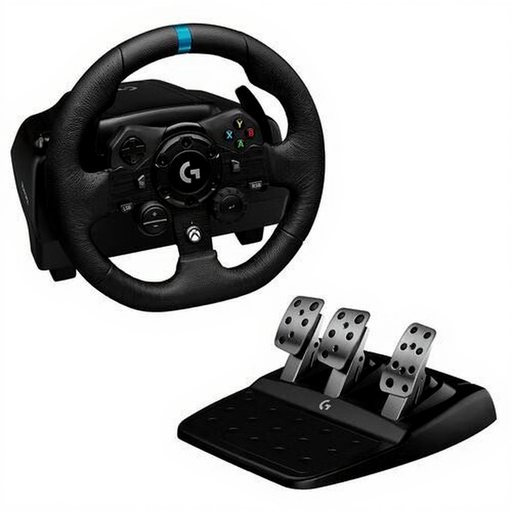
Why This Fits Their Persona: For the gamer who takes their passion for racing games seriously. This wheel offers a much deeper and more immersive experience than a controller ever could, which is essential for simulation games like Forza Motorsport or F1.
It avoids cheap wheels with weak or non-existent force feedback that feel like toys. The G923 provides detailed feedback that justifies the investment.
The TRUEFORCE technology, which Logitech claims connects directly to in-game physics for unprecedented realism. The progressive brake pedal mimics a pressure-sensitive braking system.
Didn't find what you were looking for? There are more accessories that meet these strict selection criteria. Check out our full, up-to-date range tailored for the Xbox Series X and S.
A controller's lifespan heavily depends on usage. With intense daily gaming, the joysticks (potentiometers) of a standard controller can start showing issues, like stick drift, within 6 to 12 months. Controllers with Hall effect technology are designed to prevent this problem and have a significantly longer lifespan.
Generally, yes. Microsoft has ensured good backward compatibility. Officially licensed Xbox One controllers, headsets, and steering wheels work on the Xbox Series X and Series S. However, keep in mind that you might not benefit from features developed specifically for the new generation, like the "Share" button on newer controllers. Always check the product page for specific compatibility information regarding Xbox Series S accessories.
For many gamers, yes. A good gaming headset for Xbox offers three clear advantages:
