
Participant in a noisy workspace
Wants to be heard clearly during the workshop without disturbing others with noise from their own workspace. So, consider the position of the microphone and how well the ear cushions block out sound separately.


Choose a wired USB headset if you work at a computer in one place, but check that the connector is compatible. In a noisy room, consider the microphone separately, for what other people hear, and the ear cushions, for what you hear: the label ‘noise-cancelling’ does not mean the same thing for both. Choose a mono headset if you want to keep one ear free, or a wireless headset if you want to move around during the workshop. Test the microphone and speaker in your meeting app before you start.
Wants to be heard clearly during the workshop without disturbing others with noise from their own workspace. So, consider the position of the microphone and how well the ear cushions block out sound separately.
Wants to follow several speakers while taking notes. Fit, ear cushions and an easily accessible mute button are all important considerations.
Wants to be able to stand up during activities or keep one ear free. Wireless and mono are different choices: wireless is about freedom of movement, while mono lets you stay connected to your surroundings.
| What to consider | What should you check? | Who is it for? |
|---|---|---|
| Being heard clearly over background noise | Check whether the microphone boom is adjustable and where the mute button is. Test a voice recording in the room where you’ll be taking the workshop. | I want to speak clearly when people are talking around me, without disturbing others. Around 36% of consumers prioritise being heard clearly over background noise. |
| Listening and wearing comfort | Compare mono and stereo, and look at the shape of the ear cushions. Consider whether you want to keep one ear free. | I want to follow several participants and take notes at the same time, without the headset feeling uncomfortable. Around 29% of consumers prioritise listening and wearing comfort. |
| Connection and audio test | Check that the USB connector and any adapter are compatible with your computer. In your meeting app, test that the intended microphone and speaker are active. | I want to connect and join straight away, without having to search for the right audio settings during the workshop. Around 21% of consumers prioritise a compatible connection and a successful audio test. |
| Moving around or keeping one ear free | Compare a wireless headset with a mono headset. For wireless models, check the connection and make sure the headset is charged. | I want to be able to stand up during the workshop or keep hearing someone in my own space. Around 14% of consumers mainly choose freedom of movement or the option to keep one ear free. |
A microphone that reduces background noise for the people you’re speaking to is different from ear cushions that block out noise for you. One feature does not automatically tell you anything about the other.
Check both features separately and test how your voice sounds in your own space.
A model may be available with different connections, in mono or stereo, and in versions designed for specific meeting software. A specification for one version does not necessarily apply to another.
Compare the full model and version name with the connection on your device, and check whether any adapter you need is included.
A commercial warranty is in addition to your statutory rights. The Dutch Government states that the Netherlands has no fixed statutory warranty period and that you should contact the seller if a product is faulty.
Keep your proof of purchase and contact the seller if a product is faulty.
The H340 and H390 are wired USB headsets for joining a meeting from a computer.
The Evolve2 40 SE is a wired option, while the Evolve2 65 is a wireless model range.
The Blackwire 3310 is available as a mono headset for anyone who wants to keep one ear free.
This selection includes wired and wireless headsets for joining a workshop from your own device. Check that the connection and controls on each version are right for your set-up.
 No image available
A wireless option if you want to move around during the workshop; remember to charge it.
The product description mentions Bluetooth, on-headset controls and up to 36 hours of battery life.
The description mentions eight-microphone beamforming for calls.
 No image available
A wired option for a fixed computer set-up, with controls you can use between speaking turns.
The product description mentions stereo sound, an adjustable microphone boom and a mute indicator.
The headset has a USB cable.
 No image available
A wired USB option for calls from a computer; check that the connection is compatible with your device.
The product description mentions stereo sound, plug-and-play USB connectivity and an adjustable microphone that reduces background noise.
The headset is wired.
 No image available
A wireless mono option if you want to move around during the workshop and keep one ear free; remember to charge it.
The product description mentions Bluetooth, a USB-A adapter and controls for Microsoft Teams.
The description mentions a microphone system that reduces background noise during calls.
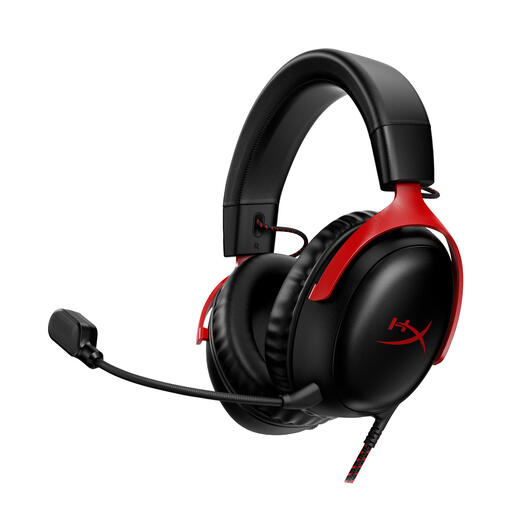 No image available
A wired headset with several listed connection options; check which one is compatible with your device and meeting software.
The product description mentions a detachable microphone, controls on the ear cup and 3.5 mm, USB-A and USB-C connections.
The description mentions memory foam in the headband and ear cushions.
Select the headset as your microphone and speaker in the meeting app, then run an audio test. Zoom offers a test that lets you play back a recording of your microphone; in Microsoft Teams, you can choose which audio devices to use.
Keep the microphone close to your mouth and test your voice before joining. Jabra gives this advice for the Evolve2 40 SE; a test recording can also help you hear how keyboard sounds and noise from your surroundings come through.
Contact the seller if the product is faulty. According to the Dutch Government, consumer purchases in the Netherlands are covered by statutory protection: the product must meet what you can reasonably expect. There is no fixed statutory warranty period in the Netherlands.
When you buy from a business at a distance, you usually have a 14-day cooling-off period. The Dutch Government advises checking the terms and how you handle the product. Any longer returns period offered by a shop is separate from the statutory cooling-off period.