
Taking part in a hybrid conversation
You discuss texts with remote participants from a room. Focus on the microphone, mute controls and connection; Logitech, Trust and HP Poly describe headsets with microphone and mute controls.


For a fully in-person writing workshop with no online conversations, recordings or digital activities, a headset isn’t necessarily needed. For hybrid participation or a digital exercise, a wired USB headset is a good fit if the connection is compatible; wireless is most useful if you want to move around during the conversation, provided you check the connection and battery beforehand. Microphone noise reduction is designed to make your voice clearer to others, while ANC affects what you hear; neither guarantees that you’ll be heard clearly in every room.
You discuss texts with remote participants from a room. Focus on the microphone, mute controls and connection; Logitech, Trust and HP Poly describe headsets with microphone and mute controls.
You listen to feedback or recordings for an extended period and want a comfortable fit. Logitech and Trust describe adjustable headbands, but fit and comfort are personal.
You want to move around the room during a digital activity. HP Poly and Jabra describe wireless headset ranges; check the connection and charge beforehand.
First, find out whether the workshop uses digital audio. Then choose between a fixed wired setup and the freedom to move around with a wireless headset.
Choose this if: you’ll only be talking and listening to people in the room, with no online participants, recordings or digital activities.
Consider: checking whether the organiser expects any digital activities after all.
Choose this if: you’ll be joining from a fixed spot and your computer or tablet supports the connection.
Consider: the cable limits how far you can move from your device; check the connector on the exact model.
Choose this if: you’ll be moving between workspaces or walking around the room during a digital conversation.
Consider: checking the connection, compatibility and battery charge. ANC for the listener and microphone noise reduction are different features.
| What to consider | What to look for | Who is this important for? |
|---|---|---|
| Clear speech | Check the microphone position and how to mute it; test your speech using the app you’ll be using. | If I’m discussing feedback while others are talking in the same room, I want remote participants to be able to follow what I’m saying. Around 36% of consumers prioritise being heard clearly. |
| Connection | Check the connector on the specific model and whether both your device and app support audio. | If I’m using a laptop or tablet, I want to be sure both the microphone and audio playback work. Around 29% of consumers prioritise a connection that works with their device. |
| Comfort and room noise | Consider adjustability and fit, and whether you’ll also need to hear the people around you while listening. | During a long feedback session, I want to be able to wear my headset and keep following the discussion. Around 21% of consumers prioritise comfort over extended wear. |
| Freedom to move | Compare wired and wireless options. For wireless models, check the connection and battery requirements. | If I’m moving around the room during a digital conversation, I don’t want to be restricted by an audio cable. Around 14% of consumers prioritise freedom to move. |
HP describes ANC as affecting what the wearer hears, and microphone noise reduction as a separate feature. They aren’t the same thing.
Check the microphone features and test your voice in a trial call. Choose ANC only if you want to hear less background noise yourself and can still follow the conversation in the room.
Jabra offers different versions with, among other things, different connections and wearing styles. HP lists a 3.5 mm connection only for the Blackwire 3315 and 3325.
Before buying, check the full model name, connector and any adapter you may need.
You don’t necessarily need your own headset for a fully in-person workshop.
Ask the organiser whether there will be online participants, recordings or an individual digital activity.
The H390 range is worth considering for a wired computer setup; the connection depends on the exact USB model.
The Ayda USB-ENC is a wired option for anyone looking for an on-ear fit and a fold-up microphone.
The Blackwire 3300 series is wired, while the Voyager Focus 2 is a wireless range for anyone who wants to take part without an audio cable.
The Evolve2 30 SE is a wired range with several USB and UC/Teams models; the Evolve2 65 Flex is wireless.
These product picks include wired USB headsets for a fixed spot and wireless headsets for digital workshop activities where you want to move around.
 No image available
A wireless option if you want to move around during a digital activity. The product name specifies USB-A and MS Teams; check that this model is compatible with your device and workshop app. Wireless use depends on Bluetooth and a charged battery.
 No image available
A wired option for online feedback from a fixed spot, with a microphone you can mute when needed. The product name specifies USB; bear in mind that a cable limits how far you can move.
 No image available
A wired stereo option for joining from a fixed computer setup. The cable limits how far you can move from your device; check that the connection is compatible before buying.
 No image available
A wired USB option for a digital conversation from a fixed spot. Check that your device supports the connection; a cable limits your freedom to move.
 No image available
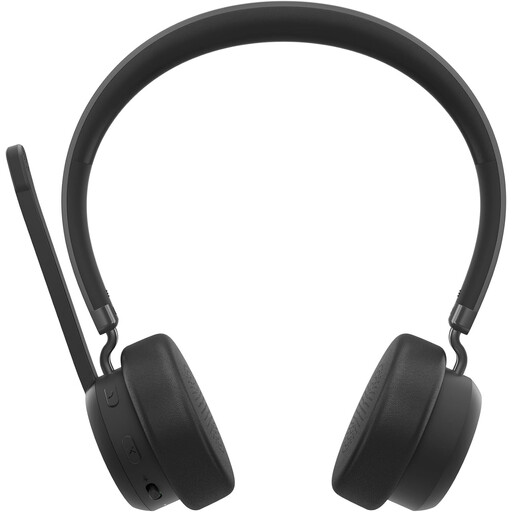
A wireless option for a digital activity where you want to move around. Wireless use depends on Bluetooth and a charged battery; check beforehand that it connects to your device.
Select the headset as both the speaker and microphone in your meeting app, then test each one. Microsoft Support also recommends checking the selected microphone and starting a test call in Teams; check the physical mute button or microphone boom too.
No, it depends on the combination of headset, device and app. In the Evolve2 30 user guide, Jabra warns that not all USB-C devices or apps support an audio connection with the headset.
Check that the headset microphone is selected in Teams, isn’t muted on the headset or in the app, and that your operating system allows Teams to access the microphone. These steps are for Teams; they don’t confirm that every model works with every workshop app.
According to ACM ConsuWijzer, online consumer purchases usually come with a statutory cooling-off period of up to 14 days after delivery, although exceptions apply. If a headset develops a fault sooner than you could reasonably expect under normal use, the seller is responsible under the statutory guarantee; in the Netherlands, there is no fixed period that automatically applies to every headset.
Dutch government information describes the requirements for CE marking and an EU Declaration of Conformity for electrical and electronic equipment covered by the rules. The Radio Equipment Directive is also relevant to Bluetooth equipment. A statement on a product page alone doesn’t prove that a particular headset meets all applicable requirements.