Start with your current camera or smartphone, a stable setup and soft, movable lighting. A new camera body won’t solve distracting reflections by itself. A mirrorless camera is worth considering if you want to use a different lens to capture fine woven details. Compare the magnification and working distance of the specific lens, and check what’s included in the kit on offer.
Who is this buying guide for?
Maker working with glossy details
You want to capture both the weave and the glossy parts clearly. So focus on controlling the light and reflections, not just on the camera body. Adobe and B&H eXplora explain the importance of light and reflections in product photography.
Seller of small products
You need overview and detail shots that you can repeat consistently. A stable setup and a consistent background can help, as Canon Netherlands explains in its product photography advice.
Photographer capturing woven details
You want to show individual fibres or joins in close-up. Compare the magnification of the specific lens, and allow for the space needed by the lens and lighting.
What should you look for when choosing?
Your current camera or smartphone
Choose this if: the whole basket fits in the frame and is large enough.
Bear in mind: your lens options depend on your device; check the framing with a test shot.
Mirrorless camera with standard zoom lens
Choose this if: you want to photograph a range of products as well as the basket, and mainly need an overview shot.
Bear in mind: a zoom lens isn’t automatically a 1:1 macro lens; check the magnification of the lens included.
Mirrorless camera with macro lens
Choose this if: you need to fill the frame with a small detail.
Bear in mind: the macro lens is a separate item unless it’s listed as part of the specific kit; also check there’s room for lighting.
| Consideration |
What to look for |
Who is this most relevant to? |
| Controlling reflections |
Move the light source or make it larger, then assess a test shot; fully diffused lighting isn’t right for every glossy part. |
If you want to keep glossy details visible without reflections overwhelming the basket, controlling the light should be your priority. Around 36% of consumers say managing reflections is their main concern. |
| Capturing woven details |
Compare the magnification of the specific lens and check whether there’s room for lighting at your chosen shooting distance. |
If you want to fill the frame with fibres or joins, check that the lens offers enough magnification. Around 29% of consumers prioritise magnifying fine details. |
| Taking repeatable photos |
Check that a stable setup and the available space suit the way you work. |
If you want to repeat product shots from similar angles, a predictable setup is important. Around 21% of consumers give repeatability top priority. |
| Complete camera kit |
Check the camera body, lens and everything else included in the kit on offer; also consider whether your current device already does the job. |
If you want to take this shot without replacing parts unnecessarily, compare the complete kit with what you already have. Around 14% of consumers prioritise the cost and completeness of the kit. |
Buying pitfalls
-
Buying a new camera body to fix a lighting problem
With reflective objects, the position of the light affects how the shine appears in the image. A different camera body won’t change the lighting setup.
First, try a stable setup and softer, movable lighting with your current device. Use a test shot to assess the reflections and the level of shine you want.
A new camera body may not be the only adjustment needed: you might also need to change the lighting or background.
-
Assuming a standard zoom lens is the same as a 1:1 macro lens
Canon specifies maximum magnification of 0.25× for the RF-S 18-45mm in manual focus mode; Fujifilm specifies 1:1 for the separate XF30mmF2.8 R LM WR Macro. These are different lenses with different magnification specifications.
Decide how large you need the smallest detail to appear in the frame, then compare the magnification of the specific lens.
You may need a separate compatible lens for greater magnification.
-
Assuming the product title tells you which lens is included
A camera body sold on its own and a kit with a lens are not the same purchase. If it’s unclear what’s included, the kit may not suit your shooting plan.
Before buying, check the full model code and confirm which lens and accessories are included in the specific offer.
If a lens is missing, you may need to add one to the kit before you can take the shot you want.
Camera brands to consider
Canon
The EOS R50 with RF-S 18-45mm is an example of a mirrorless camera with a standard zoom lens. Canon confirms that the body is compatible with RF and RF-S lenses.
- Canon specifies maximum magnification of 0.25× for the RF-S 18-45mm in MF mode.
- That magnification figure applies to the lens and mode mentioned, not to every Canon lens. The EOS R50 doesn’t have in-body image stabilisation, according to Canon Netherlands.
Fujifilm
The X-S20 can be paired with the separate XF30mmF2.8 R LM WR Macro for close-up details.
- Fujifilm specifies 1:1 magnification for the macro lens mentioned and RAW shooting for the X-S20.
- Check whether the lens is included in the kit on offer and whether there’s room in front of the lens for lighting.
Sony
The α6400 has an E-mount. The separate E-mount SEL30M35 is a compatible macro option for a suitable camera body.
- Sony specifies a maximum magnification of 1.0× and a minimum focusing distance of 0.095 m for the SEL30M35.
- Check the exact camera body variant and which lens is included in the offer; a distance specification doesn’t guarantee there’ll be enough room for your lighting.
Nikon
The Z50II is one option in the Z system if you want to put together a camera body and lens combination.
- Nikon Netherlands lists 20.9 million effective pixels for the Z50II.
- The camera body specifications don’t tell you about macro magnification; check the lens you actually choose.
Cameras on Joybuy
Below are cameras available on Joybuy that have been selected for this topic. For each model, check whether the features listed, lens and kit contents suit photographing a still subject.
 No image available
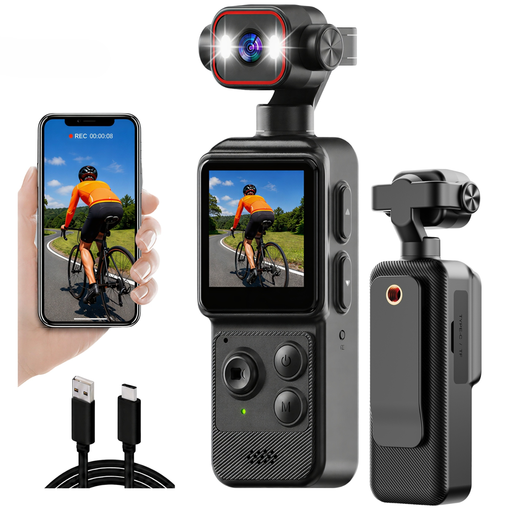
Mini 4K action camera with clip
The product name mentions photo and video recording; take a test shot to check whether the framing and sharpness suit the basket.
The name lists a 1.54-inch display, a 140° wide-angle lens, app control, LED light and a 1200 mAh battery.
Joybuy
 No image available
Komery W6, 12× optical zoom
The product name mentions photography; take a test shot to see whether the subject is captured in focus and with the framing you want.
The name lists 12× optical zoom, 4K and 64 MP. Check which accessories are included in the specific kit.
Joybuy
 No image available
DJI Osmo Pocket 3 Creator Combo
The product name mentions photography; take a test shot to check whether this camera frames a stationary basket the way you want.
The name lists a 1-inch CMOS sensor, 4K/120fps video, 3-axis stabilisation, face and object tracking, and an included microphone.
Joybuy
 No image available
Pink Songdian compact camera
The product name mentions photography and video; take a test shot to check whether the focus and framing are suitable for your detail shot.
The name lists 4K, 44 MP and 16× digital zoom.
Joybuy
 No image available
Sony ZV-E10 with 16–50mm zoom lens, black
This mirrorless camera is sold with a 16–50mm zoom lens; take a test shot to check whether you can get the framing and focus you want for the basket.
The product name says a 16–50mm zoom lens is included. The product information says a memory card and adapter/charger aren’t included.
Joybuy
Frequently asked questions
Do you need to buy a polarising filter straight away for glossy parts?
No. Start by adjusting the position and size of the light, then take some test shots. Nikon describes how a polarising filter can reduce reflections, for example on water and glass; that doesn’t mean it will remove every reflection from a glossy part of the basket. Also check which filter size fits your lens.
How can you keep both the front and back of the weave in focus?
Set up the camera securely and check the focus and depth of field in a test shot. If a close-up doesn’t show enough depth in focus, Nikon describes focus stacking: several shots taken at different focus points are combined afterwards. Keep the basket still while doing this.
What should you check before buying your camera setup?
Check the lens mount, the exact kit contents and the framing with your planned lighting. Magnification is a feature of the lens, not a camera body sold on its own.
What if a camera bought online doesn’t meet reasonable expectations?
According to the Dutch government, you’re entitled to a product that works properly in the Netherlands; if a product is faulty, the seller is your point of contact for a solution. There’s no fixed statutory warranty period for all products in the Netherlands. For an applicable online consumer purchase, you generally have 14 days to change your mind; check the terms of your specific purchase.


