Who is this choice relevant to?

Makers showcasing their weaving

You want to show the texture and small finishing details. So pay attention to the close-focusing capabilities of both the camera and the lens. OM Digital Solutions’ TG-7 manual describes shooting as close as 1 cm in the relevant close-up mode; Canon lists up to 1:2 magnification for its separate RF 35mm F1.8 IS Macro STM lens.

Sellers with baskets in different sizes

You photograph baskets of different sizes on the same small table and want to switch easily between a full view and a close-up. Measure your largest basket and check that the zoom range and available shooting distance work with your table.

Makers creating consistent product photos

You want repeatable compositions and realistic material colours. A stable set-up and control over the white balance are important considerations. Canon describes white balance settings for capturing colours; assess the result using the lighting and materials you work with.

What should you look for when choosing?

Mirrorless camera with a standard zoom

A good fit if: you mainly photograph whole baskets and want to switch between different compositions.

Bear in mind: a standard zoom is not automatically a macro lens. Nikon lists a minimum focus distance of 0.2 m for the NIKKOR Z DX 16-50mm; that figure alone does not tell you how large a weaving detail will appear in the frame.

Mirrorless camera with a separate macro or close-up lens

A good fit if: small fibres or joins matter more to you than having a single compact kit. Canon lists up to 1:2 magnification for its separate RF 35mm F1.8 IS Macro STM lens.

Bear in mind: check the lens mount, shooting distance and magnification, and whether the lens is actually included with the camera. A separate lens may also mean changing the position of the camera or lighting.

Compact camera with a close-up mode

A good fit if: you want to capture small pieces of weaving up close without changing lenses. OM Digital Solutions’ TG-7 manual describes shooting as close as 1 cm in the relevant mode.

Bear in mind: that distance applies to the specific mode and does not guarantee a suitable full view of an entire basket. Allow enough space for the camera and lighting.

What to considerWhat should you check?Who should pay more attention to this?
Close-up weaving detailsCheck the close-up mode or the specifications of the exact lens.If I want to capture recognisable fibres and joins, I look at both the camera and the lens. Around 40% of consumers prioritise weaving details above all else.
Framing the whole basketMeasure your largest basket and the available distance, then check the zoom range and kit lens.If I want to fit the whole basket into the frame on my small table, the composition needs to work with those dimensions. Around 30% of consumers put the whole basket first.
Reproducing colour and compositionCheck whether you can set the camera up steadily and adjust the white balance.If I want to photograph a series of baskets consistently, a fixed composition and control over colour reproduction are important. Around 20% of consumers prioritise consistent colour and composition.
Simple equipmentCheck which lens is included and what set-up you will need.If I want to minimise lens changes and separate components, I compare complete kits with cameras that have a fixed lens. Around 10% of consumers prioritise a simple kit.

Common buying mistakes

  • Looking only at the camera body

    With a mirrorless camera, the lens you attach also affects how close you can focus and which compositions are possible.

    Check the full kit name and compare the lens, shooting distance and dimensions of your largest basket before choosing.

    You may need a separate lens for small details. Check whether it is included in the kit.

  • Assuming a short focus distance means you can get a good full view

    A close-up mode or short focus distance describes a specific way of shooting; it does not automatically mean you can fit a whole basket in the frame.

    Separately check whether you can take both a full view and a close-up from the space available on your table.

  • Expecting a different camera to solve inconsistent colours

    A fixed composition and control over the white balance help you assess your set-up and colour reproduction under similar conditions.

    Plan where to position the camera and lighting, and check which white balance settings are available. A repeatable set-up takes preparation and space beside the table.

Camera brands to compare

Canon

A mirrorless camera with a standard zoom is an option for changing compositions; a separate macro lens may be useful for small details.

  • Canon lists an 18–45 mm zoom range for the RF-S 18-45mm F4.5-6.3 IS STM kit lens.
  • Canon lists up to 1:2 magnification for its separate RF 35mm F1.8 IS Macro STM lens.
  • The macro magnification does not apply to the RF-S kit lens. Check compatibility and what is included in the specific kit.

Nikon

The Z50II with the NIKKOR Z DX 16-50mm is a mirrorless camera option for full views and changing compositions.

  • Nikon lists a 16–50 mm zoom range and a minimum focus distance of 0.2 m for this lens.
  • That distance does not specify macro magnification or the final image you will get of a basket.

OM SYSTEM

The Tough TG-7 is a compact camera option for anyone who wants to shoot close up without changing lenses.

  • OM Digital Solutions’ manual describes shooting as close as 1 cm in the relevant close-up mode.
  • That distance applies to that mode; check separately whether you can frame a whole basket and have enough room for lighting.

Sony

The Alpha 6400 kit is an option for anyone considering a mirrorless camera with an E-mount.

  • Sony lists an APS-C sensor and E-mount for the ILCE-6400; a bundle with a 16-50mm lens is also available.
  • The body specifications do not tell you whether the included lens is suitable for the smallest weaving details. Check the exact kit model.

Cameras at Joybuy

These Joybuy products are cameras whose listed features you can assess further for basket photography. The product names alone do not tell you whether they are suitable for still product photos on a small table, so check the composition, focusing and set-up for your needs.

DJI Osmo Pocket 4 Standard Combo

DJI Osmo Pocket 4 Standard Combo

The listed 2× lossless zoom may be useful if you want to switch between compositions; the product name does not make clear whether the camera is suitable for your table set-up for basket photos.

1″ CMOS sensor; 2× lossless zoom; 107 GB built-in storage.

Joybuy

Osmo Pocket 4P Standard Combo, black

Osmo Pocket 4P Standard Combo, black

The product name does not provide enough information to determine whether it is suitable for photographing baskets on a small table. Check the focus and composition you want for your set-up.

Joybuy

DJI Osmo Pocket 3 camera

DJI Osmo Pocket 3

The rotating touchscreen can help you view and adjust the composition on screen; the listed features do not tell you whether the camera will suit the space available on your table.

1″ CMOS sensor; 4K/120fps video; rotating touchscreen.

Joybuy
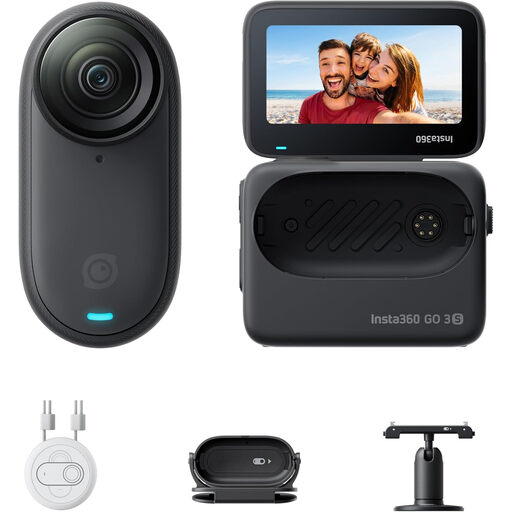
Insta360 GO 3S 128GB mini camera

Insta360 GO 3S 128GB

The product name identifies it as a mini camera; check whether the composition and focus suit photographing both woven details and whole baskets.

128 GB; 4K; supplied Action Pod with screen and mounting accessories.

Joybuy

Frequently asked questions

Do I need a macro lens straight away for weaving details?

Not necessarily. First decide how large you want the detail to appear in the finished photo, then assess the lens you will actually use. According to OM Digital Solutions’ manual, the TG-7 has a close-up mode for shooting as close as 1 cm; Canon lists up to 1:2 magnification for its separate RF 35mm F1.8 IS Macro STM lens.

How can I keep the composition and colour consistent across a series of basket photos?

Use a stable set-up and adjust the white balance when the lighting changes. Canon describes white balance settings for colour reproduction; assess the result with your own materials and lighting.

What can I do if the camera does not work properly after I buy it?

When you buy as a private individual in the Netherlands, you are entitled to receive a product that is fit for purpose. According to the Dutch government, the Netherlands has no fixed statutory guarantee period; if there is a defect, repair, replacement or a refund may be possible, depending on the applicable terms. Keep your proof of purchase and report the problem to the seller.

Can I return a camera bought online?

For many consumer distance purchases, you have a 14-day cooling-off period. The Dutch government lists exceptions; before buying, check the seller’s information and whether you are making a consumer purchase from a trader.

Can I publish photos that show identifiable people?

Not automatically. The Dutch Data Protection Authority describes identifiable images of people as personal data; before publishing, check which GDPR legal basis applies to your specific use. This information does not establish a general requirement to obtain consent from people for photos showing only a basket.
