
Vandaag of morgen in huis

Kwaliteit gegarandeerd

Welkomstaanbiedingen ontgrendelen: GRATIS bezorging | Tot 80% korting | Gratis 30 dagen JoyPlus-proefperiode
Download de app
A wireless mouse gives you a tidy desk and greater freedom of movement. However, not every mouse is suited to the same task. An esports model has different requirements from a quiet mouse for a shared workspace. Terms such as “ultralight,” “high DPI” and “ergonomic” can also create an overly favourable impression if you do not look at the complete specifications.
In this buying guide, I cover the most important pitfalls, technical features and popular choices for gamers, remote workers, students and users with multiple devices.
A mouse with 35,000 or 44,000 DPI sounds impressive, but most users work and game at much lower settings. DPI determines cursor sensitivity, not automatically accuracy or comfort. Also consider the sensor, adjustment options and the way you use the mouse.
For office work, 800 to 2,400 DPI is usually sufficient. For gaming, adjustable DPI can be more practical, especially when switching between strategy, action and FPS games.
A wireless mouse can connect via Bluetooth, a 2.4GHz USB receiver or both. Bluetooth is convenient for laptops, tablets and devices without a spare USB port. A USB receiver can be appealing for gaming because the connection is often established directly, without Bluetooth pairing.
Check the following in advance:
An ergonomic wireless mouse can be comfortable, but its shape must suit your hand and grip. A vertical mouse also requires some adjustment. Pay attention to the dimensions, weight and whether the model is designed exclusively for right-handed use.
A symmetrical mouse is often more versatile for left- and right-handed users. A larger vertical mouse may be less suitable for smaller hands or users who frequently work on the go.
Most modern mice use an optical sensor. DPI indicates how much cursor movement is registered when the mouse is physically moved. A higher value is not automatically more useful; adjustable increments matter more than the maximum figure.
The polling rate indicates how often the mouse sends data to the computer. 1,000Hz is a common value for gaming. Some wireless gaming mice support 4,000Hz or 8,000Hz. This can improve response handling, but it often requires more power as well as support from the computer and software.
A rechargeable wireless mouse means you do not have to replace AA or AAA batteries regularly. Check the charging port, stated runtime and whether the mouse remains usable while charging.
Models with replaceable batteries can be practical when you are away from a power outlet or USB cable for extended periods. Battery-life claims depend on the connection mode, lighting, polling rate and usage. Treat them as an indication from the product information, not as a guaranteed runtime.
A mouse with programmable buttons is useful for macros, shortcuts and functions in games or creative software. Check whether the configuration software works with your operating system. With some models, advanced settings are available only in Windows or only when the mouse is connected in wired mode.
Also pay attention to the keyboard layout when buying a wireless keyboard and mouse set. The Trust Ody II, Trust Trezo Comfort and Rapoo 9010M in this selection use a US/QWERTY layout. This may differ from the Dutch ISO/QWERTY layout.
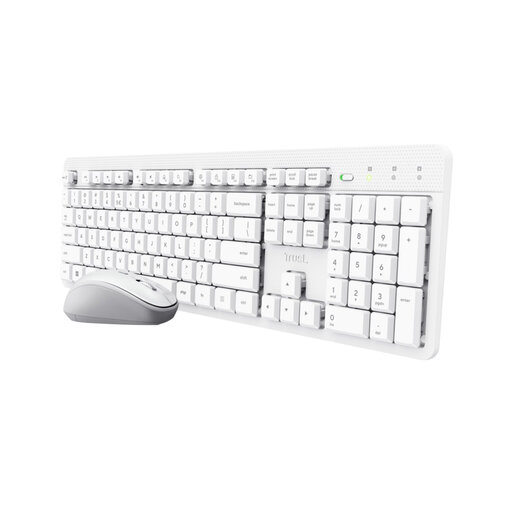
Why it fits: A practical choice for students, remote workers and families looking for a complete set at a reasonable price.
The mouse offers adjustable cursor sensitivity from 800 to 1,600 DPI. The set uses a single stowable USB receiver.
Quiet keys and mouse buttons, media controls and compatibility with Windows, macOS, Linux and ChromeOS.

Why it fits: Designed for right-handed FPS players who prioritise low weight and a high polling rate.
The listed weight is 54 grams, while the product information specifies a maximum polling rate of 8,000Hz.
Optical sensor, six buttons, programmable functions and a rechargeable battery. According to Razer, the stated battery life is up to 95 hours.
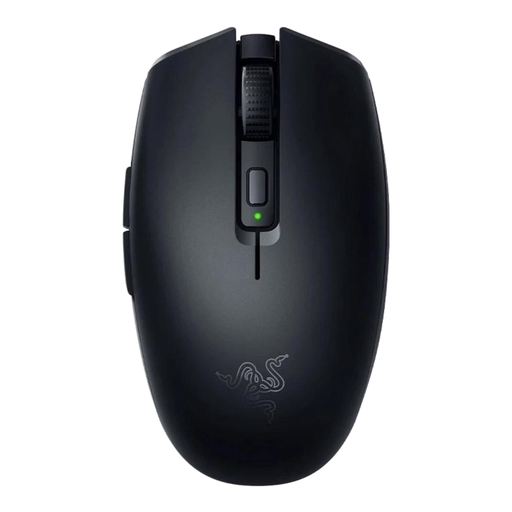
Why it fits: Compact hardware for users who game in multiple locations or want to use Bluetooth for everyday work.
You are not limited to a single connection: this model supports Bluetooth and Razer HyperSpeed Wireless.
According to the product specifications, the mouse weighs 60 grams, features six programmable buttons and has a sensor capable of up to 18,000 DPI.

Why it fits: For right-handed remote workers and office professionals looking for a vertical design and multiple connection options.
The design is clearly described as vertical, with an angle of 57 degrees. However, make sure this position suits your hand.
Bluetooth and a USB receiver, an adjustable sensor of up to 4,000 DPI and a rechargeable battery. Logitech states up to four months of use per charge.
Explore a current selection of products and accessories to complete your computer setup.
That depends on your device. Bluetooth saves a USB port and works well with laptops and tablets. A 2.4GHz receiver is practical for desktops and gaming. Above all, check that the receiver will not easily get lost and whether the mouse has a dedicated storage compartment.
Lifespan depends on the switches, battery usage, transport and maintenance. A rechargeable wireless mouse contains an internal battery that may lose capacity over time. With a model that uses AA or AAA batteries, you can replace the power source. Treat the stated battery life as a guideline and switch the mouse off when you are not using it.
Yes, but consider the click noise, shape and battery strategy. A gaming mouse with a high polling rate, RGB lighting and numerous buttons may be unnecessary for office work. In a shared workspace, a quiet mouse or a multi-device mouse is often more practical. Start by considering your everyday usage, then compare DPI, weight and additional features.
