
Vandaag of morgen in huis

Kwaliteit gegarandeerd

Welkomstaanbiedingen ontgrendelen: GRATIS bezorging | Tot 80% korting | Gratis 30 dagen JoyPlus-proefperiode
Download de app
A wireless mouse keeps your desk tidy and gives you more freedom to move. However, not every model is suited to every situation. A compact laptop mouse can become uncomfortable during long working days, while a heavy gaming mouse may be unnecessarily large for simple office tasks.
Marketing claims can also make it harder to compare models. Focus instead on verifiable specifications, connectivity options and the shape of the mouse.
A mouse with a high DPI can move the cursor across the screen more quickly. That doesn’t automatically mean you’ll work or game more accurately. For office work, an adjustable setting of around 800 to 3200 DPI is often enough. Gamers may place more importance on a higher maximum DPI, an adjustable polling rate and a sensor suited to their playing style.
So don’t look only at the highest number. Check whether you can adjust the DPI easily and whether the software is available for your operating system.
A wireless mouse can connect via a 2.4GHz USB receiver, Bluetooth or both. A USB receiver usually works as soon as you plug it in, but it does take up a USB port. Bluetooth is handy for a laptop, tablet or Mac without a spare USB-A port.
A multi-device mouse can pair with several devices, but check how many can actually be connected at the same time. For example, according to its product specifications, the Trust Ozaa+ supports up to three devices via a USB receiver and Bluetooth.
Long battery life sounds appealing, but it’s also worth checking the power source. A model with an AA battery can be convenient if you don’t want to use a cable. A rechargeable mouse saves you from having to replace batteries, but it does need charging from time to time.
Also check whether you can use the mouse while it’s charging. Some models can be used via the USB cable; on others, the cable is mainly for charging.
The shape of a mouse has a big impact on how comfortable it feels. A compact mouse for laptop use is easy to carry around, but offers less support for a larger hand. A larger model gives you more palm support, but takes up more space.
Always check whether the mouse is designed for right-handed, left-handed or ambidextrous use. The Logitech Signature M650 L, for example, is specifically designed for left-handed users with larger hands. A vertical mouse, such as the Trust Bayo II or Logitech MX Vertical, also requires a different hand position. It may take a little time to get used to.
Check which connection options are available:
Also check compatibility with Windows, macOS, ChromeOS, Android or iPadOS. Programmable buttons sometimes work only with specific software or in wired mode. According to the product information, the software supplied with the ET Wireless Gaming Mouse is available for Windows only and only for wired use.
DPI determines the cursor speed. Adjustable DPI is more useful than simply having a high maximum setting. For a gaming mouse, weight, sensor, polling rate and number of buttons also matter.
A programmable mouse lets you assign functions or macros to buttons. This can be useful for gaming, photo editing or complex spreadsheets. Do check the software requirements, though. More buttons also mean a larger mouse and potentially a longer adjustment period.
For quiet working, silent switches matter more than high DPI. A quiet mouse such as the Trust Yvi+ or Trust Ozaa+ is better suited to a shared home office, library or workplace.
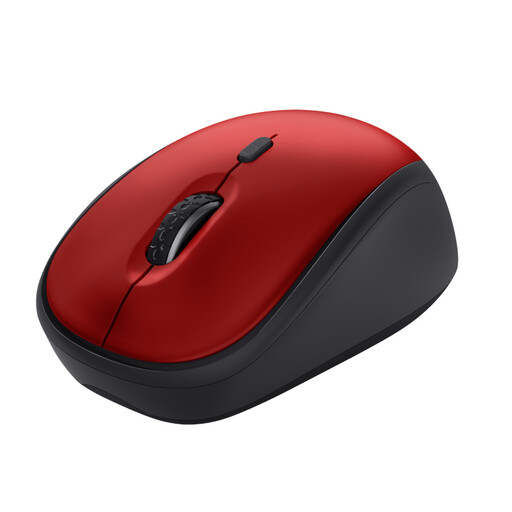
Why it suits this profile: A compact mouse for everyday tasks, laptop use and general office work. The product specifications list a 2.4GHz connection, silent buttons and adjustable DPI from 800 to 1600.
You don’t pay for features you may not use. The plug-and-play USB receiver and simple DPI switch keep setup straightforward.
Silent clicks, a compact design and, according to the product specifications, battery life of up to 12 months.

Why it suits this profile: This wireless gaming mouse is aimed at players who care about weight, sensor resolution and connectivity. The listed specifications include a weight of 63 grams, up to 30,000 DPI and battery life of up to 90 hours.
The choice is based on specific details about weight, sensor, polling rate and connectivity, not just lighting or gaming design.
Lightweight design, an optical sensor with up to 30,000 DPI and HyperSpeed Wireless, according to the product description.
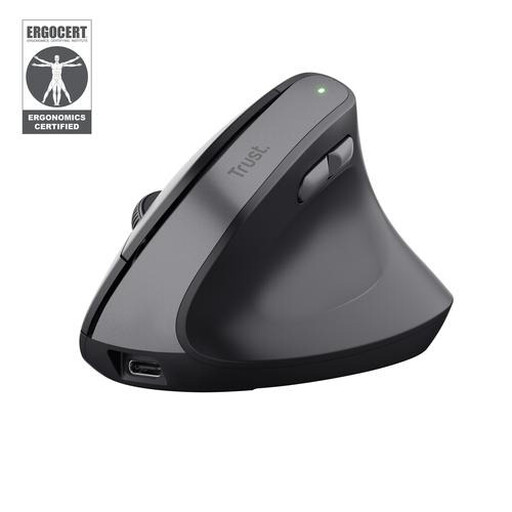
Why it suits this profile: This vertical mouse is designed for right-handed home workers and office professionals who want to try a different wrist position. According to the product information, it has a 57-degree angle.
Its vertical shape makes it clear that this isn’t an all-purpose gaming mouse. Its maximum DPI of 2400 is better suited to office and home working than competitive gaming.
Wireless 2.4GHz connection, rechargeable battery and silent buttons, according to the product description.

Why it suits this profile: This mouse is a good choice if you switch between a laptop, PC and tablet. Its product specifications list support for up to three paired devices, Bluetooth, a USB receiver and a horizontal scroll wheel.
You don’t have to choose between Bluetooth and a receiver. Having both is useful at a permanent workstation with several devices.
Rechargeable battery, silent buttons and a sensor with up to 3200 DPI, according to the product information.
We’ve put together a complete, up-to-date list of products that meet these strict selection criteria and comply with current European safety regulations.
Not always. A Bluetooth mouse only works if Bluetooth is available and enabled on your laptop. A model with a USB receiver needs a compatible USB port or adapter. Check which operating systems are supported before you order, too.
It varies by model and how you use it. According to the product specifications, a mouse with an AA battery can last for months, while a rechargeable mouse has a stated usage time per charge. RGB lighting, high polling rates and intensive use can affect battery life.
Yes, but check the connection, polling rate, sensor and weight. For fast-paced games, a gaming mouse with a 2.4GHz connection or wired mode is generally more practical than a basic Bluetooth model. For office work, silent buttons, ergonomics and battery management are often more important than an exceptionally high DPI.
