
Vandaag of morgen in huis

Kwaliteit gegarandeerd

Welkomstaanbiedingen ontgrendelen: GRATIS bezorging | Tot 80% korting | Gratis 30 dagen JoyPlus-proefperiode
Download de app
A wireless mouse gives you a tidier desk and greater freedom of movement. However, not every wireless model is automatically right for your needs. A mouse for a laptop requires different features from a model designed for long working days or fast-paced gaming sessions.
The biggest pitfalls often have less to do with appearance and more to do with connectivity, size and power supply.
A Bluetooth mouse works without a USB receiver, but your laptop or tablet must support Bluetooth. Older computers, business desktops and some docking stations may not support it, or may be less practical to use with Bluetooth. Check the following in advance:
A model with a 2.4GHz USB receiver is often easy to connect. A multi-device mouse can also be useful if you switch between a laptop, desktop and tablet.
DPI determines how sensitively the cursor responds to your hand movements. A high value is not automatically more useful. For office work, an adjustable setting of approximately 800 to 3200 DPI is sufficient for many users. Gamers may want more flexibility, particularly when playing different genres and using different screen resolutions.
Do not just look at the maximum DPI figure. Also consider:
An optical mouse generally works well on a suitable, flat surface. Glass or highly reflective surfaces can affect tracking.
Terms such as “silent”, “ergonomic” and “long battery life” should always be considered alongside the specific product specifications. According to Logitech, the clicks of the M330 Silent Plus are up to 90% quieter than those of regular mice. This is a claim made by the brand; the perceived reduction in noise may vary depending on the surface and usage conditions.
An ergonomic mouse will not suit every hand either. A vertical shape may take some getting used to, while a compact model may feel too small for prolonged use. Check the dimensions, weight and whether the model is specifically designed for left- or right-handed use.
A mouse with a USB receiver is usually practical for a desktop PC or laptop with USB-A. Bluetooth keeps a port free and is useful for tablets and slim laptops. A model with both connection types offers greater flexibility.
Multi-device functionality is useful for office work and working from home. However, check how you switch between devices. The Trust Ozaa+ uses a 2.4GHz receiver and two Bluetooth channels, allowing up to three paired devices.
For gaming, 2.4GHz is generally preferable to Bluetooth when low latency is important. A wireless gaming mouse with wired charging can continue to be used while it is charging.
A large model with full palm support can be comfortable for larger hands. A lightweight mouse weighing approximately 54 to 75 grams may be better suited to quick movements during gaming. There is no universally correct choice.
Consider the following:
If discomfort persists, it is worth reviewing your posture, desk height and breaks. A mouse can improve the fit, but it is not a medical solution.
A rechargeable mouse means you do not have to replace AA or AAA batteries regularly. Check the stated usage time, charging connection and whether you can continue using the mouse while it is charging.
With models that use disposable batteries, costs depend on battery life and battery type. For example, an HP 240 Bluetooth mouse uses one AA battery and states a battery life of up to 15 months. The Logitech M330 also uses a replaceable battery; Logitech states a battery life of up to 24 months for this model. These are stated figures under specific usage conditions and are not a guarantee for every usage pattern.
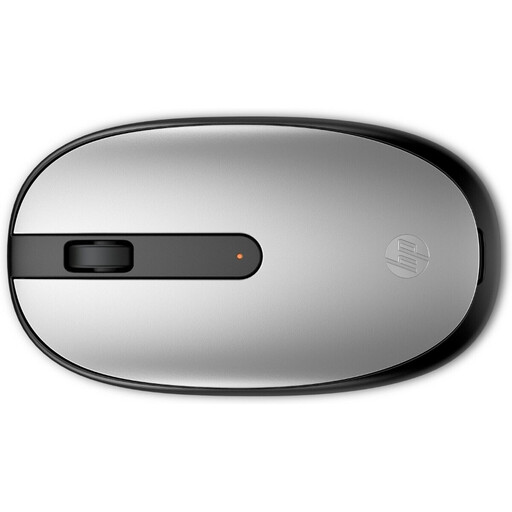
Why it suits this profile: A straightforward Bluetooth mouse for laptop users who do not want to use a USB dongle. Its ambidextrous design suits both left- and right-handed use.
The Bluetooth 5.1 connection and 1600 DPI sensor make the key features clear. However, check beforehand that your device supports Bluetooth.
54.2 grams, three buttons plus a scroll wheel, and support for Windows, macOS and ChromeOS.
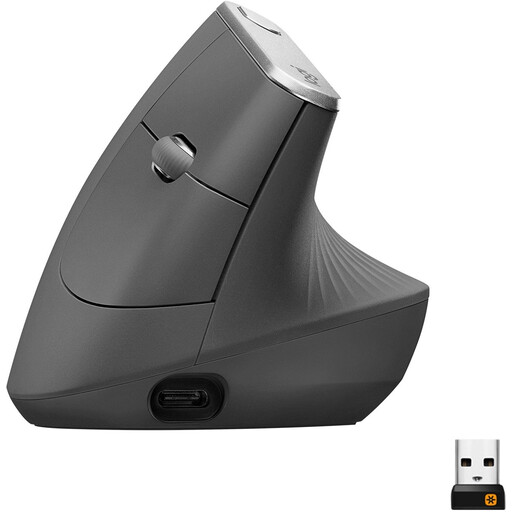
Why it suits this profile: Designed for users who spend a lot of time working at a screen and prefer a vertical, right-handed shape to a standard mouse.
The 57-degree angle, Bluetooth and included USB receiver are clearly specified. However, the vertical shape must suit your hand and working style.
Adjustable sensor up to 4000 DPI, rechargeable battery, multi-device use and fast charging.
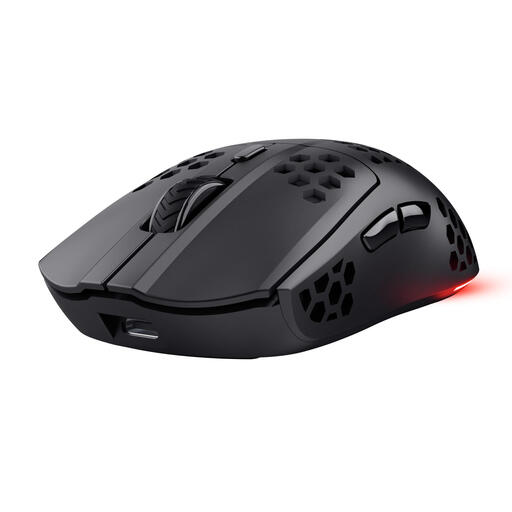
Why it suits this profile: A wireless gaming mouse for PC gamers who value low weight, adjustable DPI and programmable buttons.
The 2.4GHz connection, 1000Hz polling rate and weight of approximately 73 grams are clearly stated. This prevents RGB lighting alone from determining your purchase.
Optical sensor up to 4800 DPI, six programmable buttons and a stated battery life of up to 80 hours.
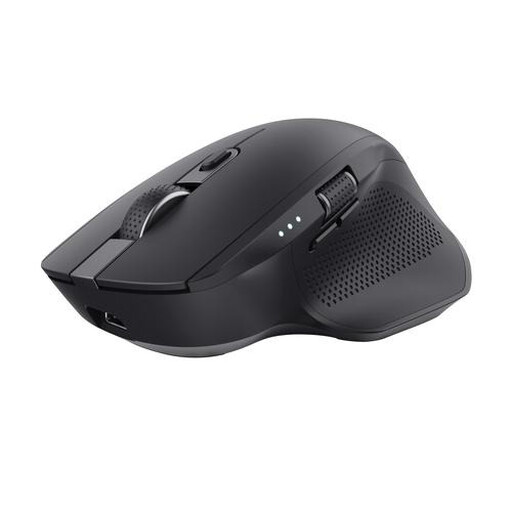
Why it suits this profile: A spacious wireless office mouse for users who frequently switch between a laptop, PC and tablet and work with large spreadsheets.
The product specification states that it supports three devices, has silent buttons, a rechargeable battery and a horizontal scroll wheel. Its large size makes it less suitable for travelling.
Adjustable DPI up to 3200, six buttons, side-to-side scrolling, and connection via RF plus Bluetooth.
We have put together a complete, up-to-date list of products that fully meet these strict selection criteria and the applicable European safety regulations.
No. A Bluetooth mouse requires Bluetooth support. A model with a USB receiver requires a suitable USB port. Also check that the operating system is supported, such as Windows, macOS or ChromeOS.
This varies considerably depending on the model and how it is used. Disposable batteries can last for months according to product specifications. A rechargeable mouse usually states its usage time per charge, such as the Trust GXT 929 Helox, which lasts for up to 80 hours. More intensive use, lighting and the connection method can affect the actual battery life.
Yes, provided the model has a suitable 2.4GHz connection, an accurate optical sensor and an appropriate polling rate. Also consider the weight, grip, DPI settings and number of programmable buttons. A standard Bluetooth mouse designed for office work is not automatically suitable for fast-paced games.
