
Vandaag of morgen in huis

Kwaliteit gegarandeerd

Welkomstaanbiedingen ontgrendelen: GRATIS bezorging | Tot 80% korting | Gratis 30 dagen JoyPlus-proefperiode
Download de app
A wireless mouse keeps your desk tidier and is handy for a laptop, home office or gaming PC. However, a cheap or poorly chosen wireless mouse can quickly disappoint. A connection that keeps dropping, a shape that does not suit your hand or a battery that needs replacing constantly are usually issues you only notice after purchase.
So do not focus solely on appearance or a high DPI rating. The right choice mainly depends on the connection, comfort, power type and the way you use the mouse.
DPI indicates how far the cursor moves with a particular hand movement. A high value is mainly useful for fast cursor movements or certain games. For word processing and browsing the internet, an adjustable setting of around 800 to 1600 DPI is often sufficient.
A mouse with adjustable DPI is more practical than a model with only a high fixed setting. You can then adjust the sensitivity to suit your screen size, software and preferences.
A Bluetooth mouse connects directly to a device that supports Bluetooth. You do not need a USB receiver, which is useful with slim laptops that have few USB ports.
An RF wireless mouse usually uses a 2.4GHz USB receiver. This is often straightforward: plug in the receiver and get to work. Do check that your computer has a suitable USB-A port. If your laptop only has USB-C, you may need an adapter.
Some models combine both options. A multi-device mouse can therefore be suitable for, for example, a laptop, desktop and tablet.
An ergonomic mouse should match your hand size, grip and working posture. A compact mouse is easy to carry around, but may be less comfortable if you have large hands. A vertical mouse offers a different grip from a traditional model and usually takes some getting used to.
Pay attention to the stated dimensions, weight and hand orientation. A right-handed model is not automatically suitable for left-handed use. If you work at a screen for long periods, you may also want to look for a shape that supports your hand in a relaxed position. This is not a substitute for personalised ergonomic advice.
First choose between:
Always check the supported operating systems. Windows, macOS, ChromeOS, iPadOS and Android do not all support the same functions. Programmable buttons may also require software that only works on Windows.
A mouse powered by AA or AAA batteries can last from several months to more than a year, depending on the model and how it is used. This is useful if you do not want to recharge it regularly. An rechargeable mouse, on the other hand, has a built-in battery and requires a USB cable.
Pay attention to the difference between “up to” and normal use. The stated usage time is a product specification based on certain conditions and may vary in practice. Also check whether the mouse can be used while it is charging.
An optical mouse works on many flat surfaces, but highly reflective or glass desks can affect tracking. A mouse mat may help in these situations.
Also look at:
A quiet mouse is useful in a shared workspace, library or bedroom. Claims such as “90% quieter” come from the brand’s product information; the perceived reduction in noise may vary depending on the user and surface.
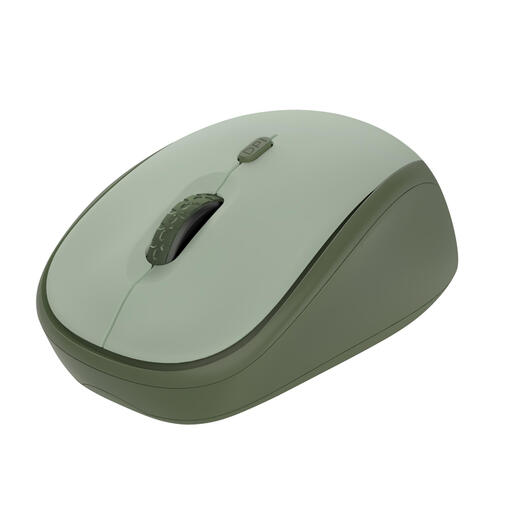
Why it suits this profile: This compact mouse is designed for office and home use. The 2.4GHz receiver connects via USB and the DPI can be adjusted from 800 to 1600.
You are not paying for gaming features you do not need. The product information states that it has quiet buttons and a range of up to 8 metres.
Optical sensor, three buttons, quiet clicks and, according to the product information, battery life of up to 12 months.
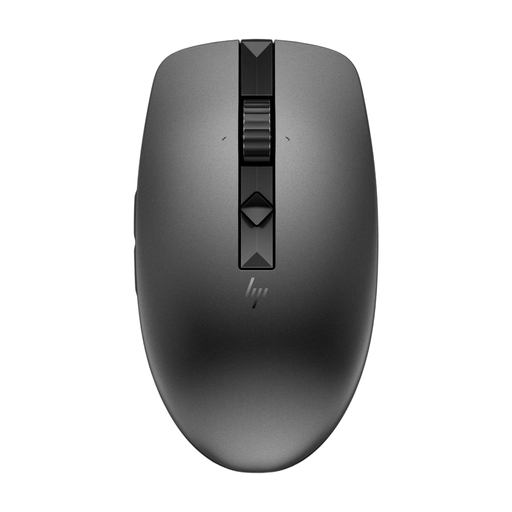
Why it suits this profile: This model is designed for people who regularly switch between a desktop, laptop and other devices.
You do not need to buy a separate mouse for every device. According to the product specifications, you can connect via a USB nano receiver and Bluetooth.
Four programmable quiet buttons, adjustable scrolling speed and stated battery life of up to 12 months.
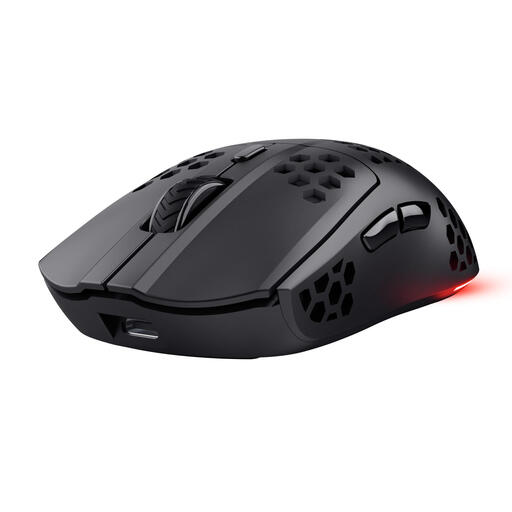
Why it suits this profile: This wireless gaming mouse is aimed at players who value low weight, programmable buttons and a rechargeable battery.
The specifications state that a USB-C cable lets you continue using the mouse while it charges. This means you are less reliant on wireless use alone.
Optical sensor up to 4800 DPI, six programmable buttons, RGB lighting and stated battery life of up to 80 hours.
We have put together a complete, up-to-date list of products that fully meet these strict selection criteria and the applicable European safety regulations.
Not every mouse works with every device. An RF model usually needs a USB-A port for the receiver. A Bluetooth mouse requires Bluetooth support and sometimes a specific system version. Before buying, check the compatibility list and available connections.
That depends on the type of mouse. Models with replaceable batteries can last for approximately 12 to 24 months according to the product specifications. A rechargeable gaming mouse often offers shorter usage time per charge, but can be charged directly via USB. Actual battery life varies depending on usage, settings and sleep mode.
Yes, but when choosing a gaming mouse, pay attention to the connection, polling rate, DPI range, weight and whether the buttons can be programmed. For competitive gaming, many users choose a 2.4GHz connection or a model with a wired backup. For office work, quiet clicks, comfort and battery life are generally more important than an extremely high DPI.
