
Vandaag of morgen in huis

Kwaliteit gegarandeerd

Welkomstaanbiedingen ontgrendelen: GRATIS bezorging | Tot 80% korting | Gratis 30 dagen JoyPlus-proefperiode
Download de app
A wireless mouse gives you more space on your desk and is handy for a laptop, PC or Mac. However, not every model is suitable for every use. A compact mouse for travelling may be less comfortable during long working days, while a wireless gaming mouse may offer more features than you need for straightforward office work.
Pay particular attention to these three common pitfalls:
A Bluetooth mouse is practical for a laptop or MacBook, as you generally do not need a free USB port. However, check that your device supports Bluetooth and that the mouse is compatible with your operating system.
A 2.4GHz connection with a USB receiver can be appealing for a mouse for PC or gaming. The receiver often needs to be connected directly or via an extension cable. If your laptop only has USB-C ports, it is important to check which type of receiver and connection are included.
A tri-mode mouse generally offers three options: wired via USB, wireless via 2.4GHz and Bluetooth. This is useful if you want to use the same mouse with several devices. Also check how many devices can be paired and how you switch between them.
DPI stands for dots per inch and indicates how sensitively the cursor responds to movement. For office work, adjustable settings of around 800 to 1,600 DPI are sufficient for many users. A high-DPI mouse is particularly useful if you want to move quickly across a large screen or use specific gaming settings.
The sensor and polling rate are also relevant for gaming. The polling rate indicates how often the mouse reports its position. A higher value can increase the input frequency, but it often places greater demands on the battery and computer. Also check whether advanced features only work with Windows software. This is important when you are looking for a mouse for Mac.
An ergonomic wireless mouse often has a curved body, thumb rest or additional support. The fit is a personal choice: pay attention to the mouse’s length and width in relation to your hand, and check whether the model is suitable for right- or left-handed use.
A lightweight gaming mouse weighing around 53 to 67 grams can support fast movements. A heavier office model may feel more stable. Also check the number of buttons. A programmable mouse is useful for shortcuts, macros, browser functions or creative software, but the settings may depend on a separate driver.
For shared workspaces, libraries or home offices, a silent mouse can be more pleasant to use. Check that the specification actually mentions silent clicks; a silent scroll function does not automatically mean that the main buttons are also quiet.
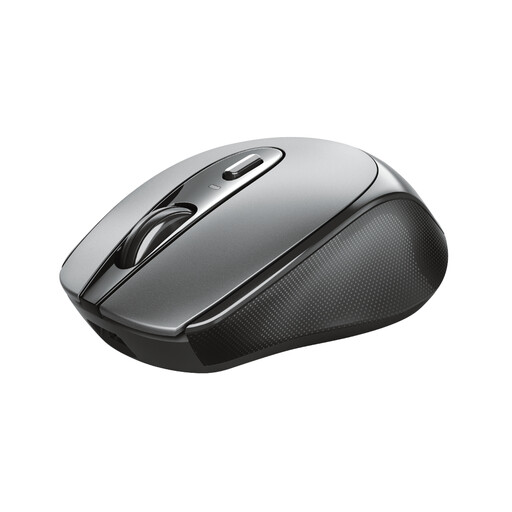
Why it suits this profile: This model offers a straightforward starting point for everyday use with a laptop or PC. Its symmetrical shape is suitable for both left- and right-handed users.
The product specification lists three DPI settings of 800, 1200 and 1600, so you are not limited to a single fixed sensitivity. The rechargeable battery eliminates the need for loose batteries.
Four buttons, USB receiver, USB-C charging, a 10-metre range and a weight of 72 grams.

Why it suits this profile: Business users working with multiple screens, spreadsheets or different devices get plenty of customisation options in a single mouse.
The connection is not limited to Bluetooth: the model supports Bluetooth and a Logi Bolt receiver. The specification also mentions silent clicks and three paired devices.
8,000 DPI, eight programmable buttons, horizontal scrolling, a rechargeable battery and support for glass surfaces according to the product specification.

Why it suits this profile: This is a compact wireless gaming mouse for players who prioritise low weight and a high adjustable sensor resolution.
The product specification states a weight of 53 grams and makes it clear that Bluetooth is not supported. You therefore know in advance that the mouse is primarily designed to use the supplied LIGHTSPEED receiver.
HERO 2 sensor, adjustable up to 44,000 DPI, polling rate of up to 8 kHz, five buttons and a stated battery life of up to 95 hours.
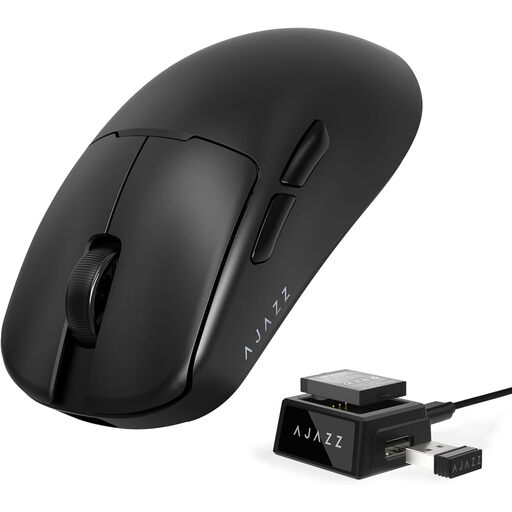
Why it suits this profile: Handy for users who switch between a PC, laptop and other devices and do both office work and gaming.
The tri-mode connection lets you switch between Bluetooth, 2.4GHz and wired use. The two replaceable batteries help limit interruptions, provided a charged spare is available.
54 grams, PAW3311 sensor, adjustable up to 24,000 DPI, 1,000Hz polling rate and programmable settings via a web driver.
We have put together a complete, up-to-date list of products that fully meet these strict selection criteria and the applicable European safety regulations.
That depends on the model. A Bluetooth mouse can be paired directly with a compatible device. A mouse with only a 2.4GHz connection usually requires a USB receiver. A tri-mode mouse often supports both options and can also be used wired.
Runtime varies according to the model and how you use it. According to the product specification, a rechargeable mouse may last from several weeks to several months, while a gaming mouse with a high polling rate or lighting may need charging more often. Treat the stated usage time as a guideline, not a fixed guarantee.
Yes, but pay attention to the connection, polling rate, sensor and weight. For competitive games, a wireless gaming mouse with a dedicated 2.4GHz connection and adjustable polling rate may be appealing. For casual gaming and office work, a Bluetooth mouse with a comfortable shape may be sufficient.
