
Vandaag of morgen in huis

Kwaliteit gegarandeerd

Welkomstaanbiedingen ontgrendelen: GRATIS bezorging | Tot 80% korting | Gratis 30 dagen JoyPlus-proefperiode
Download de app
A wireless mouse keeps your desk tidier and is useful for working from home, studying and gaming. However, “wireless” says little about comfort, connectivity or running costs. For example, an inexpensive model may work perfectly well in the office but be less suitable for everyday use with multiple devices.
Pay particular attention to these common pitfalls:
A Bluetooth mouse connects directly to a device. This is useful for laptops and tablets because you do not need to keep a USB port free. However, check beforehand that your operating system is supported and that pairing is straightforward.
A wireless mouse with a USB receiver usually uses a 2.4GHz connection. You plug the receiver into a USB-A port and can often get started straight away. This is practical for a desktop PC or work laptop with a spare port. A nano or micro receiver can also be stored in the mouse, making it less likely that you will lose it.
Do you work with a laptop, PC and tablet? Choose a multi-device mouse. Check how many devices can be connected at the same time and how you switch between connections. On some models, this is done using a button on the underside; on others, there is a separate switch.
DPI stands for dots per inch and indicates how far the cursor moves with a particular hand movement. A mouse with adjustable DPI offers flexibility:
An optical sensor generally works well on a standard mouse mat or a matt desk surface. Tracking can be less predictable on glass, mirrored desks or highly reflective surfaces. So also check whether the manufacturer specifies any limitations regarding surfaces.
An ergonomic mouse should suit your hand size and working posture. A vertical shape, such as that of the Logitech MX Vertical, takes a short period of adjustment but is clearly different from a traditional design. Also check whether the model is designed for right- or left-handed use.
A quiet mouse can be useful in a shared workspace. “Quiet” usually refers to the clicking sound of the left and right buttons; the scroll wheel and additional buttons may sound different. If you work with large spreadsheets for long periods, horizontal scrolling may be beneficial.
When it comes to power, you essentially have two options:
Also check whether you can continue working while the mouse is charging. This is particularly relevant for a gaming mouse or if you use the mouse intensively.
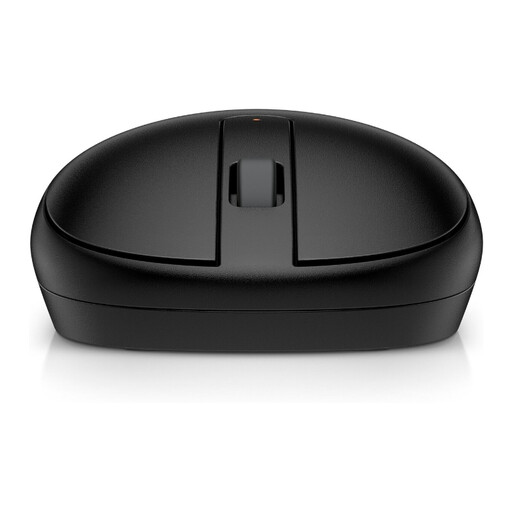
Why it suits this user profile: This compact mouse works via Bluetooth 5.1 and, according to the product specifications, does not require a USB dongle. With 1600 DPI, three buttons and a symmetrical shape, it is suitable for everyday use with a laptop.
The connection and DPI value are clearly specified. However, check beforehand that your laptop supports Bluetooth.
Bluetooth 5.1, 1600 DPI and suitable for left- and right-handed use.

Why it suits this user profile: This right-handed model has a vertical shape with an angle of 57 degrees, Bluetooth and a 2.4GHz connection via a USB receiver. The rechargeable battery and adjustable sensor of up to 4000 DPI make it suitable for extended computer use.
The vertical shape is clearly specified. Only choose this model if the hand position and right-handed design suit you.
Vertical design, two wireless connection options and a rechargeable battery.

Why it suits this user profile: This gaming mouse uses 2.4GHz, has an optical sensor of up to 4800 DPI, six programmable buttons and a stated polling rate of 1000 Hz. According to the product specifications, the mouse weighs approximately 73 grams.
The relevant gaming specifications are listed separately. Bear in mind that this model is designed for right-handed use and is not primarily focused on quiet office use.
4800 DPI, six programmable buttons and a rechargeable battery with USB-C.

Why it suits this user profile: According to the product specifications, you can connect this mouse to up to three devices via a 2.4GHz receiver and two Bluetooth channels. The additional side-scrolling button is designed for wide spreadsheets and timelines.
The number of connections, dimensions and rechargeable battery are clearly specified. Its larger size makes it less suitable for small hands or transport.
Up to three devices, horizontal scrolling, quiet buttons and adjustable DPI up to 3200.
We have put together a complete, up-to-date list of products that fully meet these strict selection criteria and the applicable European safety regulations.
Not always. A Bluetooth mouse only works when Bluetooth is supported by the laptop. A model with a USB receiver usually requires a free USB-A port. Also check the operating systems listed, such as Windows, macOS or ChromeOS.
This varies by model. Manufacturers sometimes state a usage time of several months, but actual battery life depends on usage, sleep mode and battery type. A rechargeable mouse eliminates the need to buy loose batteries, while a model with an AA or AAA battery is quickly ready to use again after replacement.
Yes, provided the connection, polling rate, sensor and shape suit your games. A gaming mouse with a 2.4GHz receiver, adjustable DPI and programmable buttons is generally a more sensible choice for fast-paced games than a basic Bluetooth office mouse. Also consider the weight, hand shape and whether you can continue playing while it charges.
