
Vandaag of morgen in huis

Kwaliteit gegarandeerd

Welkomstaanbiedingen ontgrendelen: GRATIS bezorging | Tot 80% korting | Gratis 30 dagen JoyPlus-proefperiode
Download de app
A wireless mouse keeps your desk tidy and gives you more freedom to move. But not every wireless mouse is suitable for everyday use. A model may look compact, yet feel uncomfortable during long working days. A high DPI rating might sound appealing, even though you’re unlikely to need that speed for office work. A Bluetooth mouse can also be handy, but not every device supports Bluetooth without an extra adapter.
Use these practical tips to avoid choosing the wrong mouse. Find out what to look for in connectivity, sensor, hand shape, battery and intended use.
DPI indicates how far the cursor moves when you move the mouse. A higher value mainly means that the cursor responds faster. For word processing, spreadsheets and browsing, a range of around 800 to 1600 DPI is often enough. A mouse with adjustable DPI is useful if you switch between different tasks.
An optical mouse with 1000 DPI can be perfectly suitable for office work. For large screens, creative software or users who prefer fast cursor movement, an adjustable setting of up to 2400 or 3200 DPI can offer more flexibility.
An RF wireless mouse usually works via a small 2.4 GHz USB receiver. This is practical for computers and laptops with a spare USB port. A Bluetooth mouse connects directly to devices that support Bluetooth, so you don’t need to use a receiver.
So, check the following in advance:
Some models support both Bluetooth and RF. This is useful if you switch between a laptop, desktop computer and tablet.
A compact mouse is easy to carry around, but may feel too small for larger hands. A larger ergonomic mouse offers more palm support, but takes up more space in a laptop bag. Also consider handedness: a mouse for left- and right-handed users usually has a symmetrical shape, while a right-handed model is designed to suit a specific grip.
For extended use, the dimensions, weight and shape matter more than a striking design. A quiet mouse is also useful in a shared workspace, library or home office.
A 2.4 GHz connection with a USB receiver is generally plug and play. According to the product details, the Logitech 910-002201 has a range of up to 10 metres and comes with a nano receiver. The Trust Yvi+ uses RF and has a stated range of 8 metres. In practice, walls, other wireless devices and the receiver’s position can affect the range.
Bluetooth is especially useful if you want to keep your USB ports free or use multiple devices. The Trust Ozaa and Ozaa+ combine Bluetooth with a USB receiver and can pair with up to three devices, according to the product description.
Most models in this selection use an optical sensor. For best results, use the mouse on a flat, clean surface. Don’t focus solely on the maximum DPI figure; consider how easily you can adjust the speed.
A mouse that uses AA or AAA batteries is ready to use straight away, but you’ll need to keep spare batteries handy. A rechargeable mouse has a built-in battery and charges via a USB cable. Check the stated battery life and whether you can continue using the mouse while it charges.
Clean the underside, sensor opening and scroll wheel with a soft, dry cloth. Avoid liquids and don’t drop the mouse. Battery life also depends on how you use the mouse, its power-saving features and the quality of the batteries.
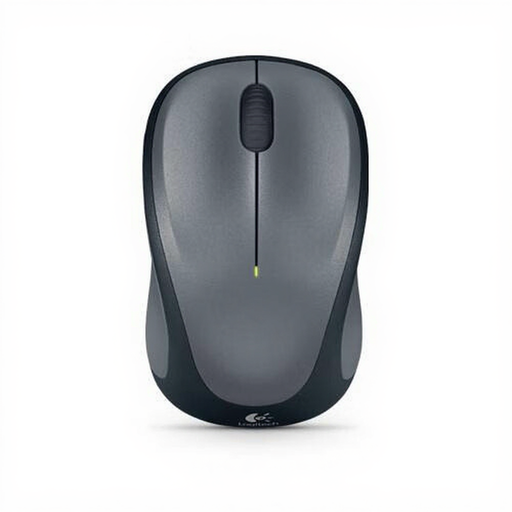
Why it suits this user: A straightforward mouse for working from home, studying and everyday office tasks. Its symmetrical shape suits both left- and right-handed users.
No unnecessary DPI claims or extra software: the optical sensor works at 1000 DPI, and the controls are limited to three buttons and a scroll wheel.
2.4 GHz RF, a range of up to 10 metres according to the product details, a weight of 86 g and one AA battery included.

Why it suits this user: For office professionals who switch between a laptop, desktop computer and tablet, and regularly work with wide spreadsheets or timelines.
Combining RF and Bluetooth means you’re not tied to a single connection type. The side-scrolling function is handy for wide documents.
Connects to up to three devices, optical sensor up to 3200 DPI, quiet buttons and a rechargeable battery with LED indicator, according to the product information.
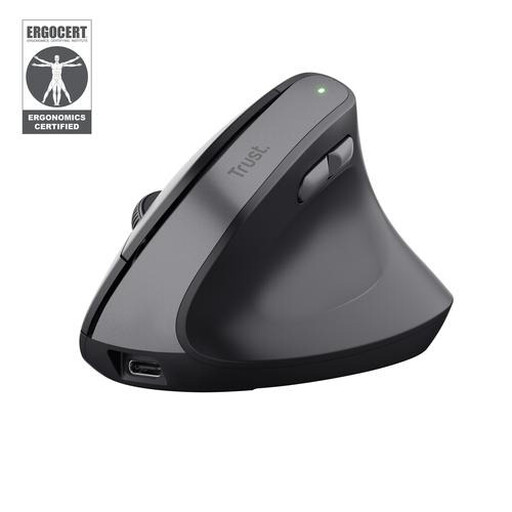
Why it suits this user: For right-handed users who deliberately choose a vertical shape, quiet buttons and adjustable cursor speed.
Its handedness and vertical angle are clearly specified, so you know in advance that this isn’t a symmetrical or universal mouse.
RF receiver, DPI settings from 800 to 2400, rechargeable battery and two thumb buttons, according to the product specifications.
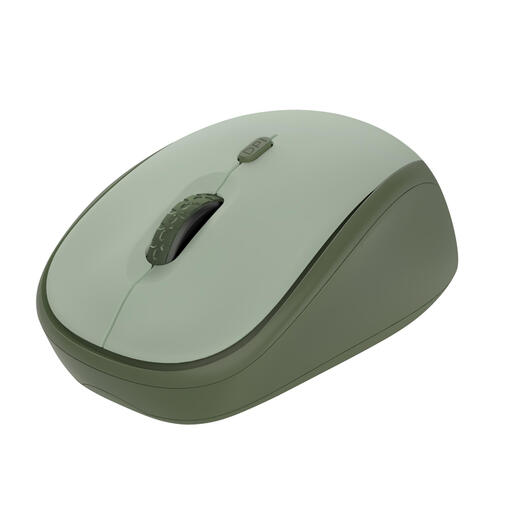
Why it suits this user: Its compact shape makes it suitable for students, flexible workers and anyone who regularly takes their mouse with them.
The specifications give both the compact size and the handedness, so you can judge in advance whether the shape suits your grip.
RF connection, quiet buttons, DPI from 800 to 1600 and a battery life of up to 12 months, as stated by Trust.
We’ve put together a complete, up-to-date list of products that meet these strict selection criteria and comply with current European safety regulations.
Yes. An RF model communicates directly with the USB receiver, while a Bluetooth mouse connects to your device’s Bluetooth system. You don’t need an internet connection. Just make sure the correct receiver is plugged in or Bluetooth is switched on.
It varies depending on the model and how you use it. A mouse powered by AA or AAA batteries may last several months, according to the product information. You’ll need to charge a rechargeable mouse periodically; some models show the remaining charge with an LED. Actual battery life depends on usage, settings and battery condition.
Yes. An optical sensor is suitable for everyday tasks such as typing, browsing and working with spreadsheets. Focus on choosing the right DPI, a comfortable shape and a reliable connection. For a quiet workspace, quiet buttons may matter more than a high maximum DPI.
