
Vandaag of morgen in huis

Kwaliteit gegarandeerd

Welkomstaanbiedingen ontgrendelen: GRATIS bezorging | Tot 80% korting | Gratis 30 dagen JoyPlus-proefperiode
Download de app
A wireless mouse keeps your desk tidy and is handy with a laptop, home office or flexible workspace. However, many models look very similar. A low price may seem attractive, while the connection, shape or battery may not suit your needs in everyday use.
So don’t just focus on the appearance or claims such as “quiet” or “ergonomic”. Above all, check the connection, dimensions, sensor and power supply. Below, you’ll find out which features matter and which models suit different usage scenarios.
A Bluetooth mouse doesn’t use a USB receiver, but your laptop or computer must support Bluetooth. This feature is sometimes missing from desktop PCs. Also check whether the operating system is compatible and whether you can access the Bluetooth settings while pairing.
A mouse with a USB receiver often works immediately after being connected. On the other hand, you’ll need a free USB-A port. If your laptop only has USB-C ports, an adapter may be required.
DPI determines how quickly the cursor moves across the screen for the same hand movement. A mouse with adjustable DPI is practical when you switch between editing text, working with large spreadsheets and using a high-resolution monitor. However, a high maximum DPI doesn’t automatically make a mouse more accurate for office work.
For everyday use, a stable optical sensor, a suitable work surface and a comfortable shape are just as important. Also check the adjustment options: some models have one fixed resolution, while others offer several settings.
With a quiet mouse, noise reduction usually applies to the left and right mouse buttons. The scroll wheel or side buttons may still be audible. According to Logitech’s product information, the M330 is designed for quieter clicks; with other models, check which buttons are actually described as quiet.
Choose a wireless computer mouse based on your devices:
Also check the operating systems listed. According to the product information, a model may be suitable for Windows, macOS and ChromeOS, but features such as programmable buttons may depend on additional software.
A compact wireless mouse is easy to carry around, but offers less room for a full-sized hand. A larger model may feel more comfortable during long working days, while a slim shape is better suited to smaller hands or a laptop sleeve.
Pay attention to hand orientation. An ambidextrous mouse can be used by both left- and right-handed users. A vertical or strongly contoured ergonomic mouse is often designed specifically for left- or right-handed use. Also check the height, width and weight rather than relying solely on the term “ergonomic”.
A mouse powered by AA or AAA batteries needs to be replaced periodically. A rechargeable mouse has a built-in battery and needs to be charged using a cable. So look at:
Actual battery life depends on usage, settings and sleep mode. Keep loose batteries and small USB receivers out of the reach of young children, and dispose of used batteries according to local collection regulations.
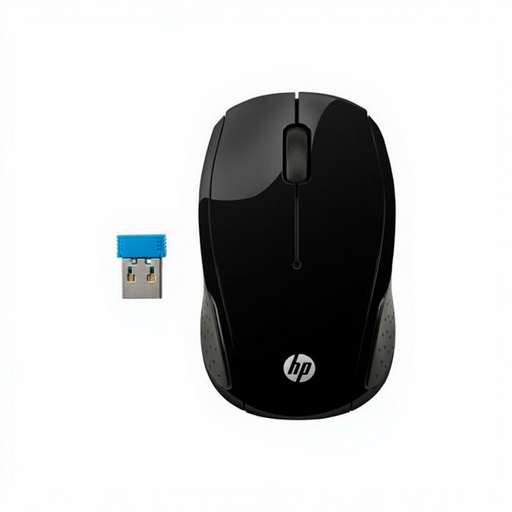
Why it suits this profile: A straightforward mouse for a PC or laptop with a USB-A port, with no additional software installation required.
The 2.4GHz connection uses the included USB receiver. The fixed optical resolution of 1000 DPI means you don’t pay for features you don’t need.
Ambidextrous design, optical sensor, two AAA batteries included, and compatibility with Windows, macOS and ChromeOS according to the product information.

Why it suits this profile: Designed for office professionals who work with multiple devices and wide spreadsheets.
The specifications list connections for three devices, quiet buttons and a rechargeable battery. This means you don’t have to choose between multi-device functionality and fewer cables on your desk.
Optical sensor up to 3200 DPI, six buttons, horizontal scroll wheel and dimensions of 120 × 75 × 45 mm according to the product information.

Why it suits this profile: For right-handed users looking for a vertical design, multiple connection options and a rechargeable battery.
The design and hand orientation are clearly stated, so you don’t have to rely solely on the word “ergonomic”. The mouse works via Bluetooth or a Unifying USB receiver.
Adjustable sensor up to 4000 DPI, rechargeable battery, five buttons and a stated wireless range of up to 10 metres.
We’ve put together a complete, up-to-date list of products that fully meet these strict selection criteria and the applicable European safety regulations.
It depends on your device. Bluetooth saves a USB port and is practical for laptops and tablets. A mouse with a USB receiver is often simpler to use with computers featuring USB-A. A dual-mode or multi-device mouse combines both options.
Its lifespan depends on the battery or batteries, buttons, scroll wheel and frequency of use. Manufacturers often provide an estimated battery life, but this isn’t a guarantee for every working environment. A rechargeable mouse has charging cycles; a model with replaceable batteries remains usable once you fit new batteries.
With a model that uses disposable batteries, you’ll pay periodically for AA or AAA batteries. A rechargeable model requires power and uses a charging cable, but doesn’t need loose batteries. So don’t just compare the purchase price; also consider the battery type, expected battery life and availability of replacement parts.
