
Vandaag of morgen in huis

Kwaliteit gegarandeerd

Welkomstaanbiedingen ontgrendelen: GRATIS bezorging | Tot 80% korting | Gratis 30 dagen JoyPlus-proefperiode
Download de app
A wireless mouse gives you more space on your desk and is handy for a laptop, PC or workstation that you move around regularly. However, models vary considerably in their connection, comfort, battery life and controls. A low price doesn’t automatically mean you’re making a bad purchase, but an attractive design or high DPI figure isn’t a guarantee that a mouse is right for you either.
Watch out for these three common pitfalls:
For a wireless mouse for a laptop, Bluetooth and 2.4GHz are the most common options. Bluetooth is handy if you don’t want to use a USB port, for example with a slim laptop. Check the required Bluetooth version and operating systems, though.
A 2.4GHz model uses a small USB receiver. It often works as soon as you plug it in, but you may need an adapter if your laptop only has USB-C ports. A dual-mode model combines Bluetooth and 2.4GHz. This is useful if you switch between a laptop, PC and tablet.
Check the official compatibility list too. According to the product information, the Lofree EP115 supports macOS 10.15+, Windows 8+, iPadOS, iOS and Android, among other systems, but it doesn’t work with Boot Camp dual-system mode on Mac devices.
DPI determines how far the cursor moves in response to a given hand movement. A mouse with adjustable DPI is versatile for word processing, photo editing and gaming. For office work, several settings between around 800 and 3200 DPI are often useful. Gamers may place more importance on a higher setting and an adjustable polling rate.
However, a higher number isn’t automatically more useful. Check the sensor type, the available DPI steps and whether you change the setting with a button or software. For a wireless mouse for a PC, connection stability also matters, especially during fast movements.
A compact wireless mouse fits easily into a laptop bag, but may offer less support for a larger hand. A larger model with a rubberised grip can be more comfortable in the office, while a lightweight gaming mouse supports fast movements.
Look out for:
When it comes to claims about quietness or ergonomics, it’s worth checking who made them. For example, Logitech says that the M330’s clicks are more than 90% quieter than traditional mouse clicks, according to its own product information. HP claims up to 90% noise reduction for the HP 285, according to its product information. These are brand claims; the noise you experience may vary depending on your surroundings and the surface you use the mouse on.
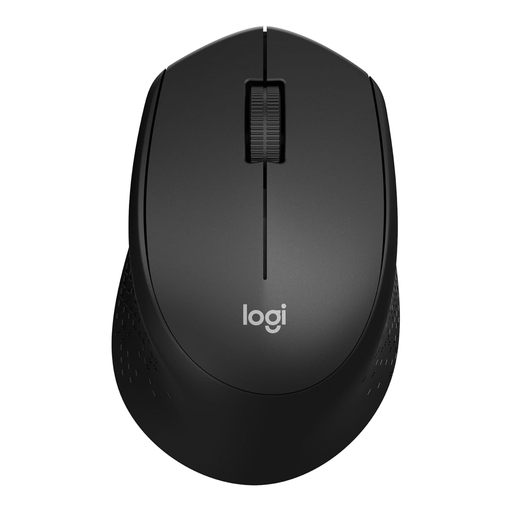
Why it suits this profile: This wireless mouse uses a 2.4GHz nano receiver and works straight away via USB. That makes it a straightforward choice for everyday computer use at home or in the office.
The product information states a range of up to 10 metres and battery life of up to 24 months. Bear in mind that this model uses batteries.
Optical sensor, 1000 DPI, three buttons and clicks that are more than 90% quieter, according to Logitech.
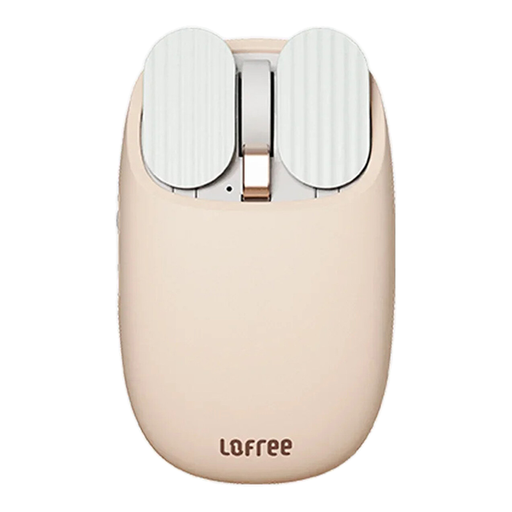
Why it suits this profile: The combination of Bluetooth and 2.4GHz suits users who operate several devices and value adjustable sensitivity.
The connection options and five DPI settings are clearly listed. Check system compatibility beforehand, especially if you use a Mac with Boot Camp.
PAW3220LU sensor, 800–3600 DPI, built-in 800mAh battery and around one month of use according to the product information.

Why it suits this profile: This wireless gaming mouse is designed for PC and laptop gamers looking for a lightweight design, programmable buttons and a 2.4GHz connection.
The specifications list the weight, polling rate, DPI range and battery life separately. This model is designed for right-handed users, so it won’t suit everyone.
Around 73 grams, up to 4800 DPI, 1000Hz polling rate, six programmable buttons and a built-in battery offering up to 80 hours, according to the product information.

Why it suits this profile: According to the product information, this multi-device mouse can connect to up to three devices via 2.4GHz and two Bluetooth channels. The extra horizontal scroll is handy for spreadsheets.
The product information clearly lists the connections, size and intended uses. Its larger design is less suited to anyone looking for a compact travel mouse.
Up to 3200 DPI, rechargeable battery, quiet buttons and a horizontal scroll function for wide documents.
We’ve put together a complete, up-to-date list of products that meet these strict selection criteria and current European safety regulations.
No. A Bluetooth mouse requires your laptop to support Bluetooth. A model with a USB receiver needs a compatible USB port. Also check whether Windows, macOS, ChromeOS or another operating system is supported.
It depends on the model and how you use it. Product specifications include examples of around 12 to 24 months when using AA or AAA batteries. According to product information, a rechargeable mouse may last from a few weeks to several months on a single charge. Manufacturer figures are estimates; intensive use, lighting and power-saving settings affect actual battery life.
Yes, if it offers a stable 2.4GHz connection, a suitable sensor, adjustable DPI and, ideally, a 1000Hz polling rate. For competitive gaming, programmable buttons and a low weight are often more important than lighting alone. Also check software compatibility and make sure the model suits your hand and grip.
