
Vandaag of morgen in huis

Kwaliteit gegarandeerd

Welkomstaanbiedingen ontgrendelen: GRATIS bezorging | Tot 80% korting | Gratis 30 dagen JoyPlus-proefperiode
Download de app
A wireless mouse gives you more freedom of movement at your desk, but not every model suits every user. A small mouse can be convenient on the go, but less comfortable during long working days. A silent mouse is useful in the office, while a gaming mouse needs to excel in low latency and accurate tracking.
When comparing models, don’t just focus on appearance or a high DPI figure. The connection, hand shape, power supply and software all determine whether a wireless computer mouse remains comfortable to use in practice.
DPI determines how quickly the cursor moves across the screen. A mouse with 4000, 8000 or even 24,000 DPI isn’t automatically more accurate for office work. For word processing, spreadsheets and browsing, a stable sensor with adjustable sensitivity is often more important than an extremely high maximum.
So check:
A mouse with adjustable DPI is particularly useful if you switch between general work, image editing and gaming.
A wireless mouse can work via Bluetooth, a 2.4GHz USB receiver or both. A USB receiver is often straightforward: plug it in and start using the mouse. Bluetooth is more convenient for a laptop or tablet without a free USB-A port.
Before buying, check:
A multi-device mouse is practical if you switch between a laptop, desktop and tablet. However, check how you switch between devices and how many devices can actually be actively connected.
An AA-battery mouse may last for months according to the product specifications, but you’ll need to keep spare batteries available. An rechargeable mouse avoids having to buy batteries regularly, but it does need to be connected to a USB cable from time to time.
Pay attention to the difference between:
According to Logitech, the M330 Silent Plus offers up to 24 months of battery life. The HP 285 Silent is specified as lasting for up to 18 months. These are stated figures; actual usage depends on factors including the settings and how frequently the mouse is used.
A standard mouse works well for many users, but if you spend hours in front of a screen every day, you may also want to consider an ergonomic mouse or vertical mouse. A vertical design changes the position of your hand and forearm. It may not feel natural to everyone straight away, so give yourself time to get used to it.
Check the hand orientation and dimensions. Many ergonomic models are designed exclusively for right-handed use. A compact mouse for laptop use may be less suitable for larger hands, while a large office model can be awkward to carry around.
For example, the Trust Bayo II Wired has a 57-degree vertical angle, five buttons and adjustable DPI from 800 to 2400. However, this model is not wireless: it works via a fixed USB cable. If you want a tidy desk, you’ll need to look at a wireless alternative.
A silent mouse is useful in a shared office, library or home office where you don’t want to disturb others. Bear in mind that “silent” usually refers to the main buttons. The scroll wheel and other buttons may sound different.
According to Logitech, the M330 Silent Plus reduces click noise by more than 90 per cent compared with traditional mice. HP also states a noise reduction of up to 90 per cent for the HP 285 Silent. These are brand claims; the audible experience may vary depending on the surface and the user.
For office work, an optical sensor, reliable tracking and a comfortable shape are usually sufficient. Gamers are more likely to look at polling rate, response time, weight and programmable buttons. A gaming mouse may therefore offer more settings, but it can also use more software and power.
A horizontal scroll wheel is practical for wide spreadsheets. For a laptop, low weight, a compact shape and Bluetooth connectivity are particularly important. So choose based on how you’ll use the mouse, rather than simply going for the highest number in the product specifications.
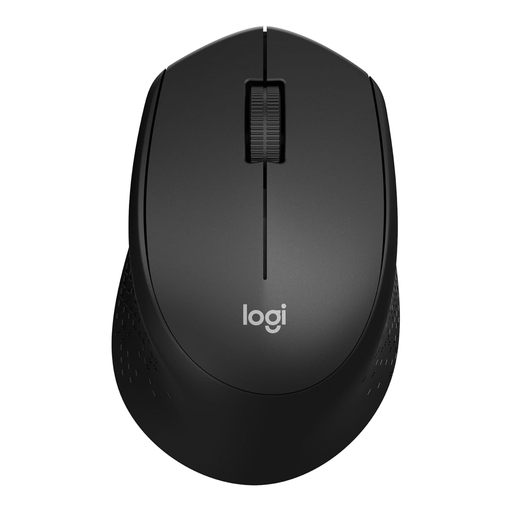
Why it suits this profile: A straightforward wireless mouse for everyday computer use, with a USB nano receiver and right-handed design.
The connection uses the included USB receiver, and the product specifications state optical tracking at 1000 DPI. No complicated software is required.
According to Logitech, clicks are more than 90% quieter, with a range of up to 10 metres and stated battery life of up to 24 months.

Why it suits this profile: A right-handed vertical mouse for extended office use, with Bluetooth and a 2.4GHz receiver.
The product information lists both Bluetooth and a Unifying USB receiver. This means you aren’t dependent on just one type of connection.
A 57-degree vertical angle, adjustable sensor up to 4000 DPI, rechargeable battery and, according to Logitech, up to four months’ use per charge.

Why it suits this profile: For homeworkers and office professionals who switch between multiple devices and work with wide documents.
The product description specifies two Bluetooth channels and a 2.4GHz receiver. You can pair up to three devices, and the model has a rechargeable battery.
Adjustable sensor up to 3200 DPI, six buttons, silent buttons and an additional horizontal scroll wheel for spreadsheets.
We’ve put together a complete, up-to-date list of products that fully meet these strict selection criteria and the applicable European safety regulations.
Not always. A Bluetooth mouse requires Bluetooth support on the laptop. A model with a USB receiver needs a suitable USB port. Also check which operating systems are supported, especially when using macOS, ChromeOS, Android or iPadOS.
Battery life depends on the battery, sleep mode and how often you use the mouse. Manufacturers often provide an estimate, such as several months for a rechargeable model or more than a year for a mouse with an AA battery. The statutory guarantee is separate from the stated battery life.
It can be, but pay attention to the connection. A gaming mouse with 2.4GHz, USB and Bluetooth offers greater flexibility. For competitive gaming, low latency, an adjustable polling rate, an accurate sensor and programmable buttons are more important than Bluetooth alone. Also check whether configuration software is available for your operating system.
