
Vandaag of morgen in huis

Kwaliteit gegarandeerd

Welkomstaanbiedingen ontgrendelen: GRATIS bezorging | Tot 80% korting | Gratis 30 dagen JoyPlus-proefperiode
Download de app
A wireless mouse keeps your desk tidier and is useful with a laptop, home office setup or gaming PC. However, the differences between models can be significant. A low price, for example, may mean that you can only connect via a USB receiver, while your laptop mainly uses Bluetooth. Terms such as “quiet”, “ergonomic” or “gaming” also do not always tell you enough about the practical features.
The most common pitfalls:
A Bluetooth mouse is practical for a laptop without a free USB port. The HP 240 Pike Silver Bluetooth Mouse uses Bluetooth 5.1 and, according to the product specification, works with Windows, macOS and ChromeOS. The mouse has a 1600 DPI optical sensor, three buttons and a scroll wheel.
A 2.4GHz connection via a USB receiver is usually plug and play. This is useful for a wireless mouse for a PC, but check beforehand that your computer has a USB-A port. A multi-device mouse combines both options and may be a good choice if you switch between a laptop, PC and tablet.
An optical mouse uses a sensor to detect movement across a surface. DPI determines how far the cursor moves with the same hand movement. A mouse with adjustable DPI gives you more flexibility for different tasks.
For word processing, browsing the internet and working with spreadsheets, a moderate setting is usually sufficient. Gamers may need higher DPI values, programmable buttons and a higher polling rate. Look at the complete package, including the sensor, connection, weight, shape and software support.
A compact wireless mouse is easy to carry around, but may feel cramped for larger hands. A larger office model provides more hand support, while a lightweight gaming mouse can make rapid movements easier.
Also consider:
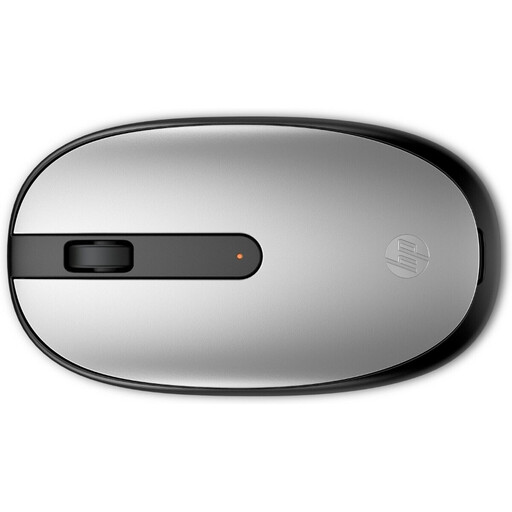
Why it suits this profile: A straightforward Bluetooth mouse for everyday use, with no separate dongle required. Its symmetrical shape suits both left- and right-handed users.
The connection and sensor are clearly specified: Bluetooth 5.1 and optical tracking at 1600 DPI. Bear in mind that it uses one AA battery.
Bluetooth 5.1, 1600 DPI, 54.2 grams and an ambidextrous design.
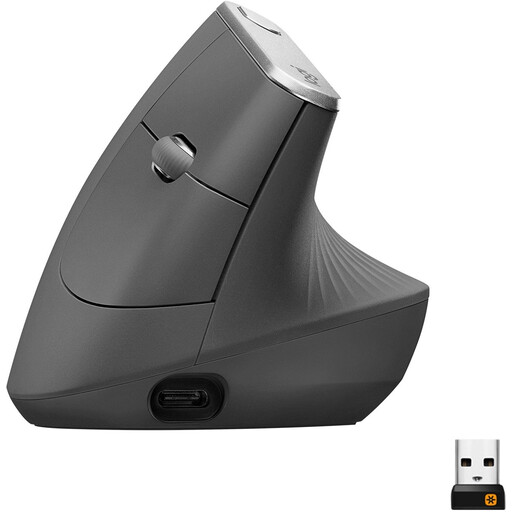
Why it suits this profile: The vertical design, Bluetooth and USB connectivity, and adjustable DPI are well suited to intensive office work and users who deliberately prefer a different hand position.
The shape and controls are clearly defined in advance: a 57-degree angle, right-handed design and adjustable DPI up to 4000. This means you are not relying solely on a general ergonomic claim.
Rechargeable battery, Bluetooth, Unifying receiver and support for multiple devices.
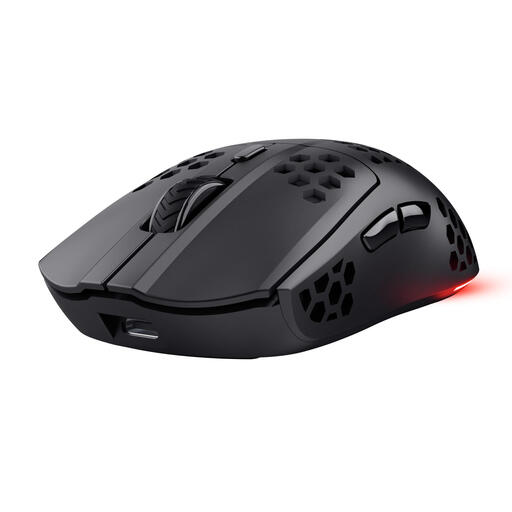
Why it suits this profile: This wireless gaming mouse is designed for PC and laptop gamers who want a low weight, programmable buttons and adjustable DPI.
The product specification lists the 2.4GHz connection, 1000Hz polling rate, six buttons and DPI settings from 800 to 4800. However, the mouse is designed for right-handed use.
73 grams, a built-in battery with a stated battery life of up to 80 hours, and USB-C charging while in use.
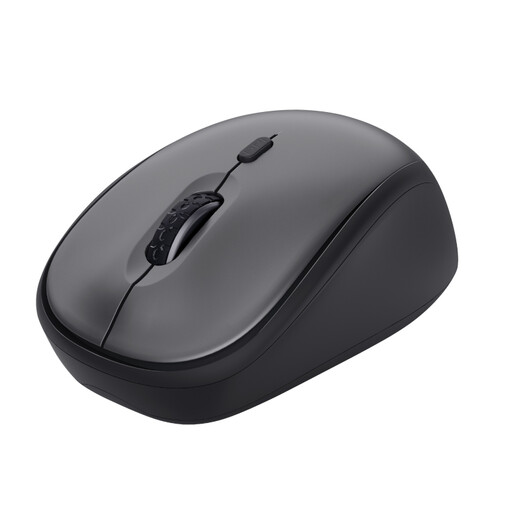
Why it suits this profile: A compact wireless mouse for home workers, flexible workers and shared spaces where clicking noise is less welcome.
According to Trust, this model has quiet buttons. The connection is clearly described as 2.4GHz via a USB micro receiver; Bluetooth is not supported.
800–1600 DPI, optical sensor, symmetrical shape and one AA battery with a stated battery life of up to 12 months according to Trust.
We have put together a complete, up-to-date list of products that fully meet these strict selection criteria and the applicable European safety regulations.
Not every mouse works with every device. Check whether your laptop supports Bluetooth or has a free USB-A port. A Bluetooth mouse, such as the HP 240, does not need a separate dongle. A model with a USB receiver is only practical when the right port is available.
That varies depending on the model and how you use it. The stated figures in the product specifications range from around 12 to 24 months for models with AA or AAA batteries. A rechargeable mouse has a set usage time per charge. According to the product information, the Trust GXT 929 Helox has a battery life of up to 80 hours, while the Logitech G309 has a stated usage time of more than 300 hours with an AA battery.
With a model that uses replaceable batteries, you will have recurring costs for AA or AAA batteries. A rechargeable mouse avoids those purchases, but uses electricity and may eventually need its battery replaced. So do not look only at the purchase price; also consider the battery type, charging options and how you use the mouse each day.
