
Vandaag of morgen in huis

Kwaliteit gegarandeerd

Welkomstaanbiedingen ontgrendelen: GRATIS bezorging | Tot 80% korting | Gratis 30 dagen JoyPlus-proefperiode
Download de app
A wireless mouse may seem like a simple purchase, but differences in connectivity, size and battery usage often only become apparent after a few weeks. A mouse might work well in the office, for example, but be less suitable for a laptop without a spare USB port. A high DPI value also does not automatically mean that a model is more comfortable or accurate.
Joybuy Product Recommendation Officer helps you distinguish between the most important specifications. This means you can avoid paying mainly for marketing terms and choose more confidently between a Bluetooth mouse, optical mouse, gaming mouse or silent mouse.
A mouse with a 2.4GHz USB receiver usually works straight away once you plug in the receiver. However, you will need a spare USB-A port. A Bluetooth mouse does not require a dongle, which is useful for modern laptops and tablets. Your device must support Bluetooth, and the pairing process may differ depending on the operating system.
Before buying, check the following:
DPI indicates how sensitively the cursor responds to movement. For word processing, browsing and administrative tasks, 800 to 1600 DPI is sufficient for many users. A mouse with adjustable DPI is more practical when you switch between different applications.
Gaming mice often offer 18,000, 26,000 or even 36,000 DPI. This can be useful for specific gaming styles and high screen resolutions, but it does not automatically make a mouse more suitable for office work. Also consider the sensor, weight and whether the buttons can be configured.
A small mouse for laptop use is easy to carry, but may be less comfortable for people with larger hands. An ergonomic mouse with a higher back or wider shape may provide more support, while a flat travel model mainly saves space.
Pay attention to:
A Bluetooth mouse keeps your USB ports free. The HP 240 models use Bluetooth 5.1 and, according to the product specifications, are compatible with Windows, macOS and ChromeOS. An RF model, such as the Trust Yvi+, uses a USB receiver and has a range of up to 8 metres according to the product information.
A stable, fast connection is important for gaming. The Razer Orochi V2 supports both Bluetooth and Razer HyperSpeed Wireless. This allows you to connect the mouse differently for work and gaming. With a wireless gaming mouse, always check that the receiver and any required software are compatible with your computer.
A replaceable AA or AAA battery means you do not have to wait for the mouse to charge while you are working. Some manufacturers state a long battery life for certain models, but actual usage time depends on the connection, settings and how you use the mouse.
A rechargeable mouse, such as the Trust Zaya, has a built-in battery and a USB-C connection. This eliminates the need for loose batteries, but you will need to charge the mouse in good time. Also check whether the cable is for charging only or whether it also supports wired use.
An optical mouse uses a light sensor to detect movement. Ideally, use the mouse on an even, non-reflective surface. Glass and highly glossy surfaces can cause problems with some sensors.
Adjustable DPI is particularly useful if you want to change the cursor speed quickly. Also look at the number of buttons, the polling rate on gaming models and the software used for button assignment. These details are easier to verify than general claims about “perfect precision”.
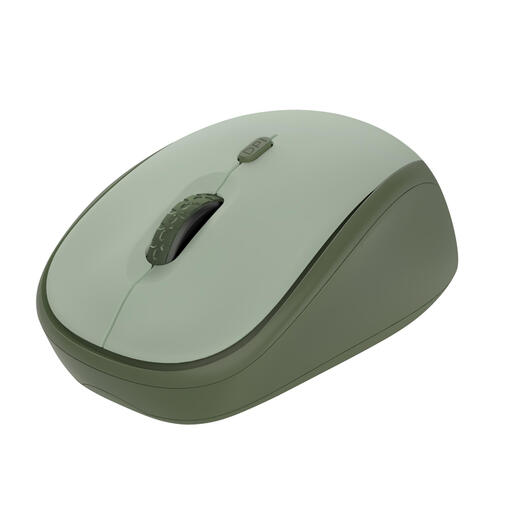
Why it suits this profile: This compact mouse is designed for office work, studying and home use. According to the product description, the USB receiver works without additional software, and the DPI can be adjusted from 800 to 1600.
The specifications clearly show which connection, DPI range and battery solution you get. This means you do not pay for features you do not need for basic use.
Silent buttons, adjustable DPI, an 8-metre wireless range and, according to the product information, up to 12 months of battery life.
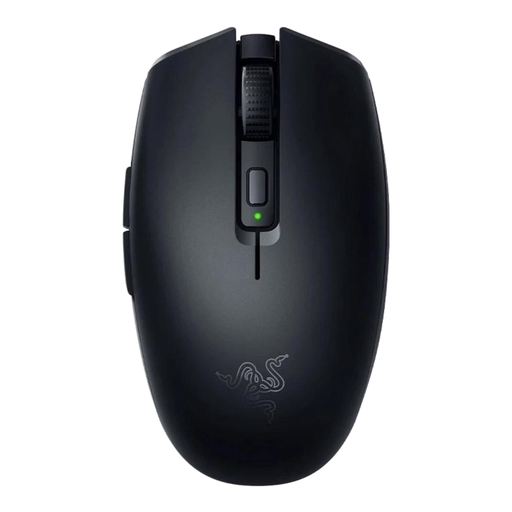
Why it suits this profile: This compact model combines Bluetooth with Razer HyperSpeed Wireless. Its symmetrical shape and 60-gram weight suit users looking for a lightweight mouse for laptop use and gaming.
You are not dependent on a single connection type. The six programmable buttons and DPI of up to 18,000 also give you more customisation options than a standard office mouse.
18,000 DPI optical sensor, two wireless options and, according to the product information, up to 1000 hours of battery life via Bluetooth or 450 hours via HyperSpeed Wireless.
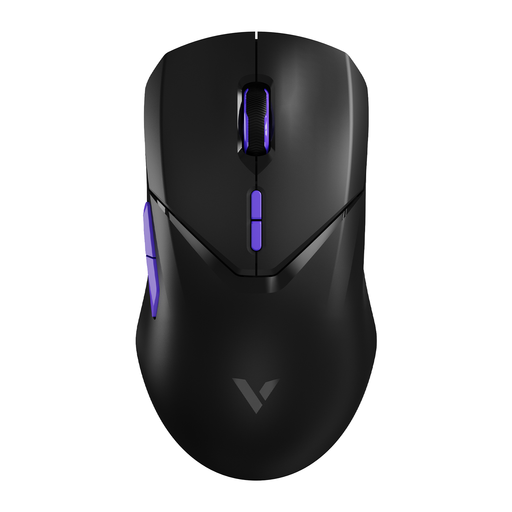
Why it suits this profile: This wireless gaming mouse is designed for users who value low latency, plenty of buttons and high sensor resolution. According to the specifications, the model weighs 68 grams.
The product information lists not only 26,000 DPI, but also a polling rate of 4000 Hz, ten programmable buttons and a built-in battery. Please note: a higher polling rate may require more processing power from your computer.
PAW 3398 optical sensor, 4K wireless polling rate and, according to the product information, up to 180 hours of battery life.
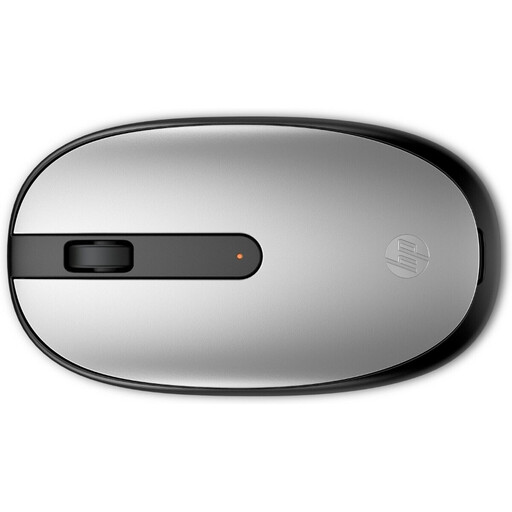
Why it suits this profile: This ambidextrous mouse works via Bluetooth 5.1 and, according to the specifications, does not require a USB dongle. That makes it practical for laptop use, studying and everyday office work.
You do not need to keep a USB port free for a receiver. The specifications also state that it is compatible with Windows, macOS and ChromeOS.
1600 DPI optical sensor, 54.2 grams and, according to the product information, up to 15 months of battery life.
We have put together a complete, up-to-date list of products that fully meet these strict selection criteria and the applicable European safety requirements.
That depends on your device. Bluetooth saves a USB port and is useful for laptops. A 2.4GHz receiver is often easy to connect and also works with computers without Bluetooth. Always check compatibility and the type of receiver included.
Battery life varies depending on the model and connection. Product information may state anything from several months to hundreds of hours. A model with a replaceable battery can be used again quickly; a rechargeable mouse eliminates the need for loose batteries but must be charged regularly.
For office work, 800 to 1600 DPI is usually practical. For gaming, a higher DPI value can be useful, but also consider sensor tracking, polling rate, weight and programmable buttons. Adjustable DPI gives you the greatest flexibility.
