
Vandaag of morgen in huis

Kwaliteit gegarandeerd

Welkomstaanbiedingen ontgrendelen: GRATIS bezorging | Tot 80% korting | Gratis 30 dagen JoyPlus-proefperiode
Download de app
A wireless mouse gives you a tidier desk and greater freedom of movement. However, there is a huge range to choose from: from a simple optical mouse for the office to a wireless gaming mouse with high DPI, programmable buttons and RGB lighting. You often only notice you have made the wrong choice after a few weeks.
The most common pitfalls are:
A 2.4GHz connection via a nano USB receiver usually works immediately after you plug in the receiver. This is useful for a desktop PC or laptop with a USB-A port. The Logitech M280, for example, uses a radio connection with a range of up to 10 metres and does not require any additional software.
A Bluetooth mouse connects directly to a compatible laptop, tablet or PC. This saves a USB port. However, check the following beforehand:
A multi-device mouse such as the Trust Ozaa+ combines a USB receiver with two Bluetooth channels. According to the product description, you can pair up to three devices, such as a work laptop, desktop PC and tablet.
Most models in this selection use an optical sensor. This detects movement using light and works on many desk surfaces. A mouse mat is still advisable if you want smooth cursor movement.
DPI stands for dots per inch and determines how far the cursor moves with the same hand movement. For word processing, browsing the internet and administrative work, 1,000 to 1,600 DPI is often sufficient. A high-DPI mouse is particularly interesting for gamers or users with multiple large screens.
Also pay attention to:
A high DPI does not automatically make a mouse better. A stable sensor, a suitable shape and a reliable connection are at least as important.
A small mouse can be convenient when travelling, but less suitable for larger hands. A large mouse offers more palm support, but takes up more space. Also check whether the model is suitable for right-handed, left-handed or ambidextrous use.
An ergonomic mouse can encourage a different wrist position through its vertical shape. The Logitech MX Vertical, for example, has an angle of 57 degrees and a sensor of up to 4,000 DPI. The Trust Bayo II is also vertical, but connects via USB and is wired. This is an important difference if you are specifically looking for a wireless mouse.
When it comes to power, you usually have three options:
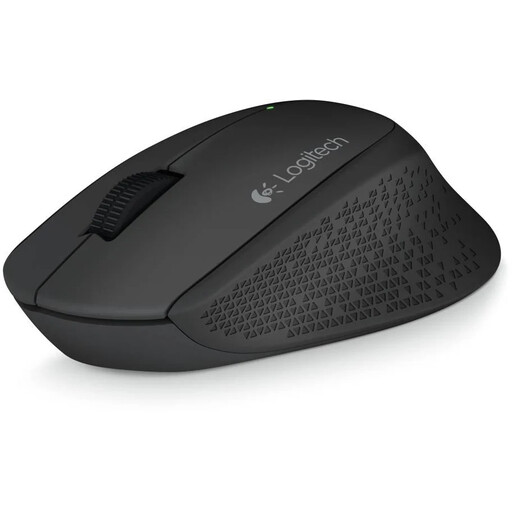
Why it suits this profile: For home use, basic office applications and browsing the internet, this model offers straightforward control without any installation.
The specifications are clear: a 1,000 DPI optical sensor, three buttons and a 2.4GHz connection. You are not paying for features you are unlikely to use.
Range of up to 10 metres, rubberised grips and one AA battery included.

Why it suits this profile: Suitable for homeworkers and office professionals who value a vertical design, Bluetooth and the ability to work with multiple devices.
The vertical design and right-handed orientation are clearly stated. This lets you check whether the shape is genuinely suitable for your working position and hand.
Bluetooth and USB receiver, adjustable 4,000 DPI and a rechargeable battery.

Why it suits this profile: A logical choice for PC and laptop gamers looking for wireless control, a low weight and customisable buttons.
The product details list the weight, connection, DPI, polling rate and battery life separately. This allows you to compare the gaming features without focusing solely on RGB lighting.
Optical sensor of up to 4,800 DPI, six programmable buttons, USB-C charging and a stated battery life of up to 80 hours.
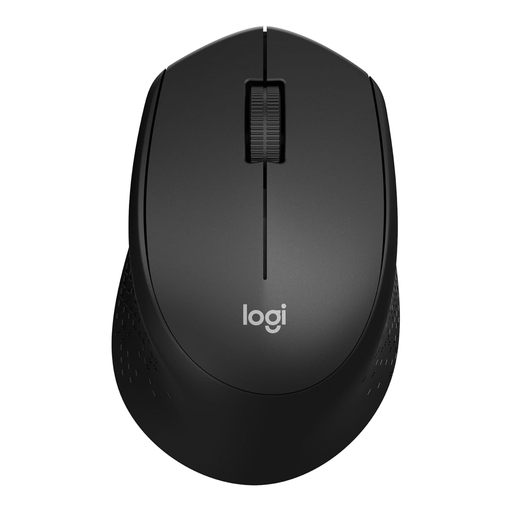
Why it suits this profile: Ideal for a shared office, a quiet home-working space or use alongside housemates.
According to Logitech, the click is over 90% quieter than on traditional mice. This is a manufacturer’s claim; the noise level may vary depending on the surface and the user.
Optical tracking, a connection range of up to 10 metres and a battery life of up to 24 months as stated by Logitech.
We have compiled a complete, up-to-date list of products that fully meet these strict selection criteria and the applicable European safety regulations.
No. A model with a USB receiver requires a suitable USB port. A Bluetooth mouse requires Bluetooth support and sometimes a recent version of the operating system. Also check whether the mouse is compatible with Windows, macOS, ChromeOS or another system you use.
This depends on the model, connection and usage. A mouse with an AA battery can last for months; manufacturers sometimes state a longer battery life under specific conditions. A rechargeable mouse needs to be charged periodically, but avoids the need to buy loose batteries. For built-in batteries, check the charging options and whether you can continue using the mouse while it is charging.
A silent mouse is primarily designed to reduce clicking noise during office work or at home. For gaming, polling rate, sensor response, weight, connection and programmable buttons are also important. Only choose a wireless gaming mouse once its technical features match the types of games you play.
